The Montserrat font by Julieta Ulanovsky has quietly become one of the most used typefaces across the web, and for good reason. Whether you are building a personal brand, designing a SaaS landing page, or putting together a pitch deck, Montserrat consistently delivers clean, confident typography that holds up across every screen size. This review covers everything you need to know about it before you commit it to your next project.
Table of Contents
What Is the Montserrat Font?
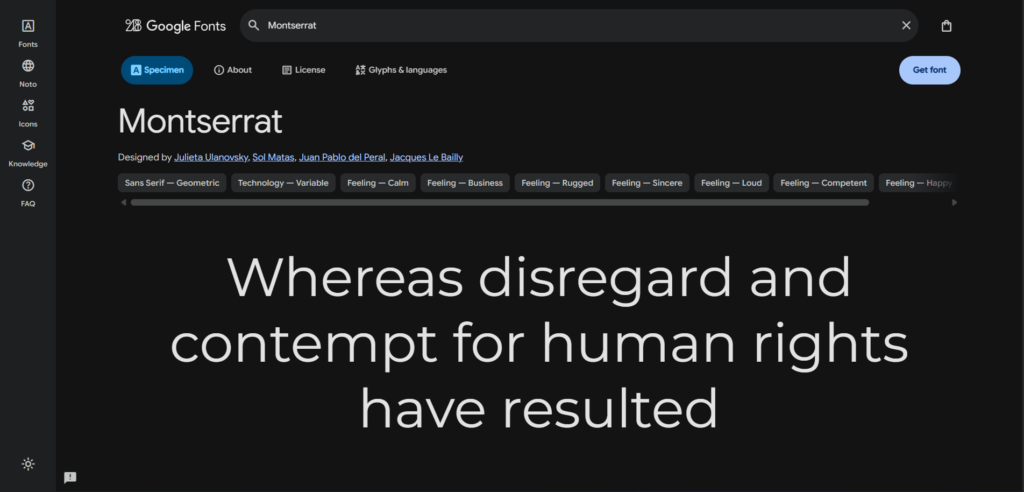
Montserrat is a geometric sans-serif typeface designed by Argentine designer Julieta Ulanovsky. She created it to preserve the urban lettering traditions of the Montserrat neighbourhood in Buenos Aires, a district known for its early twentieth-century signage and poster typography. The font was first released in 2011 and has gone through several major revisions since, most notably in 2017 when it expanded to include 18 weights and styles.
Unlike many geometric typefaces that feel cold or overly technical, Montserrat carries a warmth in its letterforms. The uppercase characters have a confident, open structure. The lowercase letters are slightly condensed in a way that keeps text dense without feeling cramped. These small decisions in the design process add up to a font that works exceptionally well for both large display headings and smaller body copy.
Montserrat is available completely free through Google Fonts, which is maintained by Google and serves fonts via a fast global CDN. Because of this distribution, it has become one of the most requested fonts on the internet. According to Google Fonts usage statistics, Montserrat consistently appears in the top three most popular fonts on the platform.
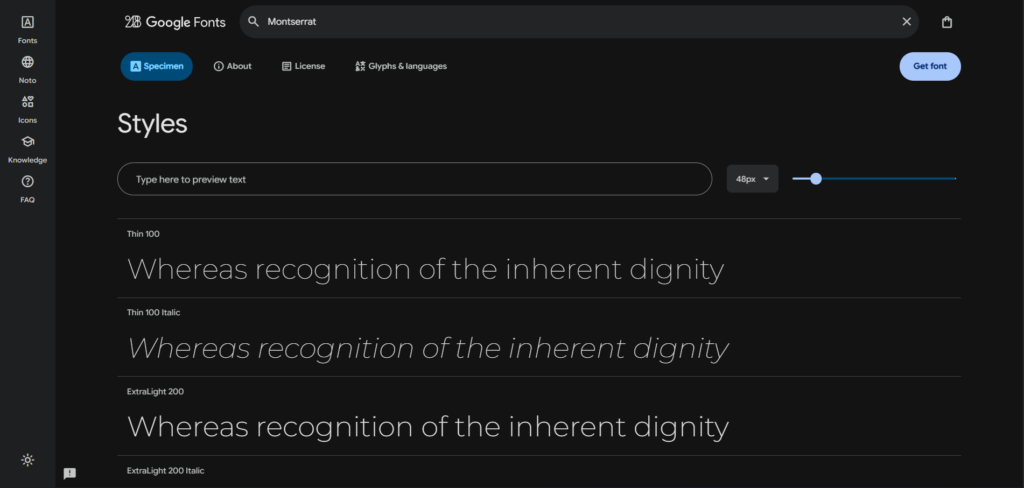
The typeface includes a wide range of weights from Thin (100) to Black (900), along with italic variants for each weight. This range gives designers genuine flexibility. You are not forced to fake bold or rely on browser rendering tricks because the font natively supports all the weight variations you will need for a full typographic hierarchy.
What separates Montserrat from competitors like Futura or Century Gothic is its approachability. Futura can look austere in body copy. Century Gothic becomes difficult to read at small sizes. Montserrat occupies a practical middle ground. It maintains strong geometric character at large sizes but remains readable and professional at 14px or 16px, which makes it one of the few display fonts that genuinely works throughout an entire design system.
How Montserrat Font Works Across Devices and Browsers?
The Technical Foundation of Montserrat
Montserrat is distributed as an open-type font, which means it takes advantage of advanced typographic features like kerning pairs, ligatures, and optical sizing. When you load it from Google Fonts, the CDN automatically serves the most efficient format for the visitor’s browser, typically WOFF2 on modern browsers. WOFF2 compression reduces file sizes by around 30 percent compared to older formats, which helps your page load faster.
The font file itself contains all 18 styles, but you do not need to load all of them. Google Fonts lets you specify exactly which weights and styles you need. If your design uses Montserrat Regular, Medium, and Bold, loading only those three cuts the payload significantly. This is a detail many beginners miss, and it directly affects your Core Web Vitals scores, particularly the Largest Contentful Paint metric.
On mobile devices, Montserrat renders cleanly because of its high x-height. The x-height is the height of lowercase letters relative to uppercase letters. Montserrat’s x-height is generous, which means letters like a, e, and o remain legible even on lower-resolution screens or when rendered at smaller sizes. This is one reason you see it used so frequently in mobile-first interfaces.
Cross-browser rendering is generally consistent for Montserrat. It behaves predictably on Chrome, Safari, Firefox, and Edge without needing any special fallback rules. When defining your font stack, it is standard practice to follow Montserrat with a system sans-serif as a fallback, such as font-family: 'Montserrat', Arial, sans-serif. This covers the rare case where the font fails to load.
Montserrat also supports a broad range of Latin character sets including Latin Extended-A, which covers most Western European languages. If your audience includes users browsing in French, German, Spanish, Portuguese, or Polish, the font will handle accented characters correctly without substituting fallback glyphs.
Step-by-Step Guide to Using Montserrat Font in Your Project
Step 1: Access Montserrat on Google Fonts
Open Google Fonts and search for Montserrat. You will land on the font specimen page where you can preview different weights and styles. Click the “Get font” button at the top right. On the selection screen, choose only the weights your design requires. For most projects, Regular (400), Medium (500), SemiBold (600), and Bold (700) are sufficient. Adding unnecessary weights increases your page load time without any design benefit.
Step 2: Embed the Font in Your Website
Once you have selected your weights, click “Get embed code” and copy the generated link tag. Paste it inside the <head> section of your HTML file, before your main stylesheet. The embed code will look similar to this:
<link rel="preconnect" href="https://fonts.googleapis.com">
<link rel="preconnect" href="https://fonts.gstatic.com" crossorigin>
<link href="https://fonts.googleapis.com/css2?family=Montserrat:wght@400;500;600;700&display=swap" rel="stylesheet">
The preconnect hints tell the browser to establish a connection to Google’s font servers early, which reduces latency. The display=swap parameter ensures your text remains visible in a system font while Montserrat loads, preventing a blank flash of invisible text.
Step 3: Apply Montserrat in Your CSS
With the font linked, you can now apply it in your stylesheet. Set it on the body element to establish it as the default font across the entire page. Then override specific elements as needed for your typographic hierarchy.
body {
  font-family: 'Montserrat', Arial, sans-serif;
  font-weight: 400;
  font-size: 16px;
  line-height: 1.7;
}

h1, h2, h3 {
  font-weight: 700;
  letter-spacing: -0.02em;
}

.subheading {
  font-weight: 600;
  letter-spacing: 0.04em;
  text-transform: uppercase;
}
A small negative letter-spacing on headings (around -0.02em) tightens up the geometric letters and gives headings a more composed, editorial feel. For uppercase labels and navigation items, a slight positive letter-spacing (0.04em to 0.08em) improves readability.
Step 4: Pair Montserrat with a Body Font (Optional)
Montserrat works as a standalone font for most interfaces, but for content-heavy pages like blogs or documentation, pairing it with a serif or readable sans-serif for body text improves the reading experience over long paragraphs.
A widely used pairing is Montserrat for headings with Lora or Merriweather for body copy. Both of these are also free on Google Fonts. The contrast between Montserrat’s geometric uppercase structure and a serif’s warmer letterforms creates a natural visual hierarchy without any additional styling tricks.
Step 5: Test Rendering at Multiple Sizes
Before finalising your typography, test Montserrat at the sizes you actually plan to use. Check 14px, 16px, and 18px for body text. Check 24px, 32px, 48px, and 64px for headings. Pay attention to how the letter-spacing looks at large display sizes, as some weights can appear slightly loose at 60px or above without manual tracking adjustments.
Also test on a real mobile device, not just a browser emulator. Fonts render differently on physical screens, particularly on older Android devices where sub-pixel rendering behaves differently from iOS.
Key Benefits of Using Montserrat Font
Readability at Every Scale
Montserrat’s open apertures, consistent stroke width, and generous x-height make it one of the more readable geometric sans-serif fonts available. Open apertures mean that letters like c, e, and a have clear, open spaces that distinguish one letter from another at a glance. This matters most at smaller sizes where letters can blur together. Designers working on mobile interfaces frequently choose Montserrat specifically because it holds its clarity at 13px and 14px where similar geometric fonts like Futura begin to lose definition.
Free and Perpetually Available
Because Montserrat is licensed under the SIL Open Font License, you can use it in personal projects, client work, commercial products, and printed materials at no cost. There is no subscription to manage, no licensing fee per website, and no limit on the number of users or page views. For small businesses and freelancers who need professional typography without design tool overhead, this is a meaningful practical advantage over premium typefaces that can cost hundreds of dollars per year per license.
Versatile Across Use Cases
Most fonts have a sweet spot. Display fonts look awkward in body copy. Serif fonts designed for print can feel heavy on screen. Montserrat is genuinely versatile. It works as a heading font on editorial sites, as the primary font for SaaS dashboards, as logo typography for startups, and as the default font for mobile apps. The 18 available weights give designers enough range to build a complete typographic system using a single font family, which simplifies both the design process and the font loading strategy.
Strong Branding Potential
Montserrat’s geometry gives it a structured, professional quality that reads as modern without feeling trendy. Trendy fonts date quickly because they are tied to a specific visual moment. Geometric sans-serif fonts have remained visually relevant for over a century, from early Swiss graphic design through to today’s digital interfaces. Brands built on Montserrat tend to age more gracefully than brands built on decorative or novelty typefaces. This is a practical consideration for any business that wants their visual identity to remain coherent across years of marketing materials.
Montserrat Font vs Alternatives: Comparison Table
| Font | Standout Feature | Screen Readability | License / Cost | Google Fonts Available |
|---|---|---|---|---|
| Montserrat | 18 weights, geometric warmth | Excellent at all sizes | Free (SIL OFL) | Yes |
| Futura | Classic modernist geometry | Good at large sizes, weaker at small | Paid (Adobe Fonts, ~$35/year) | No |
| Nunito | Rounded terminals, friendly feel | Very good for body copy | Free (SIL OFL) | Yes |
| Raleway | Elegant thin weights, decorative | Good for headings, weak in body copy | Free (SIL OFL) | Yes |
| Poppins | Indian script origins, clean geometry | Excellent, very similar to Montserrat | Free (SIL OFL) | Yes |
| Inter | Designed specifically for screens | Outstanding at small sizes | Free (SIL OFL) | Yes |
Poppins and Montserrat are often compared directly because they look similar at a glance. The main differences are that Poppins has slightly more uniform stroke widths and a more neutral personality, while Montserrat carries more historical character from its neighbourhood lettering origins. Inter is the better choice when interface density is high and small-size legibility is the top priority, but it lacks the display presence that Montserrat brings to hero sections and marketing pages.
Who Is Montserrat Font Best For?
Freelance Web Designers and Developers
If you take on client work across different industries, Montserrat gives you a safe, professional starting point that rarely requires explanation or approval. Clients recognise it as looking modern and trustworthy. It is neutral enough to adapt to a law firm, a photography portfolio, or a tech startup without feeling out of place. Having it as a default in your design workflow saves the time you would otherwise spend selecting and testing fonts for every new project.
Small Business Owners Building Their Own Website
For someone using a website builder like WordPress, Webflow, or Squarespace, Montserrat is one of the best choices to make early because it handles all typography roles without requiring a second font. If you set Montserrat Bold for headings and Montserrat Regular for body text, the result is clean and professional. You do not need design expertise to make it work well.
Brand Identity Designers
For designers working on logos, pitch decks, and brand guidelines, Montserrat’s uppercase letterforms are particularly strong. The letters have a confident, structured quality that photographs well and scales cleanly from a business card to a billboard. The Black weight at 900 is especially useful for wordmarks and logotype treatments where you need geometry without paying for a custom typeface.
Content Creators and Bloggers
For people running content sites, Montserrat works well for headings, navigation, and call-to-action buttons while pairing comfortably with a serif font for long-form body text. Its presence in headings gives articles a polished editorial feel that helps establish credibility with readers arriving for the first time. Given that it is free and loads efficiently via Google Fonts, there is no performance penalty for using it on a content-heavy site.
FAQ About Montserrat Font
Is Montserrat font free to use commercially?
Yes, Montserrat is licensed under the SIL Open Font License, which permits free use for personal and commercial purposes. You can use it in client websites, printed materials, mobile apps, software interfaces, and branded merchandise without paying a licensing fee. The only restriction under the SIL OFL is that you cannot sell the font files themselves as a standalone product. There are no page view limits, user limits, or domain restrictions attached to the licence. If you need to verify the licence terms directly, they are published on the SIL OFL page.
How many weights does the Montserrat font have?
Montserrat includes 18 styles across 9 weights: Thin (100), ExtraLight (200), Light (300), Regular (400), Medium (500), SemiBold (600), Bold (700), ExtraBold (800), and Black (900). Each weight has a corresponding italic variant. This range is broader than most free fonts, which typically offer only 4 to 6 weights. The availability of all these styles in a single family means you can build a complete typographic system without needing to mix multiple font families, which simplifies both design and performance management.
What is the best font pairing for Montserrat?
The most commonly recommended pairings are Montserrat headings with Lora, Merriweather, or Playfair Display for body text on editorial or content-heavy sites. For purely digital interfaces, Montserrat pairs well with Open Sans or Source Sans Pro in body copy. If you prefer a single-font approach, using Montserrat SemiBold for headings and Montserrat Regular for body text is clean and effective. The key principle is contrast: pair Montserrat’s geometric structure with something that has a different personality in the body text position, either a serif or a humanist sans-serif.
Does Montserrat font affect website speed?
Loading Montserrat from Google Fonts adds an external request to your page, which has a small performance cost. However, Google’s CDN is highly optimised and serves fonts in WOFF2 format with browser caching enabled. The practical impact on load time is minimal if you load only the weights you need. Loading all 18 styles would add unnecessary weight to your page. A typical setup with 3 to 4 weights adds roughly 50 to 80 kilobytes to the page payload. Using display=swap in the font URL and adding preconnect hints in your HTML further reduces the perceived load time by keeping text visible during font loading.
Can I use Montserrat font in Canva, Figma, or Adobe tools?
Yes. Montserrat is available natively in Canva, Figma, and Adobe Express through their built-in font libraries. In Figma, you can access it by typing the name in the font selector. In Adobe Illustrator and Photoshop, you can install it via Adobe Fonts or download the files from Google Fonts and install them locally on your system. Once installed locally, Montserrat becomes available in every application that uses your operating system’s font library, including Keynote, PowerPoint, and Google Slides.
Is Montserrat a good font for logo design?
Montserrat is widely used for logo typography and wordmarks, particularly in its heavier weights. The uppercase letters in Bold and Black weights have strong geometric proportions that hold up well when scaled, which is a practical requirement for logos that appear on everything from app icons to signage. It is a recognisable font at this point, which means some designers prefer to customise the letterforms or use it as a starting point for a custom typeface. For businesses that want a professional, modern wordmark without a custom type budget, Montserrat is a solid and defensible choice.
Final Thoughts
Montserrat has earned its popularity not through marketing but through consistent performance across a wide range of design applications. It is readable, versatile, historically grounded, and free. Those four qualities together explain why it appears on millions of websites and why designers keep returning to it.
If you are starting a new project and have not settled on a typeface, Montserrat is a reasonable first choice to test. It will not embarrass you in front of a client, it will not slow down your site in any meaningful way, and it will not require a budget.
The clearest next step is to visit Google Fonts, select the weights relevant to your project, and try it in your actual layout. Fonts only reveal their true character in context, and Montserrat tends to reward the effort of testing it properly. Learn More about best AI Tools like Lovable AI Review, Google Stitch AI Review, Grok AI Review & How to Use AI Tools effectively Guides
Google Fonts – fonts.google.com/specimen/Montserrat
Wikipedia: Montserrat Typeface – en.wikipedia.org/wiki/Montserrat_(typeface)
Typewolf – typewolf.com/montserrat
Fonts In Use – fontsinuse.com/typefaces/32481/montserrat
Adobe Fonts: Montserrat – fonts.adobe.com/fonts/montserrat
One Page Love – onepagelove.com/typeface/montserrat
SIL Open Font License – scripts.sil.org/OFL
CSS-Tricks / Smashing Magazine – smashingmagazine.com
Beautiful Press – beautifulpress.net/font/montserrat
Crystal Coded — Best Web Fonts Guide – crystalcoded.com/post/best-web-fonts-for-2024-seo-tips