

Leonardo AI has quietly become one of the most capable AI image generation platforms available today, and if you have been looking for a tool that goes well beyond just typing a prompt and hoping for the best, this guide covers everything you need to know. Over the next 4,000 words, you will learn what Leonardo AI actually does, how its core features work, how to get started, and whether it is the right tool for your specific situation.
Table of Contents
What Is Leonardo AI?
Leonardo AI is a web-based artificial intelligence platform built primarily for image generation, but it has expanded significantly beyond that single function. The platform allows users to generate images from text prompts, edit and extend those images using an AI-powered canvas, train custom models on their own visual assets, and now generate short video clips.
The company behind it is Leonardo.Ai, an Australian startup founded in 2022. Unlike many AI tools that are built as thin wrappers around a single base model, Leonardo AI runs multiple generation models simultaneously. At any given time, users can choose from the platform’s flagship Phoenix model, the Lucid Origin model optimised for photorealism, Flux Dev from Black Forest Labs, and several community-trained models shared in the public gallery.
What separates Leonardo AI from many competitors is the depth of its feature set. Midjourney, for comparison, gives you a Discord bot that produces beautiful images with relatively limited controls over editing and customisation. Leonardo AI gives you a full workspace: a prompt builder, a canvas editor, a model trainer, a real-time generation mode, and a video animation tool, all under one login.
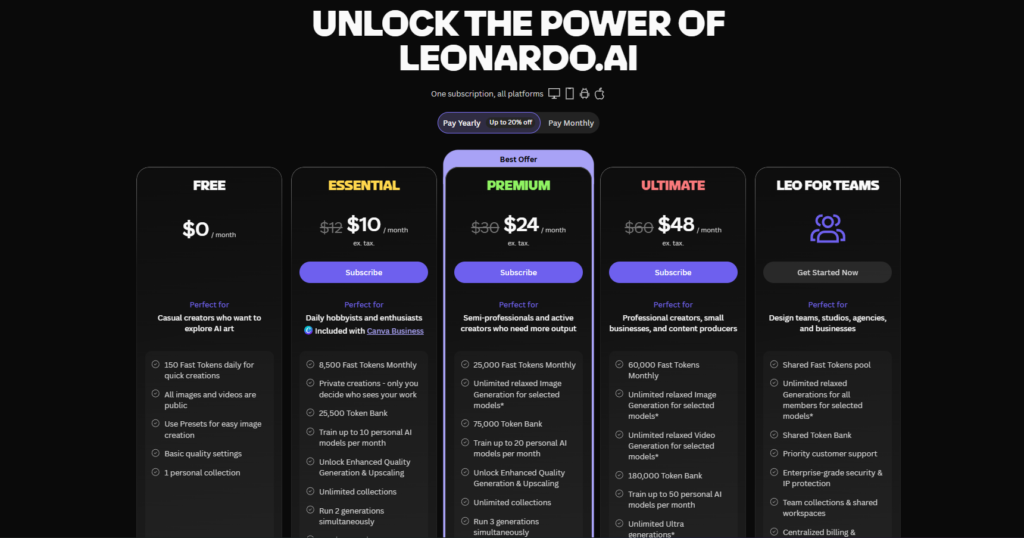
The platform is accessible at leonardo.ai and works entirely in the browser. There is no software to install. The free plan gives new users 150 tokens per day, which is enough to generate roughly 12 to 15 standard images daily depending on the settings chosen. Paid plans start at $12 per month for the Apprentice tier and go up to $60 per month for the Maestro tier.
One important thing to understand upfront: Leonardo AI uses a token-based credit system rather than a simple monthly image count. Different features consume different numbers of tokens. A standard generation at 512×512 pixels costs far fewer tokens than an upscaled 1536×1024 image with Alchemy enabled. Understanding this system is essential for getting the most out of any plan.
How Leonardo AI Works?
The Generation Engine
At its core, Leonardo AI uses diffusion model technology to generate images. This is the same underlying approach used by Stable Diffusion, DALL-E, and Midjourney, but Leonardo AI has layered significant proprietary tooling on top of the base architecture.
When you type a prompt, the system encodes your text into a numerical representation that guides the image generation process. The model then starts from random noise and gradually refines it over multiple steps until a coherent image emerges. The number of steps, the guidance scale (how closely the image follows your prompt versus explores creatively), and the chosen model all affect the final result.
Leonardo AI’s Alchemy feature is worth understanding separately. Alchemy is a proprietary processing pipeline that runs after the initial generation. It applies additional refinement passes, upscaling, and detail enhancement to produce images with significantly better sharpness, texture, and coherence than standard generation alone. Enabling Alchemy uses more tokens per image but produces noticeably superior output for final-use cases.
The Token System
Tokens are Leonardo AI’s internal currency. Every action on the platform, from generating an image to running a canvas edit to training a custom model, costs tokens. The number of tokens consumed per generation depends on several variables: image resolution, the chosen model, whether Alchemy is enabled, the number of images generated at once, and the number of inference steps.
A rough guideline for standard generations on paid plans: a 512×512 image with Alchemy off costs approximately 2 to 4 tokens. The same image with Alchemy enabled costs 8 to 12 tokens. An upscaled 1536×1024 image with Alchemy and PhotoReal settings active can cost 20 to 30 tokens. Video generation is significantly more expensive: a five-second clip using the Veo 3 integration costs approximately 2,500 tokens.
Free plan users receive 150 tokens daily. These reset every 24 hours and do not roll over. Paid plan users receive a monthly token allocation. The Apprentice plan ($12/month billed monthly, $10/month billed annually) includes 8,500 tokens per month. The Artisan plan ($30/month billed monthly, $25/month billed annually) includes 25,000 tokens. The Maestro plan ($60/month billed monthly, $49/month billed annually) includes 60,000 tokens. Full pricing details are available on the Leonardo AI pricing page.
The Model Ecosystem
One of Leonardo AI’s genuine advantages is its model variety. Rather than committing every user to a single model style, the platform offers distinct options for different creative needs.
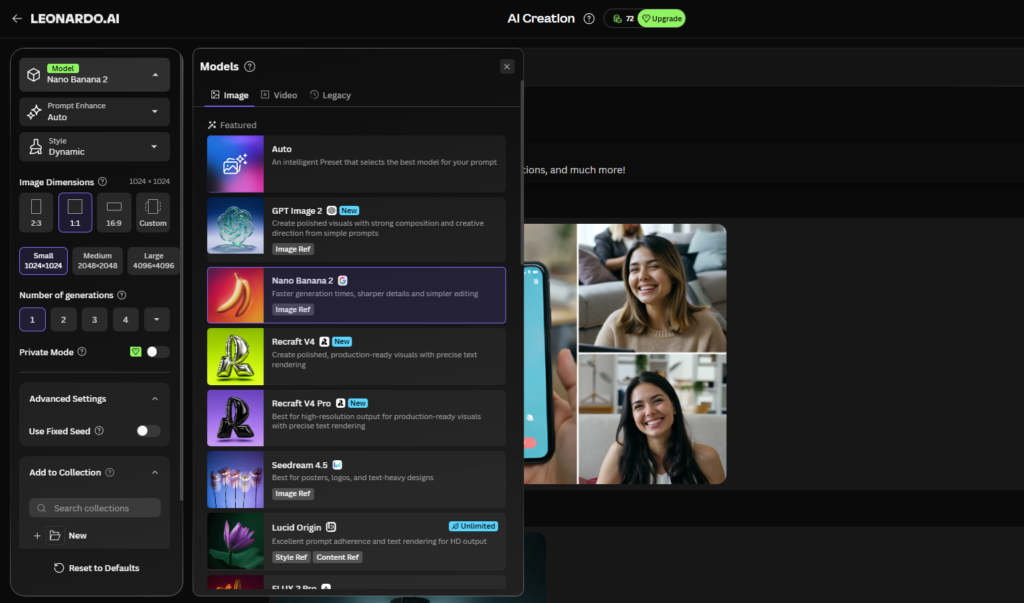
Phoenix and Phoenix 2.0 are the flagship models, optimised for strong prompt adherence and text rendering within images. Lucid Origin focuses on photorealistic output with natural skin tones and realistic lighting. Flux Dev, available through a partnership with Black Forest Labs, tends to produce highly detailed results with strong compositional awareness. Users can also browse and apply community-trained models, called Elements, which are fine-tuned on specific visual styles, character types, or product aesthetics.
Getting Started: Step-by-Step Guide
Step 1: Create Your Account
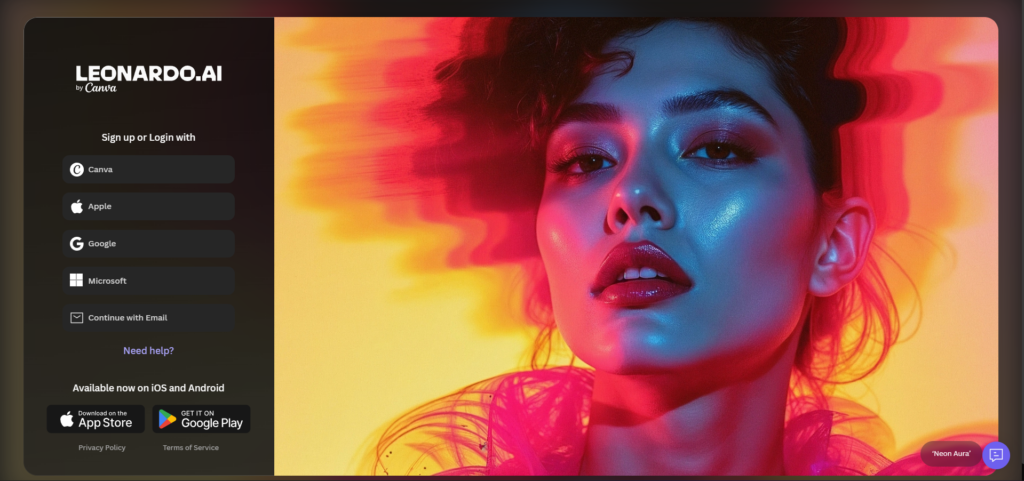
Go to leonardo.ai and click the button to sign in. You can register using a Google account, an Apple ID, or a standard email and password. After registration, you will be asked a few questions about how you intend to use the platform. This does not affect your plan or capabilities; it helps Leonardo AI personalise your initial experience.
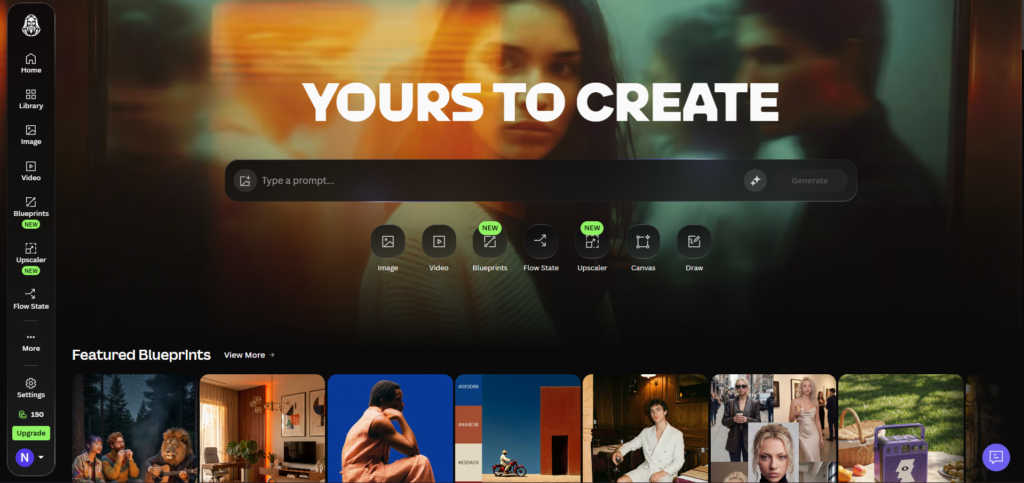
Once inside, you land on the main dashboard. This shows your recent generations, featured community work, and quick-access buttons for the main creation tools. Take a moment to look at the left sidebar. It contains links to the Image Generation tool, the AI Canvas, the realtime canvas, your trained Elements, and your personal feed.
Step 2: Start Your First Generation
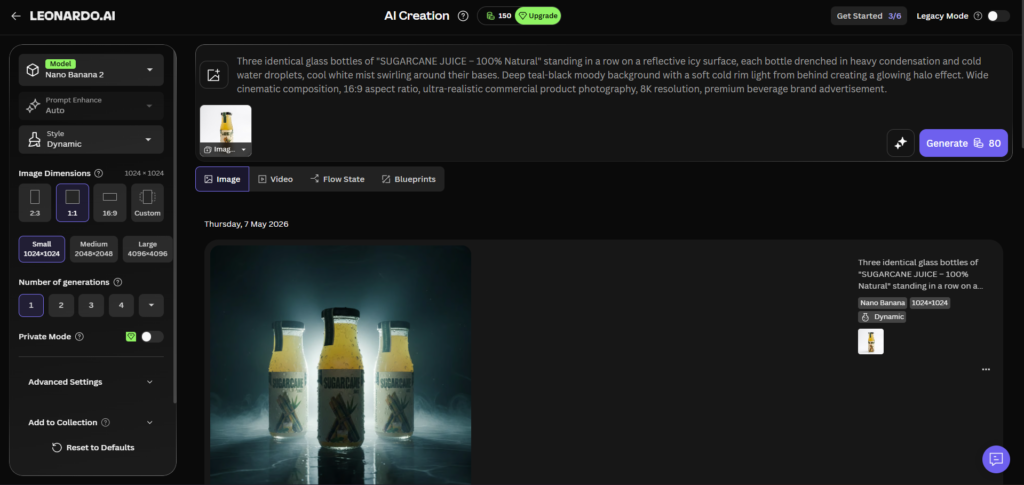
Click “Image Generation” in the left sidebar. The generation interface loads with a prompt input bar at the top, model selection controls on the right, and output settings below.
Type a prompt in the input bar. For your first attempt, keep it straightforward: something like “a quiet mountain lake at sunrise, photorealistic, soft morning light, no people.” Click the Generate button.
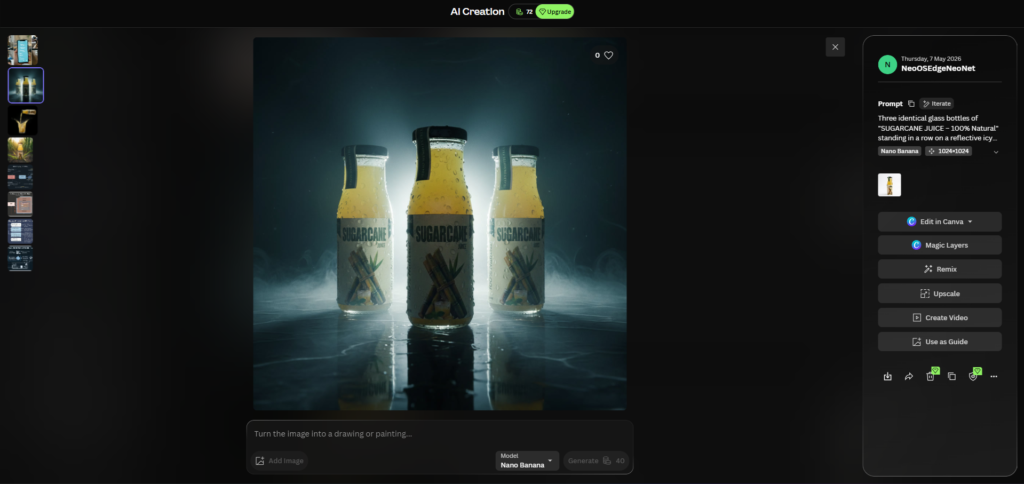
On the free plan, the default settings will produce four images at 512×512 resolution. The generation typically completes in 15 to 30 seconds. Your images appear below the prompt bar. Hover over any image to see options: download, open in canvas, upscale, or add to your personal feed.
Step 3: Adjust Your Generation Settings
The right-side panel contains controls that significantly affect output quality. Work through these before your next generation.
Resolution and aspect ratio: The default 512×512 is useful for testing prompts quickly without using many tokens. For finished work, switch to 1024×1024 or choose a landscape ratio like 1344×768 for wide compositions. Higher resolutions cost more tokens.
Guidance scale: This slider controls how literally the model interprets your prompt. A lower value gives the model more creative freedom. A higher value makes it stick more closely to what you typed. A setting between 7 and 9 works well for most prompts.
Alchemy: Toggle this on when you want to produce final-use images. It costs more tokens but adds a refinement pass that improves sharpness and detail noticeably.
Number of images: Generate four at a time for prompt testing, then narrow down to one or two once you have found settings that work.
Step 4: Use the AI Canvas to Edit an Image
Select an image from your generations and click “Open in Canvas.” The canvas loads your image into a workspace where you can make targeted edits without regenerating everything from scratch.
To fix a specific area, select the Inpaint Brush from the toolbar on the left. Paint over the area you want to change. Type a new prompt describing what should appear in that region, then click Generate. The model will redraw only the painted area while leaving the rest of the image intact. This is particularly useful for fixing AI-generated hands, changing clothing colours, or removing unwanted background elements.
To extend the image beyond its original borders, switch to the Outpaint tool. Drag the canvas edge outward, add a prompt describing the new area, and generate. This is a practical way to convert a square image into a wide landscape format without regenerating from scratch.
Step 5: Train a Custom Element (LoRA)
This step is available on paid plans. In the left sidebar, click “Training” then “Create New Element.” You will be prompted to upload a dataset of reference images. Aim for 15 to 20 high-quality images that share consistent framing, lighting, and subject matter.
Name your element, select whether it is a style element, a character element, or a product element, and set the training strength. A strength of 0.75 works well as a starting point. Training typically completes within 10 to 15 minutes on paid plans.
Once trained, your element appears in the Elements section of the generation interface. Select it before generating and the model will apply its style or character characteristics to every output. This is how designers and marketers maintain visual consistency across multiple images without reprompting everything each time.
10 Key Benefits of Using Leonardo AI
1. A Single Platform for Generation and Editing
Most AI image tools force you into a workflow where you generate an image in one place, download it, open a separate editor, make changes, and then return to the generator if you need another pass. Leonardo AI removes that friction by putting generation and canvas editing in the same workspace.
The practical effect of this is meaningful. When a generated image is 90 percent right but has an awkward element in the background, you fix it inside the same tool without breaking your creative momentum. For anyone producing images at any kind of volume, that saved time compounds significantly over a week of work.
2. Access to Multiple Models Without Changing Platforms
Leonardo AI gives users access to several distinct generation models under one subscription. If Phoenix’s prompt adherence is what you need for a text-heavy design, you use Phoenix. If a project calls for cinematic photorealism, you switch to Lucid Origin. If you want Flux Dev’s compositional detail, it is one click away.
Paying for access to multiple best-in-class models through separate subscriptions would cost considerably more. Having them inside one platform, with a unified token budget, makes experimenting with different aesthetic directions practical rather than expensive.
3. Custom Model Training for Visual Consistency
The ability to train your own Elements on a set of reference images is a significant practical advantage. Marketers can train on a client’s existing brand photography. Game artists can train on a character’s concept art to generate consistent variants. Product photographers can train on product shots to extend a visual library.
Training takes under 15 minutes on paid plans and does not require any coding or technical knowledge. The interface guides you through dataset preparation, training settings, and application. This feature alone separates Leonardo AI from many competitors that offer generation only.
4. Real-Time Generation for Rapid Ideation
The Real-Time Canvas mode allows you to sketch rough shapes and see the AI generate a corresponding image in real time as you draw. The image updates almost continuously as your sketch changes.
This is genuinely useful in the early stages of a project when you are trying to establish a visual direction. Instead of writing prompts and waiting for results, you can interact with the generation process visually. Designers who work this way describe it as closer to sketching on paper than operating a text-based tool.
5. Transparent Token System with No Hidden Costs
Some AI image tools advertise a monthly cost and then charge separately for premium features, higher resolutions, or specific models. Leonardo AI’s token system is consistent: every feature costs tokens, and those token costs are documented clearly in the interface before you commit to a generation.
This makes budget management predictable. An agency managing multiple client accounts can calculate monthly token requirements based on their workflow and choose a plan that fits without surprises. The official documentation includes token cost breakdowns for all features.
6. A Large Community Resource
Leonardo AI’s public gallery contains millions of community-generated images, and importantly, many users share the exact prompt and settings used to produce each image. Browsing the gallery is a practical way to learn prompting techniques, discover model combinations you would not have tried yourself, and find Elements trained by other users that match your creative needs.
The community library also contains hundreds of publicly available trained Elements covering styles from watercolour illustration to architectural visualisation. Many of these are free to use on any paid plan.
7. Commercial Licensing on Paid Plans
Images generated on Leonardo AI’s paid plans are available for commercial use. This includes using generated images in client deliverables, marketing materials, product packaging, and publications, subject to the platform’s terms of service.
Free plan images are generated publicly by default, which means other users can see them in the platform’s public feed. If commercial privacy is important, a paid plan with private generation enabled is necessary. It is worth reading the terms of service directly to understand what is and is not permitted for your specific use case.
8. API Access for Automation
Leonardo AI provides an API that allows developers to integrate image generation into their own applications, pipelines, and tools. The API supports image generation, image-to-image transformation, canvas operations, and model selection.
This is relevant for agencies building automated content production workflows, developers creating image-generation features in their products, and businesses that want to generate visual assets at scale without manual intervention. API access is available on paid plans, with pricing based on token consumption.
9. Video Generation for Animated Content
Through its Motion 2.0 feature and an integration with Google’s Veo 3 model, Leonardo AI allows users to animate still images or generate short video clips from prompts. Motion 2.0 applies subtle, realistic movement to a generated image, producing short looping animations suitable for social media.
Veo 3 integration enables more complex scene generation with genuine camera movement and subject animation. The token cost is significant (approximately 2,500 tokens per five-second clip), so video generation is best treated as an occasional feature for specific projects rather than a daily workflow tool.
10. Consistent Development and Feature Updates
Leonardo AI has released significant features on a regular schedule since launch, including the Phoenix 2.0 model update, Veo 3 integration, and expansions to the Canvas toolset. The platform’s blog documents these releases with practical explanations of what changed and why.
For anyone building a workflow around an AI image tool, this consistency matters. A tool that stagnates technically while competitors move forward quickly becomes less useful. Leonardo AI’s update history suggests a team that is actively developing the product rather than maintaining a static feature set.
Leonardo AI vs the Competition: Comparison Table
| Tool | Standout Feature | Image Style | Editing Tools | Commercial License | Monthly Cost (billed monthly) |
|---|---|---|---|---|---|
| Leonardo AI | Multi-model access + custom LoRA training | Flexible: photorealistic to illustrated | Full canvas with inpaint and outpaint | Yes, on paid plans | Free / $12 / $30 / $60 |
| Midjourney | Cinematic and artistic image quality | Stylised, cinematic, artistic | None built-in | Yes, on paid plans | $10 / $30 / $60 / $120 |
| DALL-E 3 (via ChatGPT) | Natural language prompt understanding | Illustrative, clean | Limited (edit mode) | Yes | Included in ChatGPT Plus ($20) |
| Adobe Firefly | Deep Creative Cloud integration | Clean, stock-photo adjacent | Strong, integrated with Photoshop | Yes (commercially safe training data) | $4.99 standalone / included in CC |
| Ideogram | Text rendering within images | Bold, graphic design focused | Basic | Yes, on paid plans | Free / $8 / $20 |
The table above uses publicly available pricing at time of writing. Midjourney’s Basic plan at $10/month offers 200 fast GPU minutes per month with no free tier at all. Adobe Firefly’s standalone plan at $4.99 includes 100 generative credits per month, with additional credits available at extra cost.
Who Is Leonardo AI For?
Freelance designers and illustrators will find the most immediate value in Leonardo AI’s combination of generation speed and canvas editing. The ability to generate a rough composition, refine specific elements in the canvas, and export a final image without touching a third-party editor fits naturally into a professional design workflow. The custom Element training feature also makes it practical to maintain visual consistency for long-running client projects.
Marketing teams and content agencies benefit particularly from the batch generation and API capabilities. A team producing social media content across multiple brand accounts can establish brand Elements for each client, generate content variants in bulk, and automate production pipelines through the API. The token system allows straightforward cost allocation per client account. If this use case interests you, the Leonardo AI for marketing guide on Edurancehub covers the workflow in detail.
Indie game developers and small game studios have a specific set of needs that Leonardo AI addresses well. Consistent character design across multiple views, environment concept art generation, texture creation, and art style matching are all documented workflows on the platform. The LoRA training system is particularly useful for establishing and maintaining a game’s visual identity without hiring a full illustration team. The Leonardo AI LoRA training guide covers the full training process step by step.
Beginners and hobbyists exploring AI image generation for the first time will find Leonardo AI approachable without being limited. The free plan provides 150 tokens daily, which is sufficient for genuine creative exploration. The community gallery offers immediate inspiration and practical prompt examples. The interface is more complex than a simple text box, but the additional controls are labelled clearly enough that most users understand them within a few sessions. If you are trying to decide whether the free plan is enough before committing to a subscription, the Leonardo AI free plan breakdown gives an honest account of what you can and cannot do.
Backlinks
- https://leonardo.ai/ – Leonardo AI Home Page
- https://docs.leonardo.ai/ – Leonardo AI Documents
- https://leonardo.ai/pricing/ – Leonardo AI Pricing Page
- https://leonardo.ai/terms/ – Leonardo Terms & Conditions
- https://blackforestlabs.ai/ – Black Forest Labs AI Website
- https://stability.ai/ – Stability AI Website
- https://openai.com/dall-e-3 – Open AI Dall E-3
- https://www.adobe.com/products/firefly.html – Adobe Firefly Page
- https://ideogram.ai/ – Ideaogram AI Website
- https://huggingface.co/docs/diffusers/en/conceptual/ethical_guidelines – Hugging Face Ethical Guidelines
Frequently Asked Questions
Is Leonardo AI free to use?
Yes, Leonardo AI has a free plan that gives every registered user 150 tokens per day. These tokens reset every 24 hours and cannot be rolled over to the next day. On the free plan, your generated images are public by default, meaning they appear in the platform’s community feed and can be viewed by other users. You cannot generate private images, access certain premium models, or train custom Elements on the free tier. For casual exploration or learning how the platform works, the free plan is sufficient. For commercial work, client projects, or anything requiring privacy, a paid plan is necessary. Paid plans start at $12 per month billed monthly.
How does the token system work in Leonardo AI?
Tokens are the platform’s internal credit unit. Every action you take consumes tokens, and the number consumed depends on what you are doing. A basic 512×512 image generation without Alchemy enabled costs around 2 to 4 tokens. Enabling Alchemy, increasing resolution, or switching to a more computationally intensive model increases the token cost per generation. Video generation is the most expensive feature, with a five-second Veo 3 clip costing approximately 2,500 tokens. Free plan users get 150 tokens daily. Paid plan monthly allocations range from 8,500 tokens on the Apprentice plan to 60,000 tokens on the Maestro plan. Unused paid plan tokens do not roll over to the following month.
What is the difference between Leonardo AI Phoenix and Lucid Origin?
These are two distinct generation models within the platform, each optimised for different types of output. Phoenix, particularly the Phoenix 2.0 version, is designed for strong prompt adherence, meaning it follows your written instructions more literally and produces more consistent results when you need specific elements included or excluded from an image. It also handles text rendering within images better than most competing models. Lucid Origin is optimised for photorealism, producing images with more natural lighting, realistic skin tones, and organic textures. For portraits, product photography, and lifestyle imagery, Lucid Origin tends to produce results that read as more naturally photographic. For complex prompt-driven compositions, Phoenix typically performs better.
Can I use Leonardo AI images commercially?
Images generated on paid plans are available for commercial use, subject to the platform’s terms of service. This includes using generated images in client deliverables, marketing campaigns, publications, merchandise, and digital products. Free plan images are generated in a public mode and are generally not recommended for commercial client work because they are visible to other platform users and the licensing terms for free plan output are more restricted. Before using any generated image in a commercial context, it is worth reading Leonardo AI’s terms of service directly and considering whether your specific use case is clearly covered. The official terms are available at leonardo.ai/terms.
How long does LoRA training take in Leonardo AI?
On paid plans, training a custom Element typically takes between 10 and 15 minutes from the point you submit your dataset. The training time can vary slightly depending on the size of your dataset and the current load on the platform’s servers, but you will rarely wait more than 20 minutes for a standard training job. The platform sends a notification when training is complete. The quality of the trained Element depends much more on your dataset than on the training duration. A dataset of 15 to 20 high-quality images with consistent framing, consistent lighting, and a single clear subject will produce a better Element than a larger dataset of inconsistent or low-quality images. LoRA training is not available on the free plan.
How does Leonardo AI compare to Midjourney for professional use?
Both platforms produce high-quality images but they serve different professional workflows. Midjourney is widely regarded as the strongest tool for stylised, cinematic, and artistic image quality. If the primary goal is producing visually striking images with a strong artistic sensibility and you do not need extensive editing capabilities, Midjourney is competitive at similar price points. Leonardo AI has a meaningful advantage for workflows that require editing, consistency across multiple generations, custom model training, and API integration. It also has a free tier, while Midjourney requires a paid subscription from the start. Many professionals use both tools: Midjourney for high-quality artistic reference images and Leonardo AI for production workflow and editing. A detailed comparison is available in the Leonardo AI vs Midjourney analysis on Edurancehub.
Final Thoughts
Leonardo AI is not the only AI image generator worth using in 2026, but it is one of the most complete. The combination of multiple generation models, a capable canvas editor, custom LoRA training, real-time generation, and API access puts it in a different category from tools that offer generation alone. The token system rewards users who understand it and plan their workflow accordingly.
The honest limitation is that mastering the platform takes time. The depth of controls that makes Leonardo AI powerful for experienced users can feel overwhelming for someone trying to generate their first image. The learning curve is real, though the community gallery and public prompt library do a reasonable job of shortening it.
If you are ready to move past simple prompt-and-hope generation into a more deliberate creative workflow, start with the free plan, spend a few sessions understanding how tokens and models interact, and decide whether the capabilities justify upgrading. The Apprentice plan at $12 per month is a reasonable first step for anyone who finds the free tier too limiting.









[…] you want a broader look at how different AI image tools compare across use cases, our complete guide to Leonardo AI covers the full competitive landscape in […]
[…] the current plan details at leonardo.ai/pricing before subscribing, and review our complete Leonardo AI guide if you want to understand the platform’s full capabilities before choosing a […]
[…] a broader view of how both tools fit into a complete creative workflow, our complete Leonardo AI guide covers the platform’s full range of capabilities in […]
[…] asset generation. And if you want to understand the full platform before diving into training, the complete Leonardo AI guide covers all features in a single […]
[…] a broader look at how the Canvas fits into Leonardo AI’s full creative toolkit, our complete Leonardo AI guide covers the platform from signup to advanced features. And if you are comparing the Canvas workflow […]
[…] use cases. For a complete overview of everything the platform offers beyond model selection, our complete Leonardo AI guide covers every feature in one […]