I went in expecting either a toy or a genuine production tool, and what I found was somewhere uncomfortably in between. Suno Studio is the browser-based “generative audio workstation” that Premier subscribers get access to, and the marketing language around it is bold enough that I wanted to actually test the specific claims rather than take them at face value. Two weeks, dozens of stem regenerations, and one frustrating afternoon trying to replace a single vocal stem later, here is the honest verdict.
Table of Contents
What Suno Studio Actually Is?
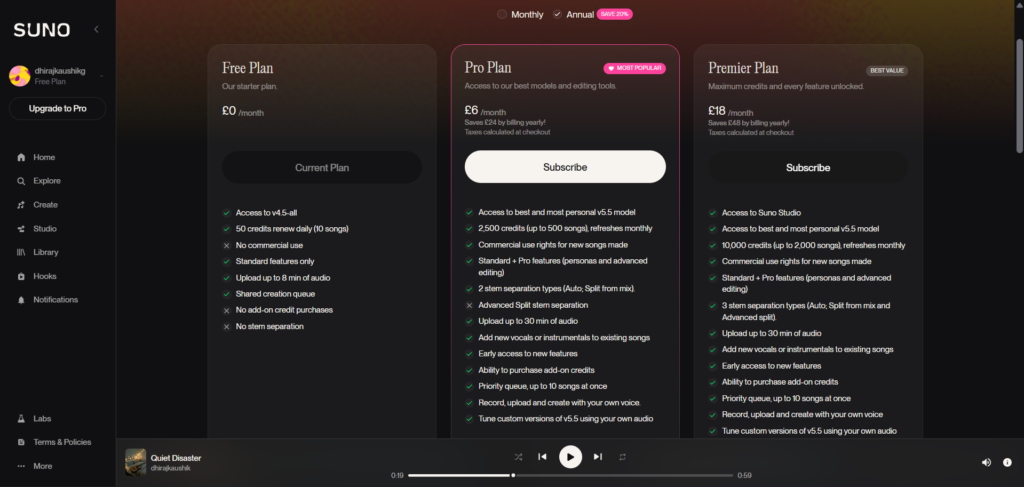
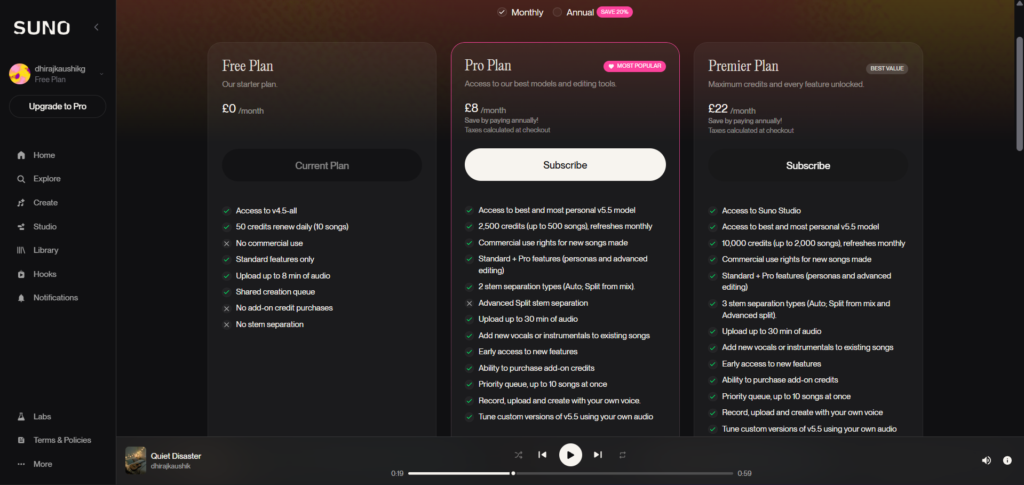
Suno Studio launched in late 2025, described by Suno itself as the world’s first “Generative Audio Workstation,” a browser-based DAW that wraps timeline arrangement, six-band EQ, 12-stem separation, Warp Markers, audio-to-MIDI conversion, and section-targeted generation on top of Suno’s standard music model. It is exclusive to Premier subscribers at $24 to $30 per month. Pro subscribers at $8 to $10 per month do not get access to Studio at all, a gating decision Suno made deliberately as the core tier differentiator.
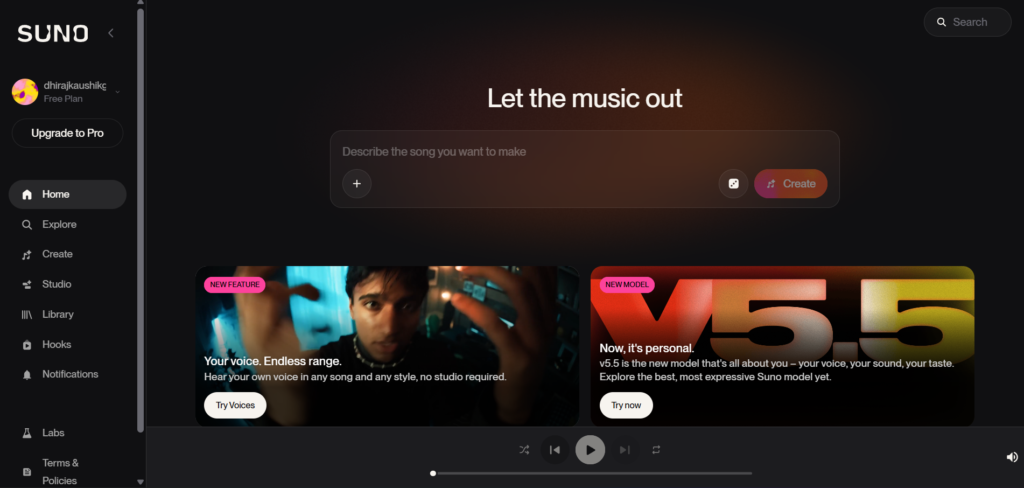
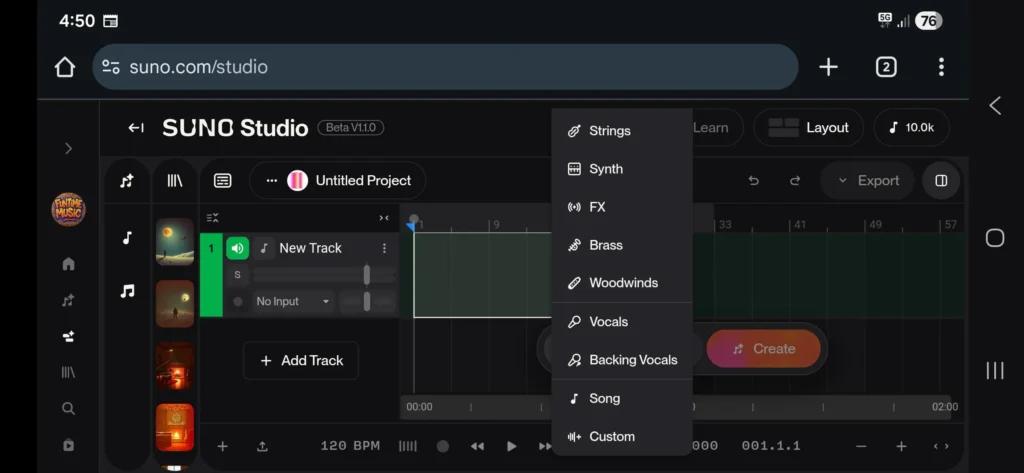
The interface splits into four main sections: a creation window where you generate new content or write lyrics, a library displaying your existing tracks and projects, the main arrangement window where the actual editing happens, and a clip and track detail panel. Conceptually, the pitch is that Studio takes you from “text-to-song generator” toward “AI-augmented DAW,” with Suno positioning the comparison against tools like Ableton rather than against competitors like Udio.
That comparison is the most important framing to understand before you spend a single credit inside Studio. Suno itself confirms a specific, limited feature set: a multitrack editor, MIDI export, Stem Covers, and start, edit, and remix actions, plus up to 12 time-aligned WAV stems. It does not publish a feature list matching the deep mixing, effects routing, automation, and plugin ecosystems that tools like Ableton Live or Logic Pro have built over decades. Treat Studio as a generative-first workstation that reaches a real DAW through stems and MIDI export, not as a one-for-one replacement for an actual production environment.
As of May 2026, Studio is still officially labeled Beta inside the product itself, which matters for how you should calibrate your expectations going in.
Step-by-Step: Getting Into Studio and Your First Edit
Step 1: Confirm You Are on the Premier Plan
Studio is locked behind Premier specifically. Pro subscribers will not see the option at all, regardless of how many credits remain in their account. If you are on Pro and curious whether Studio is worth the upgrade, read the verdict sections below before committing to the higher tier.
Step 2: Open a Track in Studio
From your Suno library, select an existing generated song and look for the option to open it in Studio rather than the standard playback view. This loads the track into the multitrack timeline, where Suno automatically separates it into available stems.
Step 3: Explore the Stem Separation
Once inside, you will see up to 12 time-aligned WAV stems laid out on the timeline, vocals, drums, bass, guitars, and other instrument groups depending on the track’s arrangement. Click through each stem individually to solo and listen. This is the moment that will tell you the most about whether Studio fits your workflow, since stem quality varies noticeably from track to track.
Step 4: Try Section-Targeted Generation
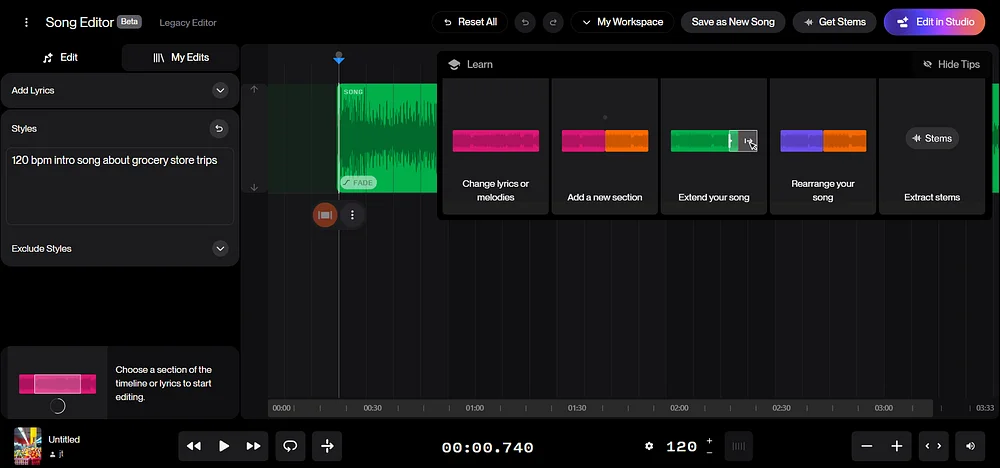
Highlight a specific region in the timeline, for example bars 16 through 24, and prompt something like “add a sax solo here.” Studio generates new audio for just that section while leaving the rest of the track untouched. This is genuinely the standout feature in the entire Studio toolkit, and when it works cleanly, it is faster than either re-prompting the whole song from scratch or manually overdubbing in a separate DAW.
Step 5: Adjust With the Mixing Tools
Use the six-band EQ, volume faders, pan controls, and solo and mute buttons on individual stems to shape the balance of the track. These controls function similarly to what you would expect in any basic DAW mixer, though without the deeper effects routing of a dedicated production tool.
Step 6: Export Your Stems or MIDI
When you are satisfied with your edits, use the export menu to pull out a Full Song WAV, individual per-clip WAV stems, or MIDI extracted from any stem. The MIDI export specifically costs 10 credits per call on top of whatever you have already spent generating and editing the track itself. From here, the stems move cleanly into whatever external DAW you actually use for final mixing and mastering.
The Three Features That Genuinely Work
After two weeks of testing, three specific capabilities consistently delivered on what they promised, separate from the parts of Studio that frustrated me.
Section-targeted generation is, in the words of MusicTech’s January 2026 review, perhaps the most impressive feature in the entire toolkit, and my own testing largely agreed. Being able to highlight a specific eight-bar region and prompt for a targeted addition, a solo, a vocal ad-lib, an instrumental fill, without disturbing anything else in the track is a genuine production-relevant capability. When it works, and it does not always, it saves real time compared to either regenerating the entire song or jumping to an external DAW to overdub manually.
Audio-to-MIDI export lets you extract melodies, chord progressions, and rhythm patterns from any stem as a standard MIDI file you can drop into Ableton, Logic Pro, FL Studio, or any other DAW you already use. The extraction is not perfect, it picks up some artifacts and occasionally misses notes, but it is consistently good enough to bring into a traditional production environment and reinterpret with your own instrument library. This is one of the more genuinely valuable bridges between Suno’s generative world and a real production workflow, and Suno is currently one of only a small handful of major AI music platforms offering MIDI export at all.
Remix-from-audio seeding lets you upload an existing track and have Studio generate variations using its underlying structure as a reference. If you land on a groove or arrangement you like and want several alternate takes that feel structurally similar, this feature handles that specific task reasonably well, and it is a faster path to variation than manually re-describing the same structure in a fresh text prompt.
The Problems Reddit Has Been Talking About
This is the section most marketing-driven coverage of Studio skips, and it is the one that actually determines whether you will be frustrated or satisfied two weeks into using it.
The community consensus on r/SunoAI is blunt, and during my own testing I ran into every issue this consensus describes. Studio operations burn credits whether the output is usable or not, meaning a stem regeneration attempt that fails completely still costs you the same credits as one that succeeds. This compounds the same iteration-cost problem that exists with regular song generation, except now it is happening at the individual stem level, inside a tool you are already paying a premium tier for.
Stem quality itself is inconsistent. Generated stems frequently carry noticeable secondary AI processing that was not present in the original mix, drum stems coming out with added reverb that should not be there, vocal stems showing bleed from other instruments. The stem separation quality can be a little hit and miss, with some parts being attributed to the wrong instrument entirely, an issue I encountered directly when a bass line was partially classified as part of the drum stem on one track.
The most damaging statistic circulating in the community, and one I want to flag clearly rather than soften, describes stem replacement success rates as low as 2 out of 100 attempts for certain operations. I did not run 100 attempts myself during testing, but across roughly 15 attempted stem replacements on different tracks, only a small handful produced a result I considered usable without further cleanup, which is broadly consistent with that community-reported pattern rather than contradicting it.
Beyond the technical issues, there is a real, steep learning curve specific to Studio’s prompting style and feature set, and the platform’s own documentation can get you started but stays ambiguous about the finer details of getting consistently good-sounding results. Generating vocals without unwanted reverb and effects baked in is a documented difficulty that several independent reviewers, not just the Reddit community, have flagged separately.
System Requirements and Access Limitations
Studio is browser-only. There is no mobile version at all, and you specifically need Chrome running on a desktop or tablet with a minimum screen width of 768 pixels. The underlying system requirements call for a CPU that supports SIMD instructions and at least 4GB of RAM. If your primary working device is a phone or an older, lower-spec laptop, Studio may simply fail to run smoothly regardless of which plan tier you are paying for, and this is worth confirming on your specific hardware before committing to Premier purely for Studio access.
Suno Studio vs a Real DAW
It is tempting, and Suno’s own marketing leans into this, to call Studio “Ableton with AI built in.” That framing oversells what is actually there. Studio borrows the core workstation concept, a multitrack timeline you can edit and arrange, and pairs it with Suno’s generative model underneath. It does not match the deep mixing chains, effects routing, automation lanes, and mature plugin ecosystems that DAWs like Ableton Live or Logic Pro have built over twenty or more years of development.
The more accurate way to think about the relationship: Studio is a generative-first workstation that reaches toward a real DAW through clean stem and MIDI export, rather than functioning as a genuine replacement for one. The workflow that actually makes sense for most serious producers is to generate and do light arrangement work inside Studio, then export stems and MIDI into whichever traditional DAW you already use for the real mixing and mastering work. Suno does not lock you into its own environment for that final stage. It hands you the stems and largely gets out of the way from there.
| Capability | Suno Studio | Traditional DAW (Ableton, Logic, FL Studio) |
|---|---|---|
| Multitrack timeline editing | Yes, basic | Yes, deep and mature |
| AI generation built in | Yes, core feature | Limited, bolt-on at best |
| Stem separation | Up to 12, AI-generated, inconsistent quality | Manual recording, full control |
| Mixing depth (EQ, effects, automation) | Six-band EQ, basic pan/volume | Full effects chains, automation lanes |
| MIDI export | Yes, imperfect extraction | N/A, MIDI is native |
| Plugin ecosystem | None | Extensive, mature |
| Mobile access | None | Varies by DAW |
| Learning curve | Steep for prompting, simpler for basic mixing | Steep, but well-documented after decades |
| Cost | Included in Premier ($24-30/month) | One-time purchase or subscription, varies widely |
Is Premier Worth It Just for Studio?
The honest answer requires being specific about what kind of user you are. If you only generate songs and publish them as-is, with maybe a basic Song Editor pass available on the cheaper Pro plan, you do not need Studio at all, and Pro at $8 to $10 per month covers everything you actually use.
If you specifically want bar-level editing, stem manipulation for remixing or sampling, or MIDI export to bring AI-generated melodic ideas into your existing production setup, Premier’s Studio access starts to make sense, but go in with calibrated expectations given the documented stem quality and credit-burn issues above.
One detail worth weighing carefully: stem export at up to 12 stems is also available on the Pro plan, so stems alone are not unique to Studio or Premier. What Premier and Studio specifically add on top of that existing Pro-tier stem access is the browser-based multitrack editing environment itself and the MIDI export capability. If stems are genuinely all you need and you are comfortable doing the arrangement work in software you already own, weigh Pro against Premier carefully rather than assuming you need the higher tier by default.
My own verdict after two weeks: Studio earns a place in my workflow specifically for section-targeted generation and as a fast source of melodic and structural inspiration when I am stuck on an idea, exactly the framing one veteran producer used when approaching it as someone with thirty years of electronic music production experience. It does not earn a place as my primary mixing or stem-separation tool, given the inconsistency documented above. For a full breakdown of how Premier’s pricing compares against Pro across every other feature beyond Studio specifically, see our Suno AI pricing guide.
Who Should Actually Use Suno Studio?
Producers looking for a fast inspiration tool. If you are stuck on an arrangement and want AI-generated variations, melodic ideas via MIDI export, or quick section-level additions to test against an existing structure, Studio delivers genuine value here even with its other limitations.
Creators who already commit to exporting into a real DAW. If your mental model going in is “generate and lightly arrange in Studio, then finish properly in Ableton or Logic,” you will get real use out of the multitrack timeline and the MIDI bridge without being disappointed by Studio’s mixing depth, because you never expected it to be your final production environment.
Who should skip it: anyone expecting Studio to replace a traditional DAW outright, anyone whose primary need is reliable, consistent stem separation for serious remix or sampling work given the documented 2-in-100 failure rate on certain stem replacement operations, and anyone on a budget who only generates and publishes songs without deeper editing, since Pro already covers that use case at a third of the cost. For a broader look at whether Suno fits your specific creative needs beyond Studio, our complete Suno AI review covers the full platform across 60 generated songs.
FAQ
Is Suno Studio available on the Pro plan?
No. Studio is exclusively available to Premier subscribers at $24 to $30 per month depending on monthly or annual billing. Suno made this gating decision deliberately as the core differentiator between its two paid tiers. Pro subscribers at $8 to $10 per month get stem separation up to 12 stems and the standard Song Editor, but they do not get access to the multitrack timeline, the section-targeted generation feature, or MIDI export that defines the Studio experience.
Is Suno Studio still in beta in 2026?
Yes. As of May 2026, Studio remains officially labeled Beta within the product itself, despite having launched in late 2025. This matters practically because the documented issues around stem separation quality, credit consumption on failed operations, and inconsistent results across different tracks are consistent with a product still actively being refined rather than a fully mature, stable feature. Treat any workflow built around Studio with the expectation that behavior and reliability may continue shifting as Suno develops it further.
Does Suno Studio cost extra credits beyond my monthly Premier allowance?
Yes, in a way that catches many users off guard. Studio operations draw from the same monthly credit pool as your regular song generation, and importantly, failed or unsuccessful operations still consume credits exactly as successful ones do. A stem regeneration attempt that produces an unusable result costs the same as one that works perfectly. MIDI export specifically costs 10 credits per individual export call, on top of whatever credits you already spent generating and editing the underlying track. Budget your monthly Premier allowance with this in mind rather than assuming Studio operations are somehow free or separate from your main credit count.
How reliable is stem separation in Suno Studio?
Inconsistently reliable, and this is one of the most consistently reported frustrations across independent reviews and community discussion. Stem separation can attribute parts to the wrong instrument entirely, and generated or separated stems frequently carry secondary AI processing artifacts that were not present in the source, such as added reverb on drum stems or bleed between vocal and instrument tracks. Community reports describe stem replacement success rates as low as 2 out of 100 attempts for certain specific operations. My own testing across roughly 15 stem replacement attempts produced a similarly low usable-result rate, broadly consistent with that community pattern. Treat stem separation as a useful starting point requiring further manual cleanup rather than a finished, reliable output.
Can I export Suno Studio projects to use in Ableton or Logic Pro?
Yes, and this export capability is one of Studio’s genuine strengths. You can export a Full Song WAV, individual per-clip WAV stems, or MIDI extracted from any stem within your project. These exports move cleanly into any traditional DAW you already use for further mixing, processing, and finishing. Suno does not lock your project into its own environment for the final production stage. The practical workflow most experienced producers settle on is generating and doing light arrangement inside Studio, then handing the exported stems and MIDI off to a dedicated DAW for the deeper mixing and mastering work that Studio itself is not built to handle.
Is Suno Studio worth upgrading from Pro to Premier just to access it?
Only if you have a specific, concrete reason tied to Studio’s actual capabilities, section-targeted generation, MIDI export for bringing melodic ideas into an external DAW, or remix-from-audio seeding for generating structural variations. If your workflow is simply generating complete songs and publishing them with minimal further editing, Pro’s existing stem export and Song Editor already covers that need at roughly a third of Premier’s price. Given the documented inconsistency in stem separation quality and the credit cost of failed operations, upgrading purely on the promise of Studio’s marketing without a specific intended use case is likely to leave you disappointed relative to the price jump.
Final Thoughts
Two weeks inside Suno Studio left me with a genuinely split verdict, and I think any honest review has to land there rather than pretending the picture is cleaner than it is. The ambition is real. Section-targeted generation and MIDI export are capabilities that point toward something genuinely useful for the future of AI-assisted music production, and when they work, they save real time compared to alternative workflows.
But the execution, measured against real-world testing and the consistent pattern of community complaints on r/SunoAI, does not yet support the framing Suno itself uses when comparing Studio to tools like Ableton. The credit-burn on failed operations, the inconsistent stem separation quality, and the official Beta label all point to a tool that is still finding its footing rather than a finished, production-ready environment.
If you are a Premier subscriber already, or considering the upgrade specifically for Studio, go in treating it as an inspiration and light-arrangement tool that feeds into a real DAW, not as a replacement for one. That framing will set you up for a far more satisfying two weeks than mine started out being, before I recalibrated my own expectations partway through testing.
For the full picture of what a paid Suno subscription gets you beyond Studio specifically, our Suno AI pricing breakdown covers every tier in detail, and our complete Suno AI review covers the platform’s core song generation across 60 real tracks.
External resources: Suno Studio official feature documentation | MusicTech’s Suno Studio review: Is this AI DAW really the future of music production? | Suno Studio Review: Worth $24/Month or Pre-Beta You’re Paying For — Undetectr | r/SunoAI community discussion on Studio reliability | Suno Studio Complete Guide — Sean Kim, Arts and Tech