Claude AI for business has moved well past the general chatbot most people first tried, now living directly inside Excel, PowerPoint, Word, and Outlook rather than sitting in a separate browser tab you have to keep switching to. After testing the current Microsoft 365 integrations alongside Claude’s Team pricing structure, the honest picture is that this has become a genuinely different product than the one most business reviews from even a year ago were describing.
Table of Contents
What Is Claude AI for Business?
Claude AI for business refers to how companies deploy Claude across teams for tasks like financial modeling, document drafting, presentation building, and internal knowledge work, either through individual Pro and Max subscriptions or Anthropic’s dedicated Team and Enterprise plans. What has changed most significantly in 2026 is where this work actually happens, since Claude now operates as a native sidebar inside Excel, PowerPoint, Word, and Outlook rather than requiring employees to copy data back and forth from a separate chat window.
The Microsoft 365 integration rolled out in stages throughout 2025 and 2026. Claude for Excel launched first in beta, followed by PowerPoint, then Word, with Outlook arriving in public beta as the final piece of what Anthropic calls the classic Office trio plus email. As of May 2026, all four integrations reached general availability except Outlook, which remains in beta with some rough edges around complex thread summarization.
The headline feature across these integrations is shared context. Working in Excel to analyze a dataset, then switching to PowerPoint to build a presentation from that same analysis, no longer requires re-explaining what the data showed. Claude carries the conversation context across apps within a single working session, a workflow improvement that meaningfully changes how a typical finance or consulting task gets done compared to switching between a spreadsheet and a separate AI chat window.
For teams evaluating whether to adopt Claude company wide, understanding how the underlying pricing tiers actually work matters more here than for an individual user, since Team pricing is seat based rather than a flat organizational fee, and getting the seat mix wrong can mean paying for capability specific employees never actually use.

Why the Office Integration Matters More Than It Sounds?
It is easy to underestimate how significant a native Office integration actually is until you have worked around its absence. Before this rollout, using Claude for business tasks meant a genuinely disruptive workflow: copying data out of a spreadsheet, pasting it into a browser tab, waiting for a response, then copying the result back and manually reformatting it to fit the original document. Each step introduced friction and opportunity for error.
Removing that friction changes more than convenience, it changes what kinds of tasks people are actually willing to delegate to an AI tool in the first place. A five minute task that required three app switches and constant copy-pasting often just did not get delegated at all, with people defaulting back to doing it manually themselves. Once that friction disappears, the range of tasks people actually route through Claude expands meaningfully.
How Claude AI for Business Actually Works?
Claude’s business tools operate on the same underlying model family as the consumer product, generally Opus for the most demanding reasoning tasks and Sonnet for faster, everyday work, but the interface and integration points are specifically built around common business workflows rather than a general purpose chat window.
Claude for Excel
Claude for Excel operates as a sidebar panel inside the spreadsheet itself, reading and modifying data while keeping formulas and cell dependencies intact rather than treating your spreadsheet as static text. It can write formulas from a plain language description, audit an existing financial model for issues like circular references or hardcoded values that should be formulas, and populate a template from raw pasted data. When it changes a cell, it highlights exactly what was affected, which matters significantly for financial models where an unreviewed change could introduce a costly error.
Claude for PowerPoint
Claude for PowerPoint reads your existing template, color scheme, and layout conventions automatically, then generates new slides that match your established deck style rather than defaulting to a generic format. Describing a section in plain language produces drafted bullets and suggested layouts, and when working from data already analyzed in Excel during the same session, it can build slides directly from that existing analysis without needing the numbers re-explained.
Claude for Word
Claude for Word handles long document work specifically, including tracked changes rather than silent rewrites, which matters for collaborative editing where a reviewer needs to see exactly what changed and why. This makes it more suited to formal business documents, reports, contracts, and long memos, than to quick, informal writing tasks.
Enterprise Deployment Options
Larger organizations with data residency or compliance requirements can route Claude traffic through Amazon Bedrock, Google Cloud Vertex AI, or Microsoft Foundry rather than connecting directly to Anthropic’s own servers. This lets Claude’s capabilities run within an organization’s existing cloud contract and security perimeter, an option that reportedly several major financial and consulting firms have adopted specifically for this reason.
This flexibility matters because it decouples the decision to adopt Claude from the decision to add a new vendor relationship outside an organization’s existing security review process. For heavily regulated industries specifically, being able to keep data flow within an already-approved cloud infrastructure provider often removes what would otherwise be a lengthy separate compliance review.
Step-by-Step Guide to Setting Up Claude AI for Business
Here is how to actually get Claude working inside your existing Microsoft 365 environment rather than as a separate, disconnected tool.
Step 1: Confirm You Have a Paid Claude Plan
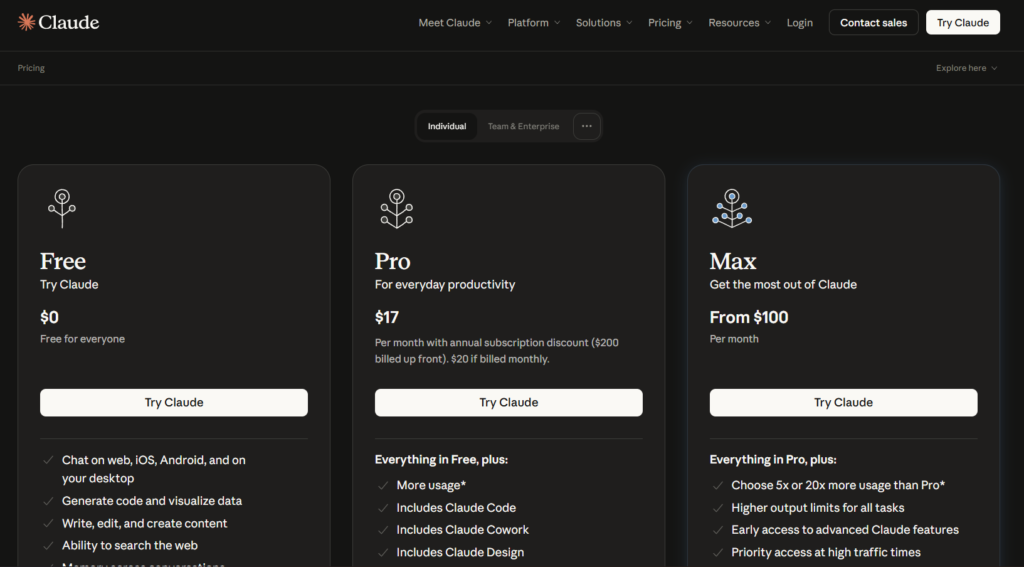
The Microsoft 365 add-ins require at least a Pro subscription, they are not available on Claude’s free plan. Teams should evaluate whether individual Pro subscriptions or a Team plan makes more sense based on how many employees will actually use the integration regularly.
Step 2: Install the Add-ins From the Microsoft Marketplace
In any Office app, go to Insert, then Get Add-ins, and search for Claude by Anthropic. The add-ins are available for Windows, Mac, and web versions of Word, Excel, and PowerPoint.
Step 3: Start With Excel If Your Work Involves Data
For most business use cases, Excel is the most mature and immediately useful integration. Open an existing workbook and ask Claude to summarize key insights or audit a specific formula before attempting a full build from scratch.
Step 4: Test the Cross-App Workflow With a Real Task
Try the full workflow on something you actually need done: analyze data in Excel, ask Claude to build a presentation from that analysis in PowerPoint, then draft an accompanying report in Word. This end to end test reveals the real value of shared context far better than testing each app in isolation.
Step 5: Set Team Level Guidelines Before Wider Rollout
Before deploying Claude across a full department, establish clear guidelines on which tasks are appropriate for AI assistance, particularly for anything involving sensitive financial data or client information. This prevents inconsistent, ad hoc usage patterns from emerging once the tool is broadly available.
Step 6: Evaluate Enterprise Deployment If Compliance Requires It
If your organization has strict data residency or compliance requirements, evaluate whether routing Claude through Amazon Bedrock, Google Cloud Vertex AI, or Microsoft Foundry fits your existing infrastructure better than a direct Anthropic connection, since this keeps data within your organization’s existing cloud contract.
Step 7: Review Usage and Cost Against Actual Team Needs
After a few weeks of real use, review which employees are actually using the tools regularly versus rarely touching them, and adjust your seat allocation between Team Standard and Premium accordingly rather than defaulting every employee to the same tier.
Key Benefits of Claude AI for Business
The elimination of manual copying between apps is the most immediately noticeable benefit for anyone doing regular analysis to presentation to report work. Finance and consulting professionals in particular describe this shared context feature as changing the actual shape of a workday, since work that used to involve exporting, pasting, and reformatting now happens as one continuous flow.
Claude for Excel’s approach of highlighting exactly which cells were changed provides a genuine safety benefit over blindly trusting AI generated formulas. For financial models where an unreviewed error could have real monetary consequences, this transparency matters significantly more than raw speed.
The fact that Microsoft 365 integration comes at no additional cost beyond an existing paid Claude plan is a meaningful benefit compared to Microsoft’s own Copilot, which requires a separate add-on subscription on top of a Microsoft 365 license. For organizations already paying for Claude for other reasons, this removes a real cost barrier to adopting the Office integration specifically.
Enterprise deployment flexibility through Amazon Bedrock, Google Cloud Vertex AI, or Microsoft Foundry benefits larger organizations with existing cloud infrastructure investments and compliance requirements, letting them adopt Claude’s capabilities without routing sensitive data through a new, separate vendor relationship outside their established security perimeter.
The tracked changes approach in Claude for Word specifically preserves an important workflow habit that many collaborative teams already rely on, reviewing exactly what changed rather than accepting a silently rewritten document. This matters more than it might initially seem, since a document editing tool that hides its own edits undermines the trust needed for teams to actually adopt AI assistance for anything beyond low stakes drafting.
Comparison Table
| Tool Name | Office Integration | Cross-App Context | Additional Cost for Office Add-ins | Monthly Cost |
|---|---|---|---|---|
| Claude AI | Excel, PowerPoint, Word, Outlook (beta) | Yes, within a session | None, included in paid plans | Free, then $20 |
| Microsoft Copilot | Native, deepest OS-level integration | Yes, via Microsoft Graph | Separate $30/user add-on | From $30/user |
| ChatGPT | Limited, via Custom GPTs and plugins | Limited | Varies by integration | Free, then $20 |
| Gemini | Native Gmail, Docs, Sheets, Slides | Yes, within Google Workspace | Included in Workspace plans | Free, then $19.99 |
| Notion AI | Native within Notion workspace | Yes, within Notion | Included with Notion plans | From $10/user |
Pricing and feature availability reflect publicly listed information as of mid-2026. Microsoft Copilot’s deeper OS-level integration reflects Microsoft owning the underlying platform, while Claude’s approach works as an add-in layered on top, a structural difference worth understanding regardless of which tool ultimately fits your organization.
Who Claude AI for Business Actually Works Best For?
Financial analysts and consultants doing regular data analysis, presentation building, and report writing benefit most immediately from the cross-app shared context, since this workflow, moving from raw numbers to a polished deck to a written report, is exactly the repetitive pattern the integration was built to streamline.
Small to mid sized businesses without a dedicated data or business intelligence team can use Claude for Excel to handle tasks that would otherwise require hiring specialized analytical help, such as building financial models or auditing existing spreadsheets for structural errors.
Organizations already standardized on Microsoft 365 for their daily work get more immediate practical value from Claude’s Office integration than businesses primarily using Google Workspace, who may find Gemini’s native integration into that specific ecosystem a more natural fit for the same underlying need.
Large enterprises with strict compliance or data residency requirements should specifically evaluate the Amazon Bedrock, Google Cloud Vertex AI, or Microsoft Foundry deployment paths before committing to a direct Anthropic connection, since this decision significantly affects how the tool fits into an organization’s existing security and compliance framework.
FAQ
Does Claude AI work inside Excel and PowerPoint?
Yes, Claude for Excel and Claude for PowerPoint are both generally available as official add-ins, installed through the Microsoft Marketplace directly inside each application. Claude for Excel reads and modifies spreadsheets while preserving formulas and cell dependencies, and Claude for PowerPoint reads your existing template and builds slides matching that established style. Both require at least a Claude Pro subscription and are not available on the free plan.
How much does Claude AI cost for a business team?
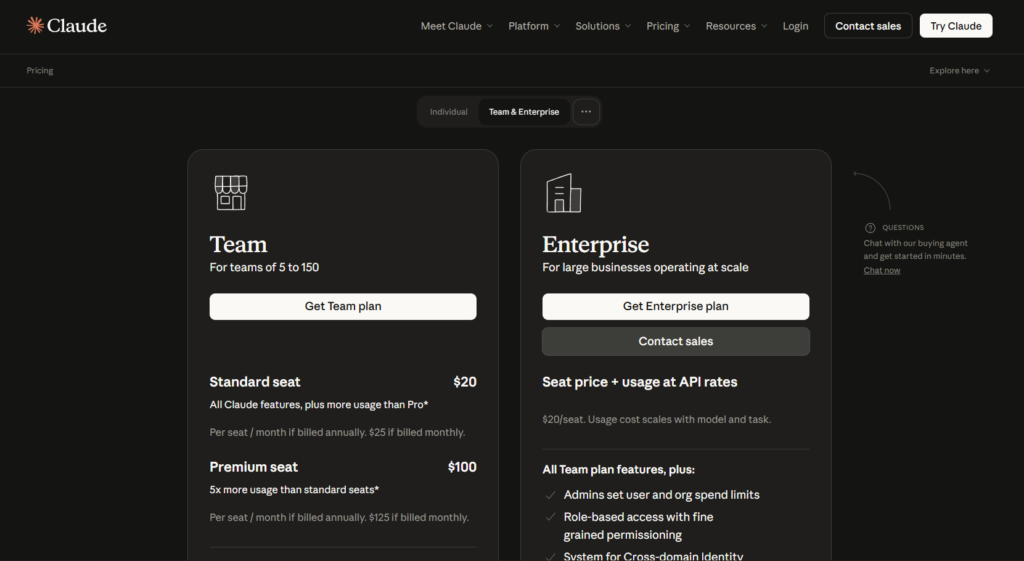
Individual Pro subscriptions cost twenty dollars a month per person, while Claude’s Team plans are seat based, with Team Standard at twenty five dollars per seat monthly and Team Premium at one hundred twenty five dollars per seat monthly, both discounted for annual billing. The right choice depends on team size and usage intensity, with smaller teams sometimes better served by individual Pro subscriptions and larger teams benefiting from Team’s centralized billing and shared administrative controls. Enterprise pricing is custom and requires contacting Anthropic’s sales team directly.
Is Claude AI better than Microsoft Copilot for business use?
Neither tool is universally better, and the comparison depends heavily on existing infrastructure and specific use cases. Microsoft Copilot has deeper OS level integration since Microsoft owns the underlying platform, while Claude’s Office add-ins work as a layered integration that comes included with an existing paid Claude plan rather than requiring Copilot’s separate thirty dollar per user add-on cost. Organizations already paying for Claude for other reasons often find the included Office integration a meaningful cost advantage, while those fully invested in the Microsoft ecosystem may prefer Copilot’s tighter native integration.
Can Claude AI build financial models in Excel?
Yes, Claude for Excel can build financial models from a plain language description, populate templates like a DCF or LBO model from raw pasted data, and audit existing models for structural issues including circular references and hardcoded values that should be formulas instead. When Claude modifies a cell, it highlights exactly what changed, which allows for careful review before those changes are trusted in a model with real financial stakes attached. This same emphasis on transparency and reviewable output shows up across Claude’s other products built for technical, high-stakes work, where showing reasoning before making a change is treated as a core design principle rather than an afterthought.
Does Claude AI integration work with Outlook?
Claude for Outlook is currently in public beta rather than general availability, meaning some features still have rough edges, particularly around summarizing very long or complex email threads accurately. Core functionality including email drafting, thread summarization, and reply improvement does work, and Anthropic has been iterating on it actively since its beta launch. Organizations relying heavily on email workflows should test the beta thoroughly before assuming it performs at the same maturity level as the more established Excel and PowerPoint integrations.
Is Claude AI secure enough for enterprise business use?
For organizations with strict compliance or data residency requirements, Claude offers deployment through Amazon Bedrock, Google Cloud Vertex AI, or Microsoft Foundry rather than requiring a direct connection to Anthropic’s own servers, keeping data within an organization’s existing cloud contract and security perimeter. Several major financial and consulting firms have reportedly adopted this deployment path specifically for this reason. Organizations evaluating Claude for sensitive business use should review Anthropic’s specific data handling and security documentation directly rather than relying on general assumptions about AI tool security.
Final Thoughts
Claude AI for business in 2026 looks meaningfully different from the general purpose chatbot most reviews were describing even a year earlier. The shift toward native Microsoft 365 integration, with genuine shared context across Excel, PowerPoint, and Word, addresses a real, practical friction point that a standalone chat window never fully solved for regular business analysis and reporting work.
The comparison against Microsoft Copilot is closer than either company’s marketing suggests, with each having genuine structural advantages depending on your organization’s existing infrastructure and how deeply invested you already are in the Microsoft ecosystem versus wanting a tool that works well but sits one layer above the underlying platform.
Outlook remains the one integration still catching up to the maturity of the other three, and organizations planning to lean heavily on email workflows specifically should factor that beta status into their rollout timeline rather than assuming full parity with the more established Excel and PowerPoint add-ins.
If your team regularly moves between spreadsheet analysis, presentation building, and written reporting, testing the full cross-app workflow on one real project this week will show you more about whether Claude fits your business than reading any further comparison of the two platforms in isolation.
External Links