Claude Projects is one of those features that gets a single line in most Claude reviews and then never gets explained properly, despite being the single biggest reason regular users stop repeating themselves in every new conversation. After setting up Projects for several different real use cases, from client work to a long running writing project, it is worth walking through exactly what it does and where it genuinely outperforms similar features from competitors.
Table of Contents
What Are Claude Projects?
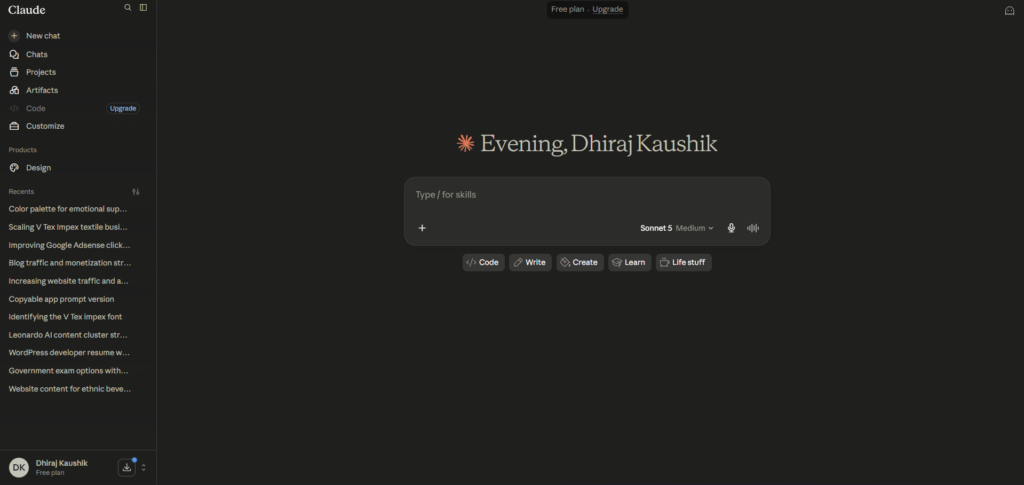
Claude Projects is a workspace feature that lets you group related conversations together, attach persistent reference material, and set custom instructions that automatically apply to every conversation started inside that specific Project. Instead of a single, endless chat history, Projects let you organize your work the way you would organize folders on a computer, by topic, client, or ongoing task.
The core problem Projects solves is repetition. Without it, every new conversation with Claude starts from zero, meaning you re-explain your business, your writing style, or your project’s background details every single time you open a fresh chat. Projects eliminate this by letting you upload documents once, write instructions once, and have that context automatically available in every conversation you start within that Project going forward.
Anthropic rolled Projects out as part of a broader shift toward treating Claude as a genuine daily workspace rather than a single purpose chatbot, a direction that also shows up in how Claude Cowork extends this same philosophy into more autonomous multi step work across files and tasks. Projects and Cowork are related but distinct, Projects is about persistent context and organization, while Cowork is specifically about autonomous task execution.
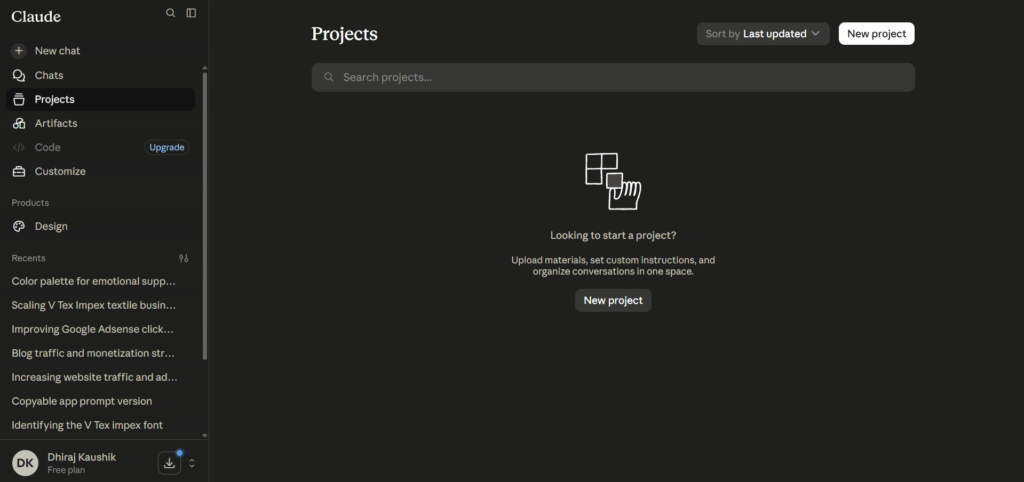
Each Project can hold its own set of uploaded files, up to a substantial combined size depending on your plan, along with custom instructions written once and applied automatically. You can have as many separate Projects as you need, and switching between them is as simple as clicking a different one from your Projects list rather than navigating through settings each time.
Why This Feature Matters More Than It First Appears?
On the surface, Projects can look like a minor organizational convenience, similar to creating folders in an email client. In practice, the effect compounds significantly over time. A single instance of not having to re-explain context saves a few minutes, but multiplied across dozens or hundreds of conversations over months of regular use, the cumulative time saved becomes substantial, often the difference between Claude feeling like a genuinely integrated part of someone’s workflow versus a tool they open occasionally for isolated questions.
The feature also changes how people think about using AI assistance in the first place. Users without Projects tend to treat each conversation as disposable, useful for a single answer and then forgotten. Users who adopt Projects properly start thinking of specific areas of their work as ongoing collaborations with an assistant that has real, accumulated context, which is a meaningfully different relationship with the tool.
How Claude Projects Actually Work?
At a structural level, a Project functions as a container that wraps around individual conversations, feeding them shared context they would not otherwise have access to. Every new chat started from within a Project automatically inherits that Project’s uploaded files and custom instructions without you needing to attach anything manually each time.
Uploaded Knowledge Base
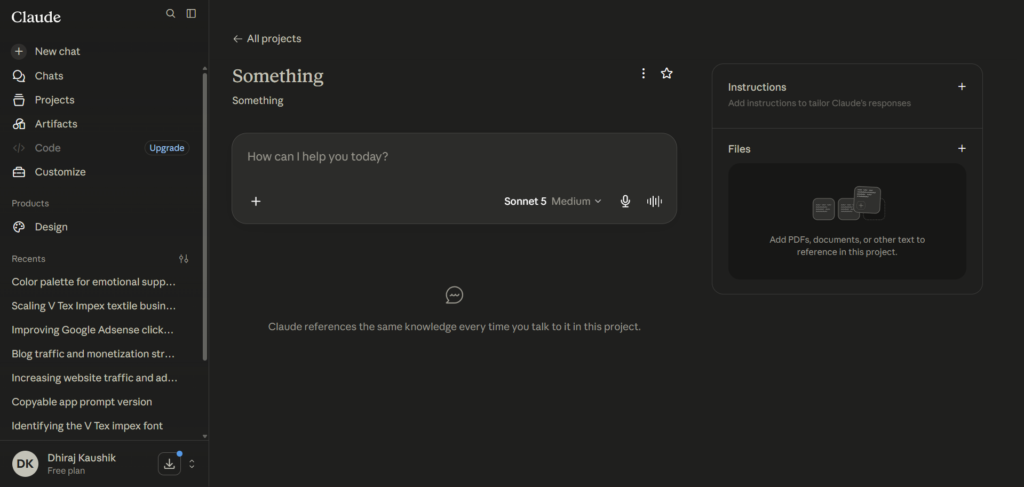
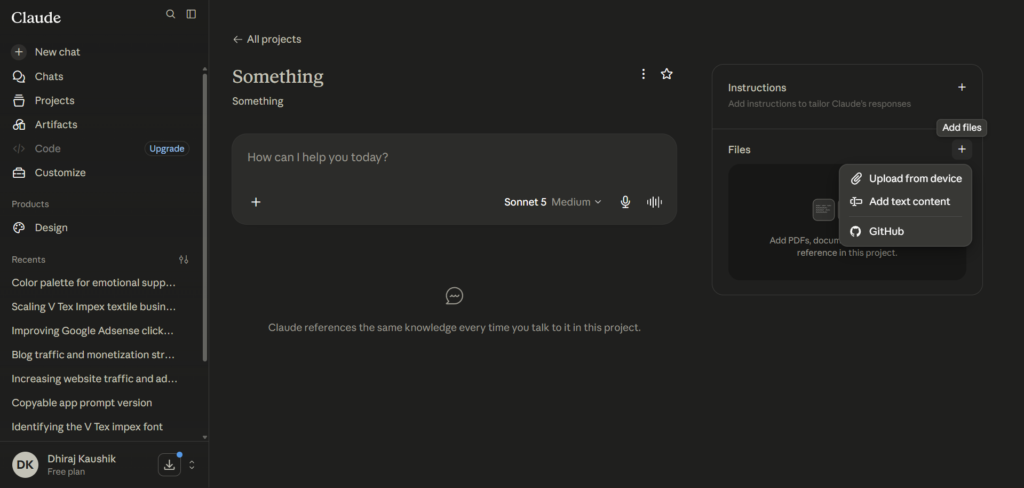
Files uploaded to a Project become part of what Anthropic calls its knowledge base for that specific workspace. This can include PDFs, Word documents, spreadsheets, and plain text files, and Claude references this material automatically when relevant to a question, without requiring you to specify which file to check each time.
Custom Instructions
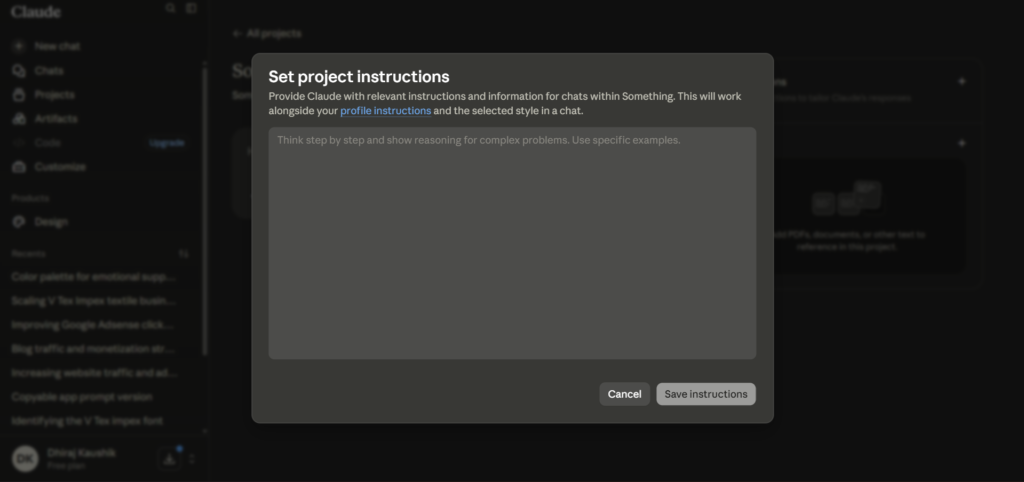
Beyond files, Projects support custom instructions, a persistent set of guidelines describing how you want Claude to behave specifically within that workspace. This might include your preferred tone, formatting preferences, or specific facts about your business or project that should inform every response, functioning similarly to a standing brief you would hand a new team member.
Conversation History Within a Project
Individual conversations within a Project still function as distinct chat threads, meaning Claude does not automatically carry context from one specific conversation into another within the same Project unless that context was part of the shared knowledge base or custom instructions. This distinction matters, since it means Projects organize and share background context, but they do not merge every past conversation into one continuous, all-knowing thread.
How This Differs From Regular Memory Features?
Some competing tools, notably ChatGPT’s memory feature, automatically retain details from past conversations across your entire account without requiring manual setup. Claude’s approach through Projects is more deliberate and opt in, nothing carries over unless you specifically upload it or write it into that Project’s instructions. This is slower to set up but gives you more precise control over exactly what context Claude has access to for a given piece of work.
This design choice reflects a broader philosophy difference between the two companies rather than an oversight on Anthropic’s part. Automatic, always on memory is more convenient out of the box, but it also means less predictable behavior, since you cannot always be certain exactly what past context is influencing a current response. Claude’s more manual approach trades some convenience for transparency, since you always know precisely what a given Project does and does not have access to.
Step-by-Step Guide to Setting Up Claude Projects
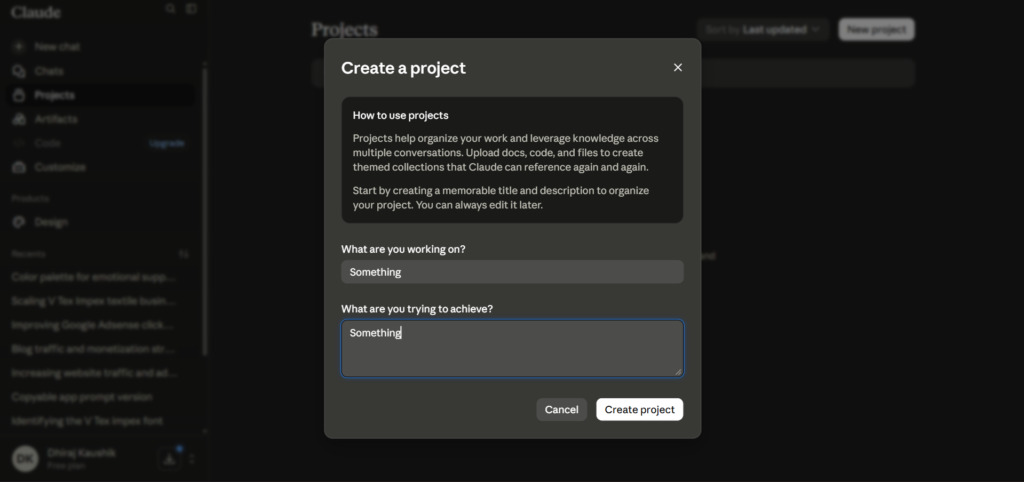
Here is exactly how to set up and get real value from a Project, whether you are managing a client, a writing project, or ongoing research.
Step 1: Identify a Recurring Need Before Creating a Project
Before creating one, make sure you actually have a recurring use case, a specific client, an ongoing writing project, or a repeated type of analysis. Creating Projects for one-off questions adds unnecessary organizational overhead without any real benefit.
Step 2: Name the Project Clearly
Give your Project a specific, descriptive name rather than something vague. A name like “Acme Corp Content Strategy” is far more useful when scanning your Projects list later than a generic label like “Work Stuff.”
Step 3: Upload Your Core Reference Material
Add the documents that will genuinely matter across multiple future conversations, a style guide, a syllabus, past reports, or brand guidelines. Avoid uploading everything indiscriminately, since a focused knowledge base produces more relevant responses than one cluttered with tangentially related files.
Step 4: Write Clear Custom Instructions
In the instructions field, describe specifically how you want Claude to behave within this Project, your preferred tone, formatting expectations, or key facts it should always keep in mind. Be as specific here as you would be briefing a new hire on their first day.
Step 5: Start Your First Conversation Inside the Project
Begin a new chat from within the Project rather than a general chat, so it automatically has access to your uploaded files and instructions. Test it with a question that specifically requires the reference material you uploaded, to confirm everything is working as expected.
Step 6: Refine Instructions as You Go
If early responses are not quite matching what you want, update the Project’s custom instructions directly rather than repeating corrections in every new conversation. This investment pays off across every future conversation in that Project, not just the current one.
Step 7: Review and Prune the Knowledge Base Periodically
As a Project evolves, periodically review the uploaded files and remove anything outdated or no longer relevant. A Project with stale, contradictory information can actually produce worse results than one with a smaller, more current, more focused set of files.
Key Benefits of Claude Projects
The most immediate benefit of Projects is the sheer time saved from not re-explaining context repeatedly. For anyone managing multiple clients, ongoing projects, or recurring types of work, this single feature can cut the setup time on every new conversation from several minutes down to seconds.
Projects also improve response quality, not just convenience. Claude’s answers within a well maintained Project tend to be more specific and relevant, since they are grounded in your actual uploaded material rather than a generic interpretation of a request typed without supporting context.
The deliberate, opt in nature of Projects offers a genuine privacy advantage for professionals handling sensitive client information. Since nothing carries over automatically the way it does with some competitors’ always on memory features, you retain precise control over exactly what context exists in each specific workspace, which matters significantly for consultants or freelancers juggling confidential information across multiple clients.
Projects also function as an informal knowledge management system over time. A well maintained Project accumulates a useful record of past decisions, explanations, and reference material specific to that area of work, something that becomes genuinely valuable months into an ongoing engagement, functioning almost like a searchable project wiki built up gradually through normal use.
This accumulated context also reduces a specific kind of error that happens when working across many disconnected conversations, contradicting yourself or forgetting a decision you already made weeks earlier. With a well maintained Project, asking Claude to recall a past decision or explanation becomes trivial, since that context genuinely exists in the shared knowledge base rather than living only in your own memory of a scattered conversation history.
Comparison Table
| Tool Name | Persistent Context Feature | Setup Style | File Upload Support | Monthly Cost |
|---|---|---|---|---|
| Claude AI | Projects, opt-in knowledge base | Manual, deliberate | Yes, per-project | Free, then $20 |
| ChatGPT | Memory, automatic across account | Automatic, always-on | Yes, per-conversation and Custom GPTs | Free, then $20 |
| Gemini | Gems, custom instruction presets | Manual, template-based | Limited outside Workspace | Free, then $19.99 |
| Perplexity | Spaces, collection-based organization | Manual | Yes, per-space | Free, then $20 |
| Notion AI | Workspace-native, tied to existing docs | Automatic within Notion | Native to Notion pages | Included with Notion plans |
Feature availability and pricing reflect publicly listed information as of mid-2026. Each tool’s approach to persistent context reflects a different philosophy, automatic and always-on versus manual and deliberate, so the better fit depends on how much control you want over what gets remembered.
Who Claude Projects Actually Works Best For?
Freelancers and consultants managing multiple clients get significant, immediate value from Projects, since each client can have its own dedicated workspace with relevant background material, without any risk of one client’s confidential details bleeding into another client’s conversation.
Writers and content creators working on long running series or ongoing publications benefit from uploading style guides and past published pieces, keeping tone and voice consistent across dozens of pieces produced over months, a use case covered in more depth in our dedicated look at how Claude specifically handles different writing workflows.
Students managing multiple courses in a single semester can use a separate Project per class, uploading syllabi and readings so that questions asked about one course never get confused with material from another, keeping each subject’s context cleanly separated throughout the term.
Small business owners handling recurring operational tasks, drafting policies, managing customer communication templates, or maintaining brand voice guidelines, benefit from a Project that accumulates this institutional knowledge over time, functioning as a lightweight internal knowledge base without needing separate specialized software.
Researchers and analysts working through a single large, ongoing investigation, whether academic or professional, benefit from a Project that holds all relevant source material in one place, letting them ask increasingly specific questions as their understanding deepens without needing to re-upload or re-summarize earlier findings each time a new question arises.
FAQ
How is a Claude Project different from a regular conversation?
A regular conversation starts with no memory of anything outside itself and exists as an isolated thread, while a Project is a persistent workspace that automatically shares uploaded files and custom instructions across every conversation started within it. Individual chats inside a Project remain separate from each other in terms of conversation history, but they all draw from the same shared knowledge base and instructions. This means Projects solve the repetition problem specifically, not the problem of merging every past conversation into one continuous memory, which is a distinction worth understanding clearly before assuming Projects behave like a single infinitely long conversation.
How many files can I upload to a Claude Project?
The exact file capacity depends on your specific plan, with paid tiers generally offering more storage space within a Project’s knowledge base than the free tier. Rather than maximizing the raw number of files uploaded, focus on uploading material that is genuinely relevant across multiple future conversations, since a large but unfocused knowledge base can dilute response relevance rather than improving it. Periodically reviewing and removing outdated files tends to produce better results than accumulating everything indefinitely.
Can I share a Claude Project with other people?
Sharing capability for Projects varies depending on your plan, with Team and Enterprise tiers generally offering more robust collaboration features than individual Pro accounts. For individual Pro users, Projects are primarily a personal organizational tool rather than a shared team workspace. Teams needing genuine multi-user collaboration on a shared knowledge base should look specifically at Claude’s Team pricing tiers, which are built around exactly this kind of shared access.
Do Claude Projects cost extra beyond a Pro subscription?
No, Projects are included in the standard Claude Pro subscription at twenty dollars a month, along with the free plan at a more limited capacity, rather than requiring a separate purchase. This makes it one of the more accessible advanced features compared to some competitors that gate similar persistent context tools behind higher, separate pricing tiers. Anyone already paying for Claude Pro for other reasons has full access to Projects without any additional cost.
Is Claude Projects better than ChatGPT’s memory feature?
Neither approach is objectively better, since they solve the same underlying problem, repetitive context, in fundamentally different ways. Claude Projects requires deliberate, manual setup but gives you precise control over exactly what context exists in a given workspace, while ChatGPT’s memory feature works automatically across your entire account with less manual setup but less granular control over what gets remembered and where. Professionals handling sensitive, client-separated information often prefer Claude’s more deliberate approach specifically for the added privacy control it provides, since automatic cross-account memory carries a higher risk of context accidentally bleeding between unrelated areas of work.
Can I use a Claude Project for coding work?
Yes, though developers doing serious coding work will generally get more value from Claude Code specifically, which is built around reading and working directly with an actual codebase rather than uploaded reference documents. Projects can still be useful for coding adjacent work, like maintaining a consistent set of coding standards or documentation guidelines across a team, but for hands-on development work itself, Claude Code’s deeper codebase integration is the more purpose built tool for that specific job.
Final Thoughts
Claude Projects solves a genuinely practical problem that most people do not realize is costing them time until they actually experience the alternative. The manual, deliberate setup takes a bit more upfront effort than an always-on memory feature, but the precise control it offers over exactly what context exists where is a real advantage for anyone managing multiple distinct areas of work.
It is not a feature that benefits every single user equally. Casual, occasional users asking one-off questions will get little value from setting up a Project, while anyone with genuinely recurring work, a client, a course load, an ongoing writing project, will find it becomes one of the most-used parts of the entire platform within their first few weeks of proper setup.
The learning curve is smaller than it might sound from this level of explanation. Most of the value comes from just two habits: uploading the material you would otherwise re-paste repeatedly, and writing instructions clear enough that you would not need to correct the same thing twice. Everything else is refinement that happens naturally over time as you use a given Project.
If you have been using Claude for anything recurring without a Project, set one up for that specific use case this week and notice how much less repeating yourself the very next conversation requires.
External Links: