Canva AI is now built into almost every corner of Canva, from a prompt box that designs whole campaigns to small tools that remove a background in one click. The marketing makes it sound effortless, but the pricing, the usage limits and the gaps rarely get a clear explanation. This review covers what Canva AI actually does in 2026, what it costs in real numbers, and where it still falls short, so you can decide before you pay.
Table of Contents
What Is Canva AI?
Canva AI is the collection of artificial intelligence tools built into Canva, the online design platform founded in Australia in 2013 by Melanie Perkins, Cliff Obrecht and Cameron Adams. It covers everything from image generation and writing help to a chat style assistant that builds designs from a plain request. You use it inside the same editor you already use for social posts, presentations, documents and videos.
Truth 1: Canva AI is not a product you can buy on its own. There is no separate Magic Studio subscription. The tools come bundled with Canva’s plans, and how much you can use depends on whether you are on Free, Pro, Business or Enterprise.
Canva AI has two layers worth separating. The first is Magic Studio, the toolkit that arrived in 2023, including Magic Write for text, Magic Media and Dream Lab for images, Magic Edit, Magic Eraser, Magic Expand and Background Remover. Each tool handles one job, and you pick it from inside the editor when you need it.
The second layer is Canva AI 2.0, announced at the Canva Create event in Los Angeles on April 16, 2026. Canva called it the biggest launch in its history. It adds a conversational assistant that generates editable designs from a prompt, along with web research, scheduling, connectors for apps such as Slack, Gmail and HubSpot, and Canva Code 2.0 for interactive pages.
The company says its AI products have been used more than 27 billion times, and that usage tripled over the past year. Those figures come from Canva itself, so read them as a sign of scale rather than proof of quality. They do explain why the platform keeps pushing AI into every part of the editor.
Truth 2: the price you read online is probably out of date. Canva raised Pro from $12.99 to $15 a month in 2025, and the most recent listings show $18 a month on monthly billing. Annual billing lowers the effective cost, with listings showing between $144 and $180 a year, while Business is listed at $25 per person monthly or $250 a year.
Older articles still quote $15 for Pro, so check the live pricing page before trusting any number, including these. We break the plans down in Canva AI Pricing Hides 5 Real Costs in 2026.
Canva also owns Affinity, the professional design suite it acquired in 2024 and made free in 2026. That gives the company a ladder from beginner templates to advanced tools, which matters when you think about where your own skills might go next.
How Canva AI Works?
Canva AI works by connecting several different models to the Canva editor. Some tools call image and video models, some call text models, and Canva AI 2.0 sits on top as an orchestration layer that decides which tool to use for your request. Canva says this layer runs on its own Canva Design Model, a foundation model trained to understand how real designs are structured.
How Canva AI Turns a Prompt Into a Design?
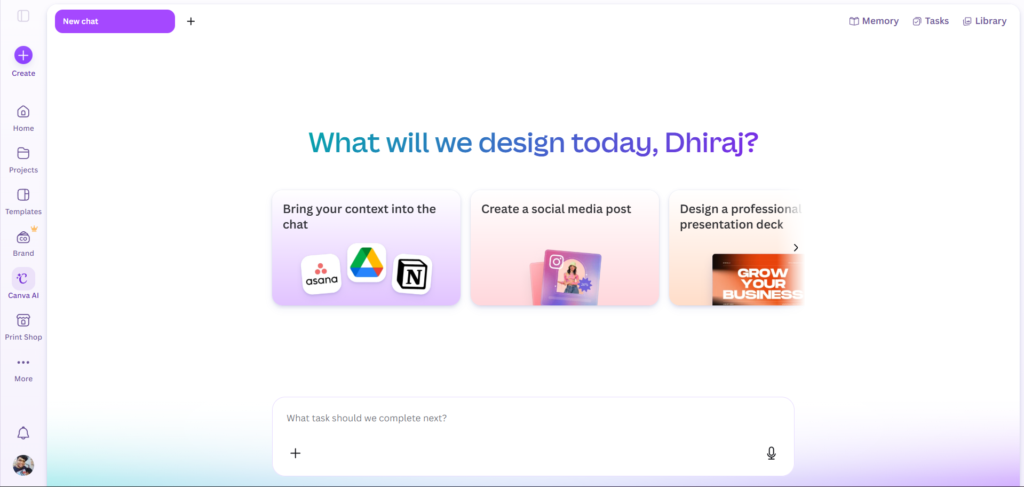
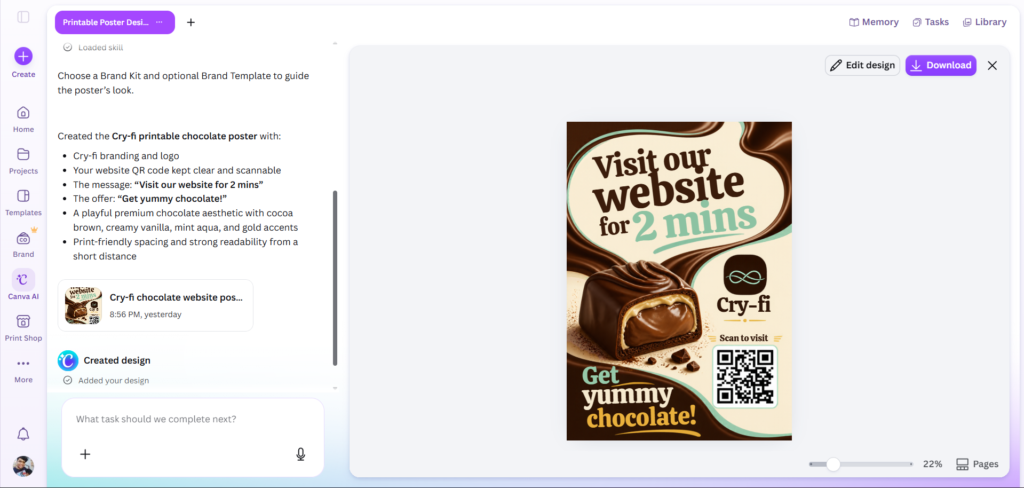
In the conversational flow, you describe a goal, such as a launch campaign for a coffee brand, and Canva AI generates layered, editable pages instead of a flat image. Canva describes four ideas behind it: conversational design, agentic orchestration, layered object intelligence, and a Memory Library that remembers your style and brand over time. You can keep refining in the same chat without starting over.
The layered part matters more than it sounds. Because the output is a normal Canva design, you can click any text box, image or shape and change it by hand. That makes the AI a fast first draft rather than a locked result.
The Magic Studio Tools Behind Canva AI
Magic Write drafts and rewrites text. Magic Media and Dream Lab generate images and short video clips from prompts. Magic Edit, Magic Eraser and Magic Expand change parts of a photo, and Magic Switch converts a design into another format or language. Our guide, Canva Magic Studio Packs 12 Powerful AI Tools, walks through each one.
How Canva AI Usage Is Counted?
Truth 3: your AI usage is metered, and the rules keep changing. Older guides quote 50 AI uses a month on Free and 500 on Pro. More recent breakdowns describe a tiered allowance split into Standard, Premium and Ultra uses, with Free reported at up to 200 Standard or 20 Premium uses a month.
When you run out, pricing trackers report that Canva slows you down with short pauses between generations rather than charging your card. That is gentler than a hard cutoff, but it can still stall a busy afternoon. Heavier tools such as the newest assistant are reported to draw down the allowance fastest.
Truth 4: team allowances do not pool. Flexprice reports that each Business seat holds its own balance, so twenty seats do not share one large pot. Canva sells an AI Pass add on, listed at $100 per person per month, for people who hit the ceiling often.
Truth 5: Canva AI 2.0 is still rolling out. It launched as a research preview on April 16, 2026, with access widening in stages afterward. Your account may already show the chat style assistant, or you may still be working in the classic editor with Magic Studio tools. For a closer look at what changes for designers, read Canva AI 2.0 Brings 5 Powerful Changes to Design.
Step-by-Step Guide to Using Canva AI
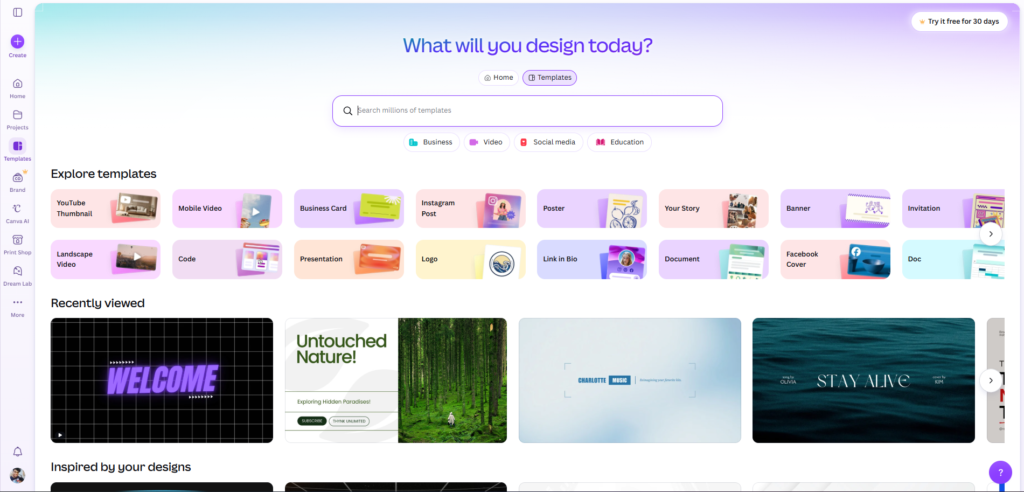
Here is a practical walkthrough for a first session. Menu names shift as Canva updates its editor, so treat the labels as a guide rather than a script. A longer beginner version lives in How to Use Canva AI in 2026 With 10 Real Steps.
Step 1: Create a Free Canva Account
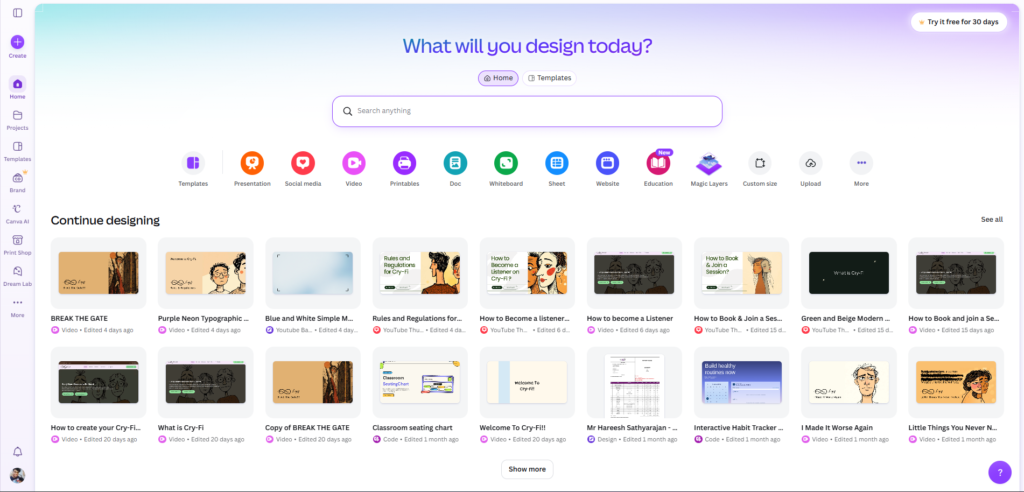
Go to canva.com and sign up with an email address, Google or Apple. A free account is enough to try the AI tools, and no card is needed. Spend a minute on the home screen before you start designing.
Step 2: Check What Your Plan Includes
Open the pricing page and compare Free, Pro and Business before you commit to anything. Look at the AI allowance listed for each plan, and note whether prices are shown for monthly or annual billing. Annual prices look lower because they assume a full year paid up front.
Step 3: Start a Design With a Prompt
From the home screen, look for the Canva AI prompt box or the Magic Design option and describe what you need in one or two sentences. Name the audience, the format and the tone. A request such as “Instagram carousel for a bakery announcing weekend hours, warm and friendly” gives the AI far more to work with than “make a post”.
Step 4: Edit the Result by Hand
Treat the first output as a draft. Swap fonts, adjust colors, replace stock photos and tighten the copy until it sounds like your brand. Because the layers stay editable, you can change one element without regenerating the whole design.
Step 5: Try a Single Magic Studio Tool
Pick one tool, such as Magic Write for a caption or Background Remover for a product photo, and run it on something you actually need. Real content shows you how Canva AI behaves better than a demo prompt does. Notice what you have to fix afterward, because that is the true time saving.
Step 6: Watch Your Usage Meter
Open your account area and look for an AI usage indicator, if your plan shows one. Note how many generations a typical project consumes. That number tells you whether Free is enough or whether Pro makes sense for your workload.
Step 7: Export and Check the Rules
Download your design as a PNG, PDF or MP4, or share a link. Before you use AI generated assets in commercial work, read Canva’s current terms for your plan, since the rules differ by asset type.
Key Benefits of Canva AI
The biggest benefit is speed from a blank page to a usable first draft. Describing a layout in a sentence and getting editable pages back removes the slowest part of most design jobs, which is deciding where to begin. Writers who need captions can get the same lift from Magic Write, though Canva Magic Write Has 5 Honest Truths for 2026 explains why those drafts still need an editor.
The second benefit is having everything in one place. Design, documents, spreadsheets, video and simple interactive pages all sit inside the same account, so you stop moving files between apps. Sheets AI and Magic Charts also turn raw numbers into clean visuals, which helps people who dread building a chart from scratch.
Brand consistency is the third. Canva’s Brand Kit stores logos, colors and fonts, and the newer assistant is built to use that brand information and a growing memory of your preferences. For a small team without a designer, that keeps posts looking like they came from the same business week after week.
The fourth benefit is a gentle learning curve. Millions of templates and stock assets mean a beginner can produce something respectable on day one without learning layers, grids or color theory. Many people never need more than that, which is exactly why Canva became the default design tool for non designers.
The fifth is fair value for light users. The free plan is permanent and includes a limited monthly AI allowance, and a paid plan only becomes worthwhile once you depend on premium assets, Brand Kits or heavier AI use. If you are weighing that step, Canva Free vs Pro Has 6 Real Differences lays out what the upgrade actually changes.
Truth 6: the output looks polished but often feels generic. AI generated layouts tend to follow safe, familiar patterns, so two businesses using the same prompt can end up with similar looking posts. Treat Canva AI as a speed tool, and spend your saved time adding the specific details that make a design feel like yours.
Canva AI vs Other AI Design Tools
Canva is not the only option, and the right pick depends on what you already pay for. This table compares Canva AI with four common alternatives on the points that matter most to buyers.
| Tool Name | Standout Feature | Design Quality | Lock-in Risk | Monthly Cost |
|---|---|---|---|---|
| Canva AI | Conversational design plus a huge template library | Strong for social posts, slides and documents | Moderate, editable layers stay inside Canva | Free, then $18 for Pro on monthly billing |
| Adobe Express | Firefly generative AI with Adobe Fonts and Stock | Strong, with more polished AI imagery | Moderate, tied to the Adobe ecosystem | Free, then $9.99 for Premium |
| Microsoft Designer | Free AI generated posts inside Microsoft’s tools | Good for quick social graphics | Low, simple exports | Free, more credits with Microsoft 365 Personal at $9.99 |
| Visme | Data visualization and presentation design | Strong for infographics and reports | Moderate, projects live in Visme | Free, then $29 for Starter |
| Figma | Precise interface design and team collaboration | Excellent, with a steeper learning curve | Moderate, files live in Figma | Free, then $16 per seat for Professional on monthly billing |
Prices reflect publicly listed US rates found in mid to late 2026 and change often, so confirm each figure on the vendor’s own page. The Adobe comparison is the one readers ask about most, and Canva AI vs Adobe Shows 7 Honest Differences covers it in depth.
Truth 7: Canva’s AI images trail dedicated generators. Magic Media and Dream Lab are handy for quick visuals inside a layout, but tools built only for image generation usually give you more control and sharper results. We put them head to head in Canva AI Image Generator Tested in 7 Real Ways.
Truth 8: your designs are easy to make and harder to leave. You can export to PNG, PDF and video, but the editable layers and brand setup stay inside Canva. The longer you build there, the more switching to another tool means rebuilding from exports.
Who Is Canva AI For?
Solo founders and small business owners who publish social content every week get the clearest payoff. They need consistent posts, flyers and promotions without paying a designer each time, and Canva AI shortens each job. Canva AI for Small Business Gives 6 Proven Wins shows how that plays out in practice.
Creators who ship videos on a schedule also benefit, especially for thumbnails, channel art and short promotional clips. The speed of templates plus AI edits suits people who would rather spend time on the video itself. Our walkthrough, Canva AI for YouTube Thumbnails Uses 8 Real Tricks, covers the thumbnail side.
Marketing teams, teachers and students fit well too, because shared templates and Brand Kits keep work consistent across many hands. Business seats cost more per person, so teams should count how many people truly need AI heavy access before buying for everyone.
Truth 9: Canva AI is not built for precision work. Professional designers who need exact control over typography, print production or complex vector illustration will find Canva limiting. Figma, Illustrator or the now free Affinity suite are better homes for that work.
FAQ
Is Canva AI free?
Partly. Canva has a permanent free plan that includes a limited monthly AI allowance, so you can try tools such as Magic Write and Background Remover without paying. Heavier use, the newest assistant and premium assets push you toward Pro. Reported allowances differ between sources and change over time, so check your own usage meter and the live pricing page for current limits.
How much does Canva AI cost in 2026?
Canva AI has no separate price because it is bundled into the plans. Pro was most recently listed at $18 a month on monthly billing, with annual billing lowering the effective monthly cost. Business was listed at $25 per person per month or $250 a year. Older sources still show $15 for Pro, so verify the current figures on canva.com before you buy.
What is the difference between Canva AI and Magic Studio?
Magic Studio is the set of individual AI tools that launched in 2023, such as Magic Write, Magic Media and Magic Edit. Canva AI is the broader umbrella, and it now includes Canva AI 2.0, the conversational assistant announced in April 2026. In everyday use the names overlap, so most people just mean the AI features inside the Canva editor.
Can I use Canva AI images commercially?
Canva’s terms generally let you use content you create with its tools in your own projects, including commercial ones, but the rules differ by asset type and plan. Stock elements carry their own license, and the law around ownership of AI generated images is still developing. Read Canva’s current AI product terms and content license before using generated images in client work, ads or anything you plan to sell at scale.
What happens when I run out of Canva AI credits?
Reports on Canva’s current system say you are slowed down with short pauses between generations rather than billed automatically. Allowances reset on your billing cycle, and on Business plans each seat has its own balance rather than a shared pool. If you hit the limit often, compare a higher plan or the AI Pass add on against simply spacing out your heavier requests.
Can Canva AI replace a graphic designer?
For routine work such as social posts, simple presentations and flyers, it can replace a lot of designer hours. It will not replace the strategic and creative judgment behind a brand identity, and its output can feel generic without human direction. Many small businesses use Canva AI for everyday content and hire a designer for logos, campaigns and anything that has to stand out.
Final Thoughts
Canva AI is genuinely useful for the job most people actually have, which is producing decent looking content quickly without design training. The honest caveats are the shifting usage limits, the climbing prices, and a polished but sometimes generic look. None of them make it a bad choice, but they are the reasons to test the free plan properly before paying.
The most important number is not the monthly price. It is how many AI generations your real workload consumes, because that decides whether Free, Pro or a team plan fits. Track a week of normal use and the right plan usually becomes obvious.
Open Canva on the free plan today, run one real project through its AI tools, and let your own usage tell you whether an upgrade is worth it.
External Links:
- https://canva.com/newsroom/news/canva-create-2026-ai
- https://www.creativebloq.com/design/design-software/canva-ai-2-0-can-create-an-entire-brand-campaign-from-a-text-prompt
- https://www.cmswire.com/digital-experience/canva-ai-20-adds-agentic-design-tools/
- https://flexprice.io/pricing-index/canva
- https://moda.app/blog/canva-pricing
- https://www.eesel.ai/en/blog/canva-ai-pricing
- https://www.firecrawl.dev/alexandria/alternatives/canva
- https://www.adobe.com/express/
- https://www.figma.com/pricing/
- https://www.visme.co/