Gemini Deep Research surprised me more than I expected. I spent two full weeks using it as my primary research tool for real work tasks, replacing Google searches, manual note-taking, and the usual tab-juggling routine most US professionals know too well. Here is exactly what happened, what worked, what did not, and whether it is worth your time in 2026.
Table of Contents
What Is Gemini Deep Research?
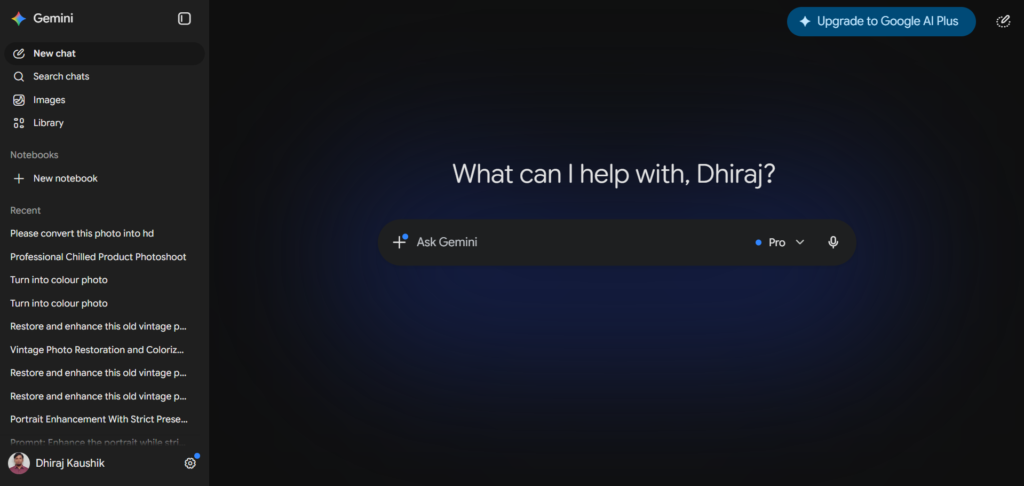
Gemini Deep Research is an autonomous research feature built into Google’s Gemini AI platform. Instead of answering a question in seconds like a normal chatbot, it takes your query, builds a multi-step research plan, searches across dozens of sources on the web, reads full articles and documents, and then delivers a structured report with cited sources. The whole process takes between 5 and 30 minutes depending on how complex your question is.
Google developed this as part of its push to make Gemini genuinely useful for knowledge work, not just quick Q and A. It sits inside the Gemini app at gemini.google.com and is available to both free and paid users, though with very different usage limits. Free users get 5 Deep Research runs per month. Google AI Pro subscribers at $19.99 per month get significantly more, and the feature integrates with Google Workspace for users who work inside Docs, Sheets, or Gmail daily.
What makes Gemini Deep Research different from a regular Gemini search is the depth. A standard Gemini response is fast and conversational. Deep Research is slow, methodical, and produces a document you can actually keep, share, and reference. Think of one as a conversation and the other as a research assistant handing you a completed brief.
The feature became meaningfully better in early 2026 when Google added the ability to review and edit the research plan before the tool starts working. That one change made a noticeable difference in output quality because you can redirect the focus before it goes down the wrong path.
How Gemini Deep Research Actually Works?
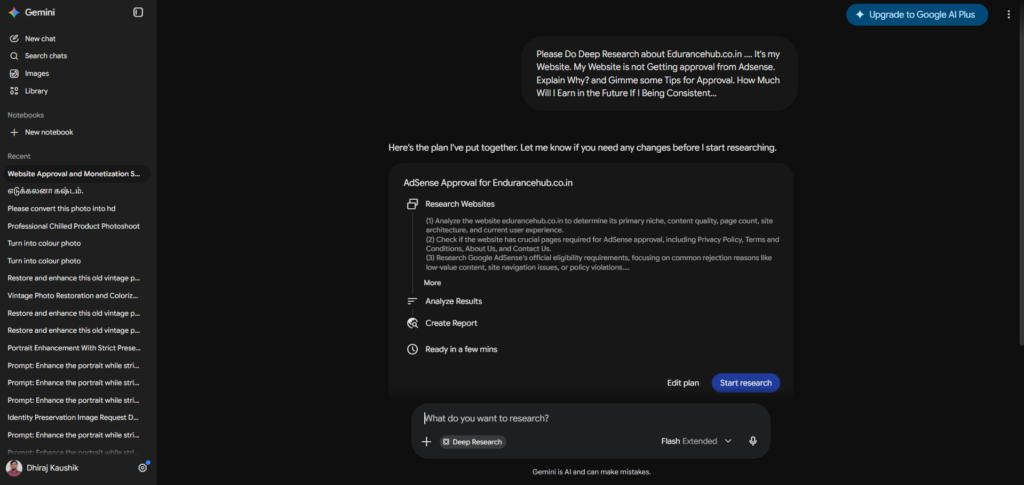
When you submit a query to Gemini Deep Research, the tool does not immediately start searching. It first generates a research plan, a structured list of subtopics and questions it intends to investigate. You see this plan before anything happens, and you can edit it. This is the most important part of the workflow and the part most new users skip entirely.
Once you approve the plan, Gemini begins browsing the web. It does not just skim headlines. It reads full articles, follows links within those articles to related sources, and cross-references findings across multiple pages. The model looks specifically for contradictions between sources and notes them in the final report rather than silently picking one version of the truth.
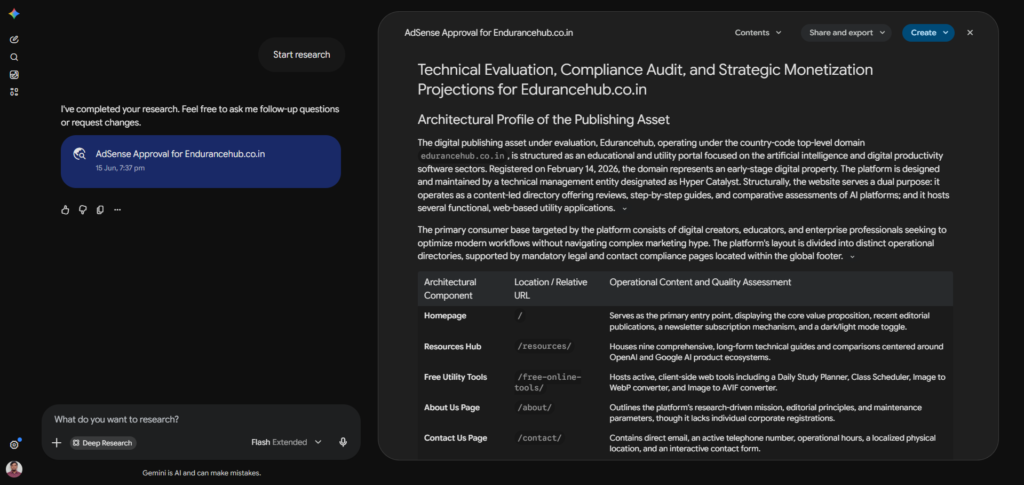
The synthesis stage is where the real value appears. Instead of dumping a list of links at you, Gemini Deep Research produces a structured document with section headings, summaries, and inline citations. Every claim links back to the specific source it came from. You can click through and verify anything in under a minute.
The output format matters for US professionals especially. The reports come out formatted like briefing documents, with an executive summary at the top and detailed sections below. They export cleanly to Google Docs, which means you can drop them straight into a team workflow without reformatting.
One thing I noticed during my two weeks of testing: the quality of the output is directly proportional to the quality of the research plan. Vague queries produce vague reports. Specific, scoped questions with clear output requirements produce documents that are genuinely useful. This is not a criticism of the tool. It is a skill you build after a few sessions.
Gemini Deep Research uses Google’s own search infrastructure as its backbone, which gives it a meaningful advantage over tools that rely on third-party search APIs. It also benefits from Google’s ability to index content that other tools cannot reach as easily, including recent news, academic preprints, and industry publications.
Step-by-Step: How to Use Gemini Deep Research?
Step 1: Open Gemini and Access Deep Research
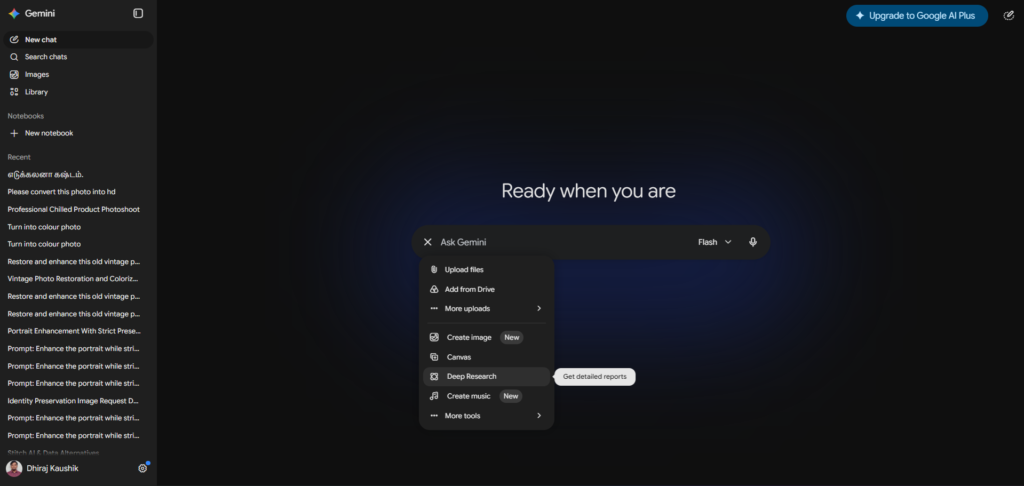
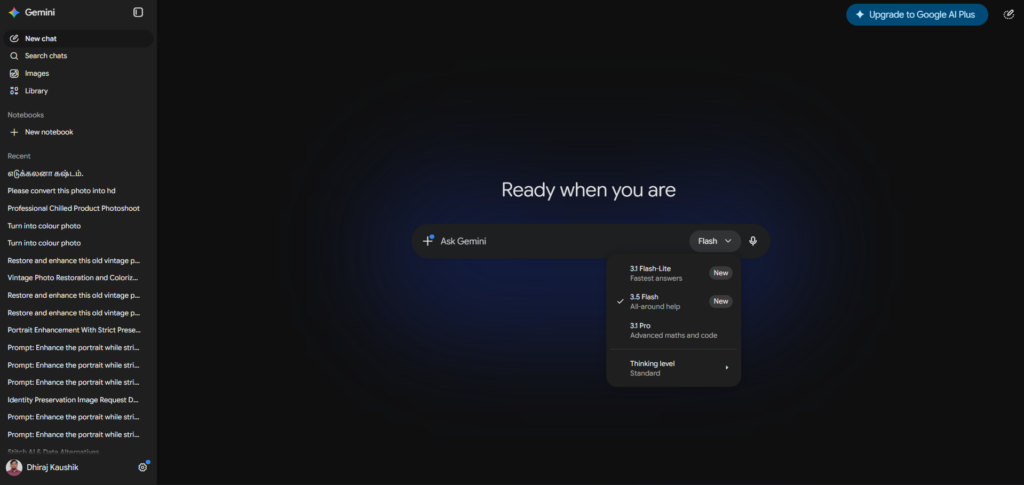
Go to gemini.google.com and sign in with your Google account. Look for the Deep Research option in the left sidebar or in the model switcher at the top of the interface. On mobile, it appears in the tool menu when you tap the Gemini icon. If you are on the free plan, you will see a counter showing how many of your 5 monthly runs remain. Click Deep Research to open the input screen.
Step 2: Write Your Research Query as a Brief, Not a Question
This is where most people go wrong. Do not type “tell me about AI tools for marketing.” That is too vague and produces a surface-level report. Instead, write something like: “Research the current landscape of AI image generation tools for US marketing professionals in 2026. Cover pricing in USD, key features, commercial licensing terms, and practical limitations for small agency workflows. Produce a structured report with a comparison table and specific plan recommendations.”
The more specific you are about scope, format, and intended audience, the better the output. Think of it like briefing a researcher, not asking a search engine.
Step 3: Review and Edit the Research Plan Before Approving
After you submit your query, Gemini Deep Research will generate a research plan before it starts searching. This plan lists the subtopics it intends to investigate and the types of sources it plans to prioritize. Read it carefully.
If the plan is missing something important, add it. If it is planning to cover something irrelevant to your actual question, remove it. This review step costs you two minutes and can dramatically improve the quality of your final report. Skipping it is the single biggest mistake I made in my first few sessions.
Step 4: Monitor Progress and Interrupt If Needed
Once you approve the plan, the research begins. You will see a progress panel showing which sources are being read, which subtopics have been completed, and an estimated time to completion. Most runs take between 10 and 25 minutes.
You can watch this in real time or close the tab and come back. Gemini sends a notification when the report is ready. If you check back during the process and notice it going in an irrelevant direction, you can interrupt and redirect without losing the work already completed.
Step 5: Review, Export, and Use the Report
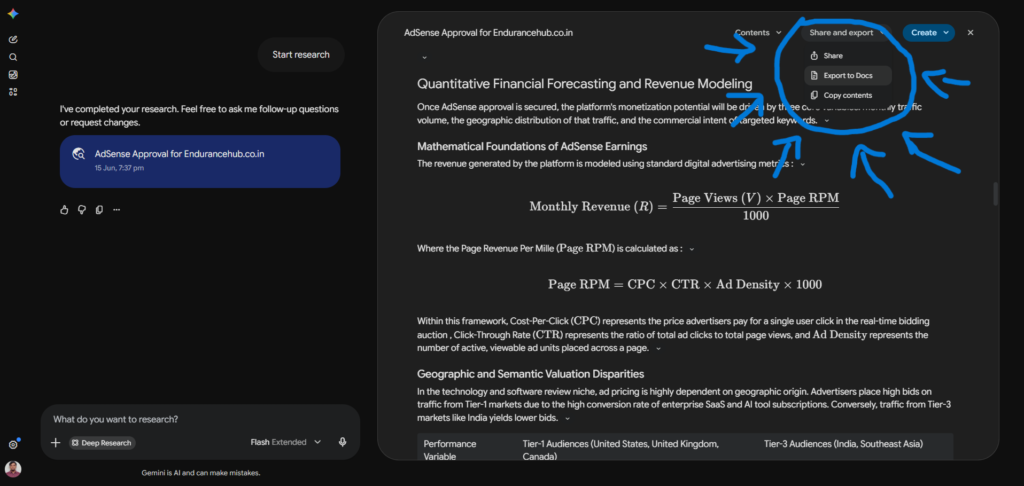
When the report is ready, read it critically before using it professionally. Check a few of the inline citations against the original sources to confirm accuracy. The citations are tools for verification, not guarantees of correctness. Export to Google Docs by clicking the export button in the top right of the report view. From Google Docs you can share it with a team, add your own analysis, or format it for a client presentation.
[SCREENSHOT: A completed Gemini Deep Research report showing the structured format with section headings, inline citations as numbered superscripts, and the Export to Google Docs button visible in the top right corner. Alt text: Completed Gemini Deep Research report with citations and Google Docs export option]
Key Benefits I Found After 2 Weeks of Daily Use
It genuinely replaces hours of manual research for the right tasks. The tasks where Gemini Deep Research saved me the most time were competitive analysis, market overviews, and topic briefings where I needed information from 15 or more sources synthesized into one document. Manually doing that kind of research takes two to four hours depending on the topic. Deep Research consistently produced a usable first draft in 15 to 25 minutes. That is not a small difference for a US professional billing by the hour or working under deadline pressure.
The Google Workspace integration is a genuine advantage. If you already work in Google Docs, Gmail, and Google Sheets daily, the export workflow feels natural rather than forced. Reports land in Docs with clean formatting and clickable citations. You can immediately share them with colleagues who are already in the same Google Workspace environment. I found this more frictionless than comparable tools that require copying text into a separate document editor.
The free tier is more generous than most US users realize. Five Deep Research runs per month sounds limited, but for professionals who use the tool strategically rather than casually, five high-quality research reports per month is meaningful. The key is treating each run like a valuable resource rather than using it on trivial questions. I found that planning my five free runs each month around my actual project needs produced far better results than using them impulsively.
Source citation makes verification fast. Unlike AI tools that produce confident summaries without telling you where the information came from, Gemini Deep Research cites every substantive claim inline. I could verify any specific statistic or fact in under 60 seconds by clicking the citation link. For US professionals who need to share research with clients or stakeholders, this citation trail is important for credibility. Presenting a cited report is a different level of professional output from sharing a paragraph of AI-generated text.
Gemini Deep Research vs Alternatives
| Tool | Standout Feature | Report Quality | Source Transparency | Monthly Cost |
|---|---|---|---|---|
| Gemini Deep Research | Google Search integration, Workspace export | Structured with citations | Full inline citations | Free (5 runs) / $19.99 (Pro) |
| ChatGPT Deep Research | Strong synthesis, SharePoint integration | Detailed, well-structured | Full inline citations | $20/mo (Plus, 10 runs) |
| Perplexity Deep Research | Fastest results, real-time data | Shorter, less structured | Source links provided | Free (limited) / $20/mo (Pro) |
| Claude Research Mode | Strong writing quality | Well-written narrative | Partial citations | $20/mo (Pro) |
| Manual Google Research | Full control over sources | As good as the researcher | You choose everything | Free |
The honest summary: Gemini Deep Research is the best choice for US professionals already inside the Google ecosystem. ChatGPT Deep Research edges it slightly on report depth and has better third-party app integration. Perplexity is faster but shallower. Manual research gives you full control but costs the most time. Check the Complete Guide on our Perplexity AI Deep Research & ChatGPT Deep Reseach
Who Should Actually Use Gemini Deep Research?
US freelancers and consultants who produce research-heavy deliverables. If you regularly produce market analyses, competitive briefs, or industry overviews for clients, Deep Research compresses the most time-consuming phase of your work significantly. The citation trail also means you can hand a client a report that cites sources, which reads as more credible than a document with no attribution. The Google AI Pro plan at $19.99 per month is justifiable within the first week of professional use for this audience.
Small business owners making informed purchasing or strategic decisions. Before committing to a vendor, a software platform, or a new business direction, running a Deep Research query on the topic produces a structured overview of the landscape in 20 minutes. For a solo business owner without a research department, this is genuinely useful. The free plan’s 5 monthly runs cover most decision-making research needs without any subscription cost.
Students and academic researchers at US universities. Google AI Pro is free for verified US students through June 30, 2026 at google.com/edu/gemini. That makes Deep Research available at no cost for the academic year. Building literature overviews, understanding the key arguments in a field, and producing annotated source lists are tasks Deep Research handles well for academic work. The verification standard still applies. Every cited claim should be checked against the original source before it appears in any submitted work.
Content professionals and bloggers covering complex topics. Researching a topic thoroughly before writing, understanding the current state of a debate, and finding verifiable statistics with sources are exactly the tasks Deep Research handles for content work. Treat the output as research infrastructure rather than copy you publish directly. For anyone writing about AI tools, technology, or business topics for a US audience, this is a legitimate research acceleration tool. For more on building an effective AI tools content workflow, see our complete Gemini review.
Frequently Asked Questions
How many times can I use Gemini Deep Research for free?
Free Gemini users get 5 Deep Research runs per month. These reset at the start of each billing cycle. Once you use all five, the Deep Research option becomes unavailable until the next monthly reset. Google AI Pro subscribers at $19.99 per month get significantly more runs with no hard cap on daily use. If you are evaluating whether the feature is worth upgrading for, using your 5 free runs on your most important research tasks each month first is the right approach before committing to a paid plan.
How long does a Gemini Deep Research report take?
Most Gemini Deep Research reports take between 10 and 25 minutes to complete, depending on the complexity of the query and the number of sources being synthesized. Simple, well-scoped queries on topics with clear publicly available information tend to complete faster. Broad, multi-angle research questions covering many sources can take up to 30 minutes. You do not need to keep the tab open during this time. Gemini sends a notification when the report is ready, and you can return to it when convenient.
Is Gemini Deep Research better than ChatGPT Deep Research?
Both tools produce strong research reports, and the honest answer is that the best choice depends on your workflow rather than absolute quality. Gemini Deep Research is the better option if you work inside Google Workspace daily, since reports export cleanly to Google Docs and integrate naturally with Gmail and Sheets. ChatGPT Deep Research has stronger third-party app integration including SharePoint, OneDrive, and Dropbox, which makes it more useful for teams not on Google Workspace. On raw report quality, independent testing shows both tools perform comparably on most general research tasks, with slight variations depending on the specific topic and source availability.
Can Gemini Deep Research access paywalled content?
No. Gemini Deep Research can only read freely accessible web content. Academic papers behind paywalls, premium publications requiring subscriptions, and private databases are beyond its reach. For research requiring access to paywalled academic literature, the tool will find and summarize freely available abstracts, preprints, and open-access versions where they exist, but cannot access full paywalled articles. If your research regularly requires paywalled academic sources, you will need to supplement Deep Research output with manual library access or a service like Semantic Scholar for open-access academic content.
Does Gemini Deep Research work with Google Docs and Gmail?
Yes. Completed Deep Research reports can be exported directly to Google Docs with one click using the export button in the report view. From Google Docs, you can share the report with collaborators, add your own analysis, or format it for client delivery. The integration with Gmail is more limited at the standard level, though Google AI Pro users with full Workspace integration can use Gemini features within Gmail for related tasks like drafting emails based on research findings. For deep Workspace integration including Docs, Sheets, and Gmail together, the Google AI Pro plan at $19.99 per month is required.
Should I trust Gemini Deep Research reports without checking sources?
No, and this applies to every AI research tool available in 2026, not just Gemini. Deep Research includes inline citations for every substantive claim, which makes verification fast, but the citations do not guarantee accuracy. The tool synthesizes what it reads, and occasional misreadings of source context do occur. For any claim that will appear in a client deliverable, a published article, or inform a business decision, spend two minutes checking the citation against the original source. The citations are provided specifically to make this verification straightforward. Treating the report as a verified final product without checking sources is the most common misuse of the feature.
Final Thoughts
Two weeks of daily use confirmed what I suspected going in. Gemini Deep Research is genuinely useful for the specific tasks it is designed for, specifically multi-source research synthesis that would otherwise take hours manually. It is not a replacement for critical thinking or human judgement on the output. It is a research acceleration tool that produces a strong starting point rather than a finished deliverable.
For US professionals who already live inside Google Workspace, the integration advantage makes it the natural choice over alternatives. For everyone else, it is worth using the free plan’s 5 monthly runs to evaluate whether the workflow fits your actual needs before upgrading.
Start at gemini.google.com, click Deep Research, and run your first query on a topic you genuinely need to understand. That first session will tell you more about whether it earns a place in your workflow than any review can. For a full look at everything Gemini offers beyond Deep Research, our complete Gemini review covers every feature and plan in one place. You can also compare how this stacks up in our Gemini vs ChatGPT breakdown if you are trying to decide between the two platforms.
External resources: Gemini Deep Research official page | Google AI Pro pricing | Google AI for Students | Gemini pricing guide 2026 | Gemini vs ChatGPT honest comparison
Useful Backlinks
| # | Specific Article / Page | URL |
|---|---|---|
| 1 | “Deep Research in Gemini — Official Google Help” | support.google.com/gemini/answer/14579112 |
| 2 | “Gemini Pricing Guide 2026: Free, Google AI Pro and Ultra Plans” — Zenken AI | ai.zenken.co.jp/en/post/gemini-pricing-guide/ |
| 3 | “Gemini vs ChatGPT: Honest Comparison After Daily Use” — Dupple | dupple.com/learn/gemini-vs-chatgpt |
| 4 | “I Tried ChatGPT and Google Gemini Deep Research” — LivePlan | liveplan.com/blog/planning/deep-research-chatgpt-vs-gemini |
| 5 | “Gemini Pricing 2026: Complete Breakdown of Every Plan” — AIToolPick | aitoolpick.org/blog/gemini-pricing-2026/ |
| 6 | “What Is Gemini Deep Research and How to Use It” — Coursera | coursera.org/articles/gemini-deep-research |
| 7 | “Gemini Deep Research vs Perplexity: Which AI Research Tool Wins?” — TechRadar | techradar.com/features/gemini-deep-research-vs-perplexity |
| 8 | “Google AI Pro Review: Is Gemini Advanced Worth $19.99?” — AIonX | aionx.co/gemini-advanced-reviews/gemini-advanced-features-list-complete-guide/ |
| 9 | “Gemini Deep Research: A Practical Guide for Professionals” — Gend.co | gend.co/blog/gemini-deep-research |
| 10 | “ChatGPT vs Gemini Deep Research: 9 Tests, One Clear Winner” — Tech-Insider | tech-insider.org/chatgpt-vs-gemini-2026/ |