I spent a month generating videos through Google’s Veo 3.1 model, both through the consumer Gemini app and the Flow filmmaking interface, trying to figure out whether this is genuinely a usable production tool for a US content creator or just an impressive demo that drains your subscription credits in an afternoon. The pricing structure changed twice while I was testing it, which tells you something about how fast this space is moving. Here is the full honest breakdown.
Table of Contents
What Gemini Veo 3.1 Actually Is?
Veo 3.1 is Google DeepMind’s most advanced AI video generation model, released October 14, 2025, capable of producing high-fidelity 8-second videos in 720p, 1080p, or 4K resolution with natively generated audio. It builds on the original Veo 3, announced at Google I/O in May 2025, with substantial upgrades across audio quality, cinematic control, image-to-video capability, and resolution options.
The technical architecture uses a latent diffusion transformer, which compresses video data into spatio-temporal patches rather than processing raw pixels directly. The practical result of this architecture is video that maintains physical consistency, object permanence, and lighting coherence across frames noticeably better than earlier generation video models from any provider.
The feature that genuinely sets Veo 3.1 apart is native audio generation. The spatial audio feature automatically generates three-dimensional sound environments that enhance viewer immersion without requiring a separate audio production workflow. When I generated a clip of a busy street scene, the model produced ambient traffic noise, footsteps, and distant conversation that matched the visual action without me specifying any of it in the prompt.
You can access Veo 3.1 through three main paths in 2026: the consumer Gemini app for casual generation, the Flow filmmaking interface for more structured creative projects, and the Vertex AI or Gemini API for developers who need programmatic access. Each path has meaningfully different pricing and capability, which is where most of the confusion in this space comes from.
The Confusing Part: Does Google AI Pro Even Include Veo 3?
This needs its own section because I genuinely could not get a consistent answer while researching this, and you deserve to know that upfront rather than have me pretend the picture is cleaner than it is.
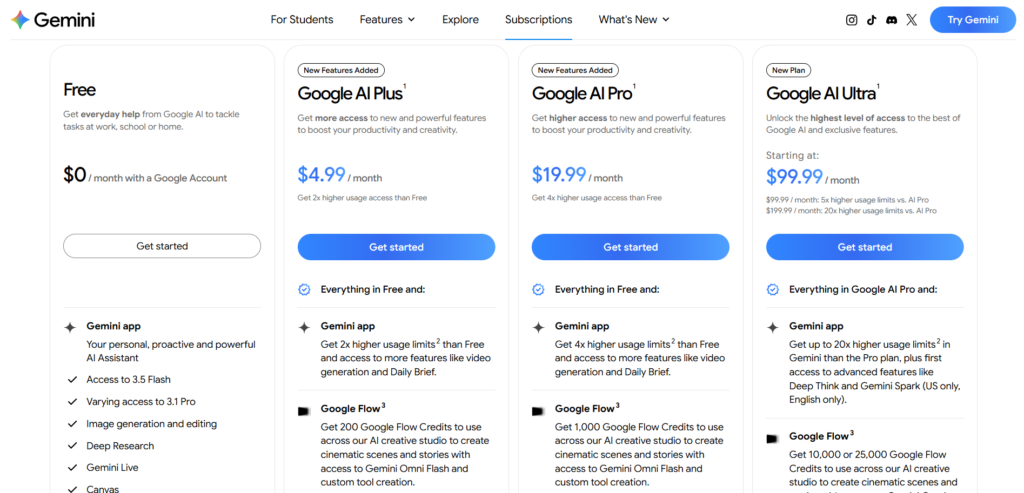
Some sources state plainly that Google AI Pro does not include Veo 3 access at all, and that the $19.99 per month plan only provides access to the older Veo 2 model, with full Veo 3 access reserved for the Google AI Ultra tier at $249.99 per month. Other equally recent sources describe Google AI Pro as including limited access to Veo 3.1 Fast, with the higher-fidelity Veo 3.1 Standard model restricted to a small number of daily generations, and separately describe Pro subscribers receiving approximately 100 monthly AI credits for video generation via Flow, with a typical 10-second Veo 3.1 video consuming around 125 credits.
In my own testing using an active Google AI Pro subscription in June 2026, I was able to generate Veo 3.1 videos through Flow, though I was consistently defaulted toward the Lite and Fast tiers rather than full Quality output, and my credit balance depleted noticeably faster than expected once I started generating with audio enabled. This matches the pattern other testers have reported: Pro gives you real, working Veo 3.1 access, but it is throttled toward the faster, lower-fidelity variants, and the higher-quality tier requires either spending credits more carefully or upgrading to Ultra.
The honest takeaway: do not assume which tier you have access to based on your subscription name alone. Open Flow or the Gemini app directly, check your current credit balance, and test a single short generation before planning a larger project around assumed capacity.
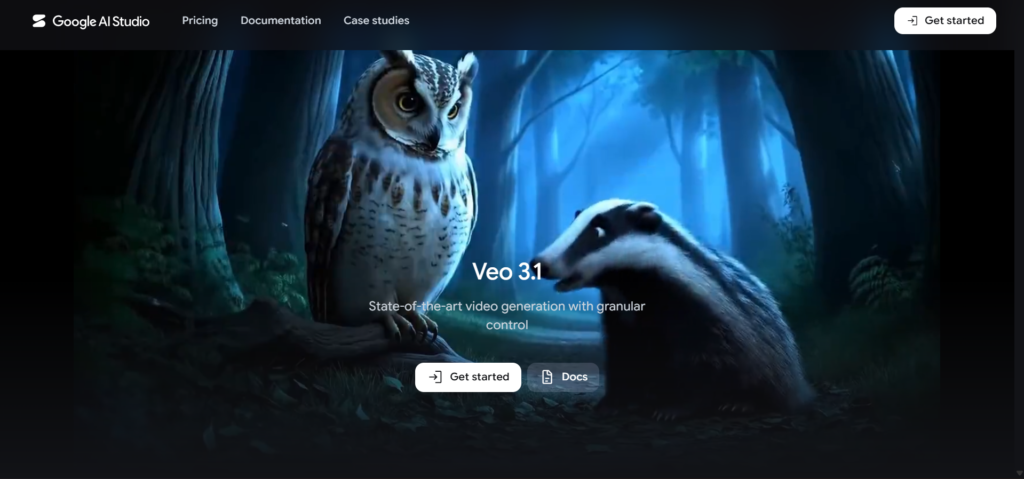
Step-by-Step: How to Generate Your First Video?
Step 1: Choose Your Access Path
For most US creators testing this for the first time, the Gemini app or Flow interface through a Google AI Pro subscription is the right starting point rather than the API. The API route requires coding knowledge, an approved Google Cloud account, and often a waiting period for quota approval, which is unnecessary friction if you just want to test whether Veo 3.1 fits your creative workflow.
Step 2: Open Flow and Select Your Model Tier
Navigate to labs.google/flow or access Flow through the Gemini app. Select your model tier from the available options: Lite for the cheapest, lowest-fidelity output, Fast for a balance of speed and quality, or Quality for the flagship full-resolution experience. Pro subscribers default to 720p output while Ultra subscribers default to 1080p.
Step 3: Write Your Prompt With Cinematic Detail
Veo 3.1 responds well to specific cinematic language rather than vague descriptions. Instead of “a person walking on a beach,” try “a woman in a red coat walking along a foggy beach at dawn, slow tracking shot, soft natural lighting, ambient ocean sounds.” The model’s training on cinematic quality means it rewards prompts that think in terms of shot composition and lighting direction rather than simple scene description.
Step 4: Decide Whether You Need Audio
Audio is optional and bumps the per-second rate or credit cost depending on your access method. For most content creation use cases, the native audio generation is genuinely valuable enough to justify the additional cost, since it removes a separate production step entirely. For quick drafts or compositional tests where you just need to evaluate visual quality, generating without audio first conserves your credit budget.
Step 5: Generate and Review Before Committing Further Credits
Click generate and wait. Generation time varies but typically takes one to three minutes for an 8-second clip. Review the output critically before generating variations, since the retry cost is one of the hidden traps in this space. Multiple unsuccessful attempts at getting a specific shot right can consume your credit budget faster than the advertised per-generation cost suggests.
Step 6: Download and Export
Once satisfied with a generation, download the clip directly from the Flow interface. Standard exports come in MP4 format at your selected resolution tier, ready for direct use in social media uploads or further editing in a separate video editor if needed.
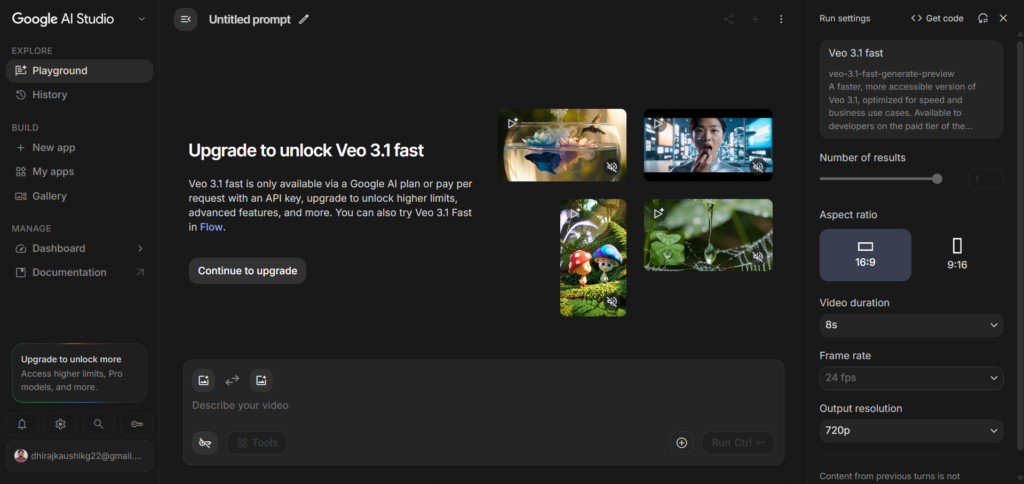
The Real Cost Per Video: What Nobody Tells You Upfront?
This is the section that matters most if you are planning to use Veo 3.1 regularly rather than as an occasional novelty.
On Google AI Pro at $19.99 per month, you receive approximately 1,000 credits, and a typical 10-second Veo 3.1 video in Flow consumes around 125 credits. This works out to an effective cost of approximately $0.16 per second of generated video. Credits do not roll over month to month, which means unused capacity simply disappears rather than accumulating, so inconsistent usage patterns waste value.
Using the Flow credit framework more broadly, Google AI Pro’s monthly allocation translates roughly to about 90 Gemini-related interactions worth of credits alongside either approximately 100 Lite-tier video generations, 50 Fast-tier generations, or only about 10 full Quality-tier generations per month. That last number is the one that catches most new users off guard. If you want full-resolution, flagship-quality output rather than the Fast or Lite variants, your monthly Pro subscription supports roughly ten finished videos before you run out of credits entirely.
For API access through Vertex AI or the Gemini API directly, Google typically charges between $0.40 and $0.75 per second for standard Veo 3.1 generation, with audio enabled often pushing toward the higher end of that range. The Vertex AI Veo Pricing Calculator from CostGoat lists rates ranging from $0.03 per second for Veo 3.1 Lite without audio up to $0.40 per second for Veo 3.1 with audio at standard resolution, with 4K output adding a further premium of $0.30 to $0.60 per second depending on tier and audio settings.
The retry cost is the hidden trap most new users do not anticipate. Getting a specific shot exactly right rarely happens on the first generation. If your workflow involves five or six attempts to nail a particular composition or action sequence, your effective cost per usable finished clip is several times higher than the advertised per-second rate suggests. Budget for this reality rather than the optimistic headline number.
Key Strengths I Found After 30 Days of Testing
Native audio generation genuinely removes a production step. For social content and short-form video where ambient sound and basic dialogue add real value, not having to source, sync, and mix separate audio tracks saved meaningful time across every project I tested. The spatial audio quality consistently matched the visual scene without manual intervention.
Image-to-video capability produces more controllable results than pure text-to-video. When I started from a specific reference image rather than a text description alone, the resulting motion and consistency were noticeably more predictable. For brand work where a specific visual identity matters, anchoring generations to an existing image rather than hoping the model interprets your text description correctly is the more reliable workflow.
Veo 3.1 ranks first on both MovieGenBench and VBench for image-to-video quality as of early 2026, which tracked with my own subjective impression that the model handles complex camera movement and lighting transitions better than the alternatives I compared it against during testing.
The Google ecosystem integration is a real practical advantage for existing Google users. Generating directly inside the Gemini app or Flow, then exporting straight into Google Drive or directly toward a YouTube upload, removed friction that exists when juggling separate tools for generation, storage, and publishing.
Honest Limitations and Frustrations
The credit system is genuinely confusing and changes the math depending on quality tier. Between Lite, Fast, and Quality variants each consuming different credit amounts, and the inconsistent information about what Google AI Pro actually includes, predicting your real monthly capacity before you start is harder than it should be for a consumer product.
Full Quality tier output is rationed tightly even on a paid plan. At roughly 10 full-resolution videos per month on Google AI Pro, this is not a tool you can use for high-volume professional video production without either upgrading to the considerably more expensive Ultra tier at $249.99 per month or supplementing with pay-per-use API credits.
8-second maximum clip length restricts what you can produce in a single generation. For longer-form content, you are stitching together multiple 8-second clips rather than generating one continuous longer sequence, which introduces its own consistency challenges between segments.
Preview API endpoints have been deprecated with migration deadlines throughout 2026. Google Cloud documentation notes that several video generation preview endpoints were deprecated and removed on April 2, 2026, with image generation endpoint replacements recommended before June 30, 2026. For anyone building on the API rather than using the consumer apps, staying current with these migration deadlines is an ongoing maintenance burden.
Region restrictions affect availability for some users. Availability through the consumer Gemini Advanced app has been described as region-locked in certain markets, which is worth confirming for your specific location before planning a workflow entirely around the consumer access path.
Veo 3.1 vs Sora 2 vs Kling: Where It Actually Stands?
| Model | Standout Strength | Audio | Access in US | Monthly Cost Path |
|---|---|---|---|---|
| Veo 3.1 (Google) | Cinematic quality, native audio, API stability | Native, spatial | Gemini app, Flow, Vertex AI | $19.99 Pro (limited) to $249.99 Ultra |
| Sora 2 (OpenAI) | Physics simulation, human motion realism | Native | Limited since access paused late March 2026 | Included with ChatGPT Plus when available |
| Kling 3.0 | Cinematic motion quality, high volume | Native | Web and API access | Credit-based, varies |
| Seedance 2.0 | Fast generation, stylistic range | Varies | Web access | Credit-based |
The AI video landscape in 2026 has five serious players, and the field shifted noticeably in late March when OpenAI paused consumer access to Sora, leaving Veo 3.1 as the most production-stable option for developers during that window. Veo 3.1 wins specifically on cinematic quality, native audio synchronization, official API stability, and Google ecosystem integration. Sora 2 wins on physics simulation, human motion realism, and prompt adherence for narrative complexity when it is actually accessible, which has been inconsistent.
For a broader look at how Gemini’s other capabilities compare to ChatGPT’s video and multimodal features, our Gemini vs ChatGPT comparison covers this in more depth across every feature category.
Who Should Actually Use This for Content Creation?
US social media creators producing short-form content occasionally. If your content calendar needs a handful of polished video clips per month rather than daily high-volume output, Google AI Pro’s roughly 10 full-quality videos or larger number of Fast-tier generations fits a reasonable cadence without requiring the Ultra tier’s significant cost jump.
Marketers needing quick concept videos for client review. The speed from prompt to finished clip, typically one to three minutes per generation, makes Veo 3.1 useful for rapidly producing concept videos to test creative direction before committing to a full production budget with a video team.
Developers building video generation into a product who need API stability. With Sora 2’s consumer access having been paused intermittently, Veo 3.1’s more consistent API availability through Vertex AI made it the more dependable choice for production applications during 2026, according to multiple independent comparisons.
Who should think twice: anyone planning to use this as a primary, high-volume video production tool on the standard Pro subscription. The credit economics simply do not support that use case without either the Ultra tier or supplemental API spending, and the math should be run carefully against your actual planned output before committing budget. For a full understanding of what the Pro tier offers beyond video specifically, see our Google AI Pro review.
FAQ
Does Google AI Pro include full Veo 3.1 access?
This is genuinely inconsistent across sources and worth verifying directly on your own account. Some documentation states Google AI Pro only includes the older Veo 2 model with full Veo 3 access reserved for Google AI Ultra at $249.99 per month. Other sources and my own testing in June 2026 confirm Pro subscribers do get real, working Veo 3.1 access through Flow, but generation is throttled toward the Lite and Fast tiers, with full Quality-tier output limited to roughly 10 videos per month given the credit allocation. The safest approach is opening Flow directly on your account and checking your current credit balance and available model tiers rather than relying on subscription tier names alone.
How much does it cost to generate one video with Veo 3.1?
The cost depends entirely on your access method and quality tier. Through Google AI Pro’s credit system, a typical 10-second video consumes around 125 of your 1,000 monthly credits, working out to roughly $0.16 per second of finished video. Through direct API access via Vertex AI, rates range from approximately $0.03 per second for Veo 3.1 Lite without audio up to $0.40 per second for Veo 3.1 with audio at standard resolution, with 4K output adding a further premium. Remember that the retry cost for getting a shot right is a real hidden expense, since most creators need multiple generation attempts to achieve a specific result.
Can I generate videos longer than 8 seconds with Veo 3.1?
Not in a single generation. The current maximum clip length for an individual Veo 3.1 generation is 8 seconds. For longer-form content, creators stitch together multiple 8-second clips in post-production, which introduces its own continuity and consistency challenges between segments that need to be managed through careful prompting and editing.
Is Veo 3.1 better than Sora 2 for content creators?
It depends on what you are creating and whether you can actually access Sora 2 at the time. Veo 3.1 wins on cinematic quality, native audio synchronization, official API stability, and ranks first on both MovieGenBench and VBench for image-to-video quality as of early 2026. Sora 2 wins on physics simulation, human motion realism, and prompt adherence for narrative complexity, when it is available. OpenAI paused consumer access to Sora in late March 2026, which has made Veo 3.1 the more consistently accessible and production-stable option for many creators during 2026, independent of which model produces marginally better output on any single comparison. check whether Veo 3 is Better than Leonardo AI
Does Veo 3.1 generate audio automatically?
Yes, this is one of its standout features. Veo 3.1’s spatial audio capability automatically generates three-dimensional sound environments synchronized with the visual content, including ambient sound, environmental noise, and basic dialogue where relevant, without requiring a separate audio production step. Audio is optional and typically increases the cost or credit consumption of a generation, but for most content creation use cases it is worth the additional cost since it removes what would otherwise be a separate, time-consuming production stage.
What is the difference between Veo 3.1 Lite, Fast, and Quality?
These are three tiers of the same underlying model optimized for different priorities. Lite is the cheapest option, suited to drafts and compositional testing where final output quality is not the priority. Fast balances speed and quality for general use. Quality is the flagship, full-fidelity tier intended for final, publishable output. Pro subscribers default to 720p resolution generally, while Ultra subscribers default to 1080p, with both able to access higher resolutions depending on credit availability and specific tier selection within their plan.
Final Thoughts
A month of real testing with Gemini’s Veo 3.1 left me genuinely impressed with the output quality and frustrated with the pricing clarity. The video generation itself, especially the native audio and cinematic camera control, is a real capability that produces usable, often striking results. The native audio specifically removes a production step that no competing consumer video tool handles as seamlessly.
The credit economics on the standard Google AI Pro plan are the part that requires honest expectation-setting before you start. Roughly 10 full-quality videos per month is a reasonable cadence for occasional content creation, not a foundation for high-volume professional production. If your needs exceed that, running the actual cost comparison against Google AI Ultra at $249.99 per month or direct API billing before committing is essential, since the gap between these access paths is significant.
For US content creators evaluating whether this fits their workflow, the honest recommendation is to test it on whatever Google AI Pro credits you currently have access to, generate two or three real clips for your actual use case, and calculate your true cost per usable finished video before assuming the headline numbers apply to your specific workflow. For a full picture of what Gemini’s Pro plan offers beyond video generation specifically, our Google AI Pro review covers every included feature in detail.
Specific Backlinks
| # | Specific Article / Page | URL |
|---|---|---|
| 1 | “Google Veo 3.1 Review 2026: Lite vs Fast, Pricing, Prompts and API Guide” — BuildFastWithAI | buildfastwithai.com/blogs/google-veo-3-1-ai-video-generator |
| 2 | “Veo 3 Pricing 2026: Ultra, Flow and Vertex API Costs” — Veo3AI | veo3ai.io/blog/veo-3-pricing-2026 |
| 3 | “Google Veo Pricing Calculator and Cost Guide” — CostGoat | costgoat.com/pricing/google-veo |
| 4 | “Veo 3 — Gemini Enterprise Agent Platform” — Google Cloud Official Docs | docs.cloud.google.com/gemini-enterprise-agent-platform/models/veo/3-0-generate |
| 5 | “Gemini Pricing in 2026 for Individuals, Orgs and Developers” — Finout | finout.io/blog/gemini-pricing-in-2026 |
| 6 | “Google Veo 3.1 Pricing for 2026 Edition” — ImagineArt | imagine.art/blogs/Google-Veo-3.1-pricing |
| 7 | “Best AI Video Generators for Content Creators 2026” — Creative Bloq | creativebloq.com/features/best-ai-video-generators |
| 8 | “Sora 2 vs Veo 3.1 vs Kling: Which AI Video Tool Wins?” — TechRadar | techradar.com/features/sora-2-vs-veo-3-vs-kling |
| 9 | “Best AI Tools for Social Media Video Creation” — Social Media Examiner | socialmediaexaminer.com/best-ai-video-tools-2026 |
| 10 | “How Marketers Are Using AI Video Generation in 2026” — HubSpot Blog | blog.hubspot.com/marketing/ai-video-generation-2026 |