The Suno AI free plan is the easiest way to start making AI generated music without paying a cent, but most beginners in the US do not realize how limited it actually is. This article breaks down exactly what you get, what you do not get, and when it makes sense to upgrade. If you are trying to decide whether the free tier fits your goals, the details below will save you time and a few frustrated attempts.
Table of Contents
What Is the Suno AI Free Plan?
Suno is an AI music generator that turns text prompts or written lyrics into full songs, complete with vocals, instrumentation, and mixing. The company built its reputation by making music creation accessible to people with zero production background. You type a style, a mood, or a full set of lyrics, and Suno renders a finished track in under a minute.
The Suno AI free plan is the no cost entry point into that system. It costs $0 a month and requires nothing more than an email or Google account to activate. Anyone in the US can sign up at suno.com and start generating immediately, with no credit card required.
What makes Suno different from older AI music tools like Amper or early Jukebox experiments is the vocal quality. Suno generates full sung lyrics with believable phrasing, not just instrumental loops. That single feature is why it grew so quickly among podcasters, hobbyist songwriters, and content creators who needed background music fast.
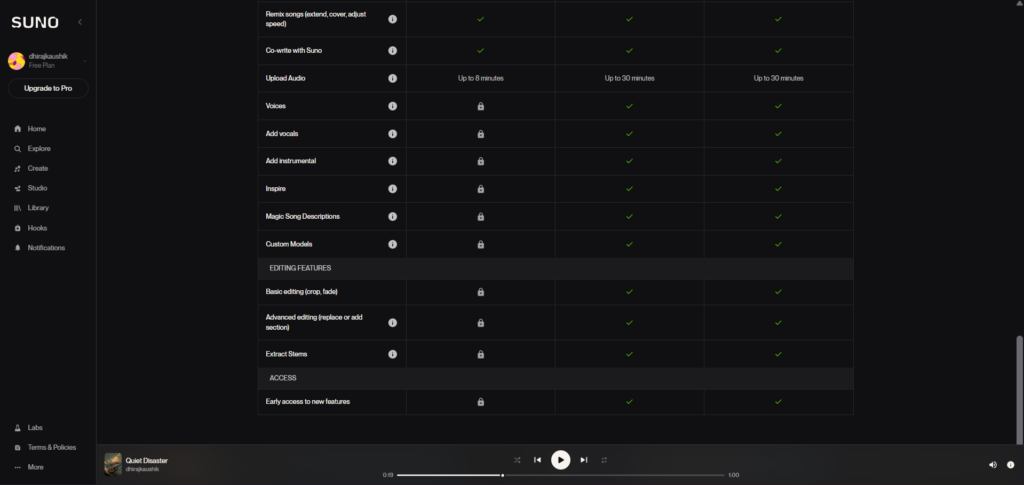
The free plan gives you access to Suno’s core generation models, which is a meaningful decision on Suno’s part. Many competitors gate their best models entirely behind a paywall. Suno lets free users hear what the technology can actually do before asking them to pay, which builds trust even if the daily output is capped.
That said, the Suno AI free plan was never designed for serious or commercial work. It exists to let people test prompts, learn how the system responds to different genres, and decide if they want to commit to a paid tier. Understanding that intent matters, because a lot of confusion online comes from people expecting free tier output to behave like a paid subscription.
Suno has also been shifting its business model through 2026 following a licensing partnership with Warner Music Group, announced after a copyright settlement between the two companies. That deal signals Suno moving toward officially licensed training data, which affects how free tier and paid tier rights are framed going forward. It is worth knowing this context before you start generating tracks you might want to publish later.
How the Suno AI Free Plan Works?
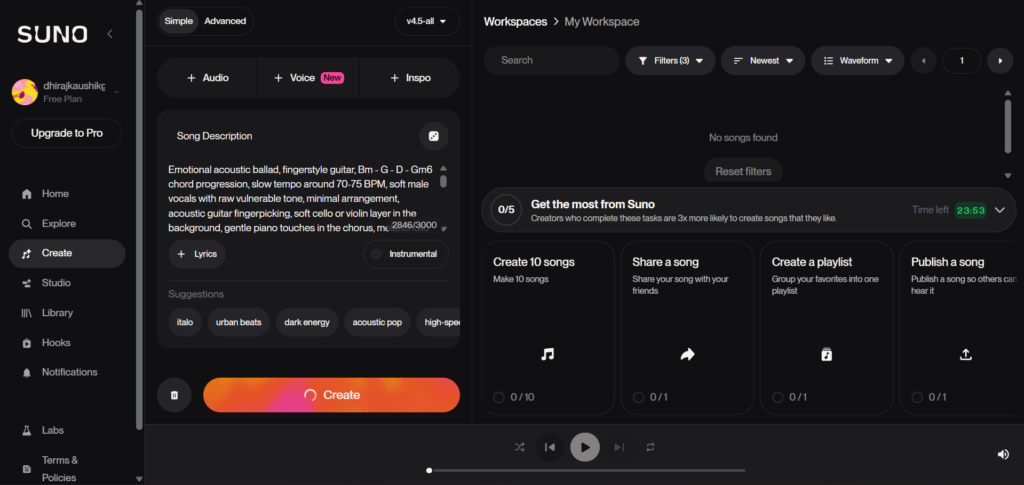
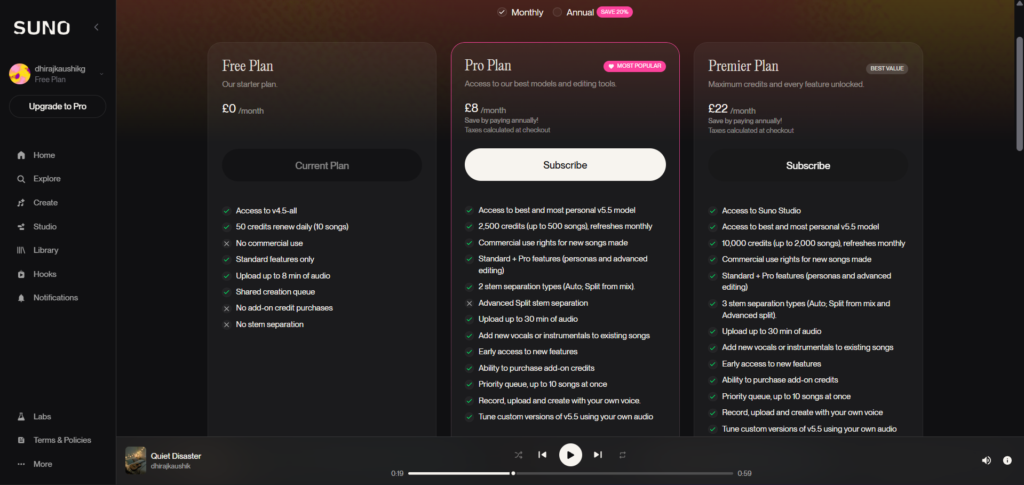
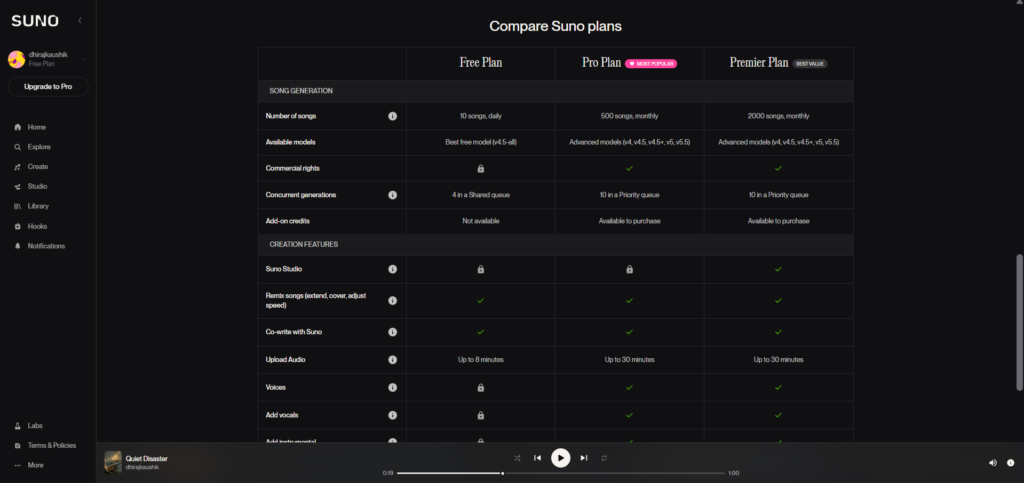
Suno runs on a credit system, and understanding credits is the fastest way to actually get value out of the Suno AI free plan. Every action you take, from generating a new song to extending an existing one, spends a set number of credits. Free accounts receive 50 credits every day, and those credits reset daily rather than accumulating.
A single full song generation typically costs around 5 credits, though the exact cost can shift depending on song length and which features you use. Doing the math, that puts free users at roughly 10 songs per day before running out. Once your daily credits are gone, you either wait for the next reset or upgrade to a paid plan.
Unlike Pro and Premier subscribers, free plan users cannot buy extra credits when they run out. There is no top up option on the free tier, which is one of the more restrictive parts of how the Suno AI free plan works compared to competitors that let anyone pay per generation. If you burn through your 50 credits by noon, you are done until the next day.
Free accounts are also placed in a shared generation queue, so during peak US hours, like evenings on the East Coast, your songs may take noticeably longer to render. Paid users get priority processing, which is one of the quieter reasons people upgrade even before they hit credit limits.
The other mechanism worth understanding is licensing. Songs made on the Suno AI free plan are restricted to personal, non-commercial use. Suno’s terms of service are specific about this, and paid subscriptions do not retroactively unlock commercial rights for songs you already made while on the free tier. If you plan to monetize anything, the plan you are on at the moment of generation is what matters, not the plan you switch to later.
Step-by-Step Guide to Using the Suno AI Free Plan
Getting started takes only a few minutes, but there are a handful of steps beginners tend to rush through. Here is the process broken down clearly.
Step 1: Create Your Free Suno Account
Go to suno.com and click the sign up button in the top right corner. You can register using Google, Discord, Microsoft, or a plain email address. No payment information is requested at this stage, which is one of the reasons the platform has such a low barrier to entry for US users testing AI music tools for the first time.
Step 2: Verify Your Account and Explore the Dashboard
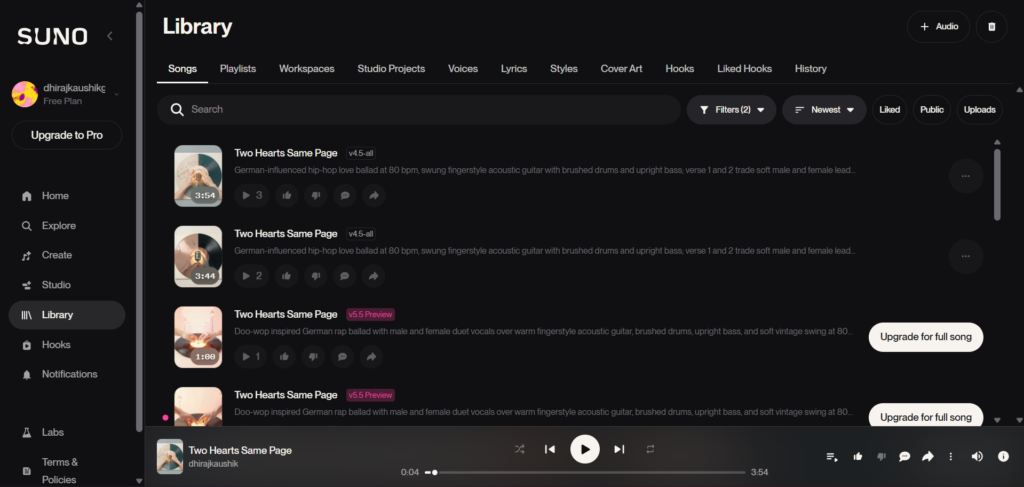
After confirming your email or linking your account, you will land on the main creation dashboard. Take a minute to look around before generating anything. The layout includes a prompt box, a style selector, and a library where your past creations are saved.
Step 3: Write Your First Prompt
You have two main options here. You can describe the song in plain language, something like “upbeat indie pop song about summer road trips,” or you can switch to Custom Mode and paste in your own written lyrics along with a style tag. Beginners usually get better first results with simple, descriptive prompts rather than overly detailed ones.
Step 4: Generate and Review Your Song
Hit the create button and Suno will typically produce two versions of your song within 30 to 90 seconds, depending on queue traffic. Listen to both. Free tier users on the Suno AI free plan often skip this step and just take the first result, but comparing both versions usually surfaces the better take.
Step 5: Check Your Remaining Credits
Before generating again, glance at your credit balance, usually visible near your profile icon. Since the Suno AI free plan only gives 50 credits a day, tracking this early prevents the frustration of running out mid session. Each generation typically uses around 5 credits, so budget accordingly if you have a specific number of songs you want to try.
Step 6: Download or Save Responsibly
You can download completed tracks as MP3 files directly from your library. Remember that anything created here falls under the non-commercial terms of the free tier, so treat these downloads as demos, practice runs, or personal listening rather than material for monetized content.
Key Benefits of the Suno AI Free Plan
The biggest benefit is simply the ability to test real AI music generation without any financial commitment. A lot of tools force you to enter payment details just to try a demo, and Suno’s willingness to give full model access for free lowers the risk of exploring something new. For someone in the US who is only curious about AI music and not ready to commit money, this removes the biggest barrier to entry.
The daily credit reset is another underrated advantage. Because credits refresh every 24 hours instead of expiring permanently, the Suno AI free plan effectively gives you a fresh batch of experiments every single day. Over a week, that adds up to roughly 70 songs worth of testing, which is more than enough to understand your own taste in prompts and styles before paying anything.
Access to the same core generation models used by paid tiers is also a genuine benefit, not a watered down version. Some competitors reserve their best voice models exclusively for subscribers, leaving free users with clearly inferior output. Suno’s approach means the free plan actually demonstrates the product’s real capability, which builds more informed decisions about whether to upgrade.
Finally, the low friction signup process itself is a benefit worth mentioning. There is no waitlist, no approval process, and no need to justify your use case. You can go from landing on the homepage to hearing your first generated song in well under five minutes, which matters for creators who want to test an idea the moment it occurs to them rather than waiting around.
Suno AI Free Plan vs Alternatives
| Tool | Standout Feature | Vocal Quality | Commercial Rights on Free Tier | Monthly Cost (Free Tier) |
|---|---|---|---|---|
| Suno AI | Full song generation with realistic vocals | Very strong | No | $0 |
| Udio | Strong genre blending and remix tools | Strong | No | $0 (limited credits) |
| Boomy | Fast instrumental track creation | Weak on vocals | Limited, revenue share required | $0 |
| Soundraw | Royalty free background music focus | Instrumental only | Yes, with subscription only | $0 (preview only, no downloads) |
| Mubert | API focused generative ambient music | Instrumental only | No | $0 (limited streams) |
Suno stands out mainly because of vocal realism. Boomy and Soundraw are built more for background and instrumental tracks, so they are not really direct competitors if your goal is full songs with lyrics. Udio is the closest comparison in terms of vocal output, though its free tier credit allowance tends to be even tighter than Suno’s daily 50 credit system.
Who Is the Suno AI Free Plan For?
Hobbyist songwriters who want to hear a melody idea come to life without hiring a producer are a natural fit for this plan. If you have lyrics sitting in a notes app and just want to hear what they sound like set to music, 10 free generations a day is more than enough to experiment.
Podcasters and YouTubers testing intro music concepts also benefit, at least during the planning stage. You can use the free plan to figure out the vibe and genre you want, then switch to a paid plan once you are ready to actually use a track in a monetized video.
Students and casual creators exploring AI tools as a class project or personal curiosity fit well here too. Since there is no cost and no commercial pressure, the free plan works as a genuine learning sandbox for understanding how prompt wording affects musical output.
The plan is a poor fit for anyone planning to publish music commercially right away. If you are a working musician who needs distributable tracks for streaming platforms, or a business that needs licensed background music for ads, the free tier’s non-commercial restriction makes it the wrong starting point. In that case, going straight to Suno Pro at $10 a month saves you from having to redo work later.
FAQ
How many credits does the Suno AI free plan give you each day?
The Suno AI free plan gives users 50 credits every day, and these credits reset on a 24 hour cycle rather than rolling over or accumulating. Since a typical full song generation costs around 5 credits, this works out to roughly 10 songs per day for most users. Keep in mind that longer tracks or certain editing actions can use more credits than a standard generation, so your actual daily output may vary depending on how you use the platform.
Can I use songs from the Suno AI free plan for commercial purposes?
No, songs created under the Suno AI free plan are restricted to personal, non-commercial use according to Suno’s terms of service. This means you cannot legally use free tier tracks in monetized YouTube videos, paid advertising, client work, or commercial releases. Upgrading to Pro or Premier later does not retroactively grant commercial rights to songs made while you were on the free plan, so the subscription tier active at the time of generation is what determines your rights.
Does the Suno AI free plan include access to the same models as paid plans?
Yes, free plan users generally get access to Suno’s core generation models rather than a stripped down version. This is different from many competing AI music tools that lock their best voice and instrumental models entirely behind a paywall. The main differences between free and paid tiers come down to credit volume, commercial licensing, and processing priority rather than model quality itself.
Can I buy extra credits if I run out on the free plan?
No, the Suno AI free plan does not offer a credit top up option, which is only available to Pro and Premier subscribers. Once your 50 daily credits are used, your only option is to wait for the next daily reset. This is one of the more restrictive aspects of the free tier compared to platforms that allow pay as you go purchases regardless of subscription status.
Is the Suno AI free plan good for beginners with no music background?
Yes, the free plan is specifically well suited for complete beginners since it requires no technical or musical knowledge to use. You simply describe the song you want in plain language or provide lyrics, and Suno handles the composition, vocals, and mixing automatically. Many first time users find that experimenting with different prompt styles on the free tier is the best way to learn how the platform interprets creative direction before committing to a paid plan.
What happens to my free plan songs if I later upgrade to Pro or Premier?
Songs generated while you were on the free plan remain classified under the non-commercial terms that applied when they were created, even after you upgrade. Suno’s help documentation is explicit that paid subscriptions do not automatically apply commercial rights retroactively to older free tier output. If you want a specific song to carry commercial rights, the safest approach is to be on a paid plan at the time you generate that particular track, rather than assuming an upgrade will cover past work.
Final Thoughts
The Suno AI free plan is genuinely useful for what it is designed to do, which is letting curious users test real AI music generation without spending anything. The 50 daily credits and access to core models make it one of the more generous free tiers among AI music tools available to US users right now. Just do not mistake it for a production ready solution, because the non-commercial restriction and daily credit ceiling exist specifically to encourage upgrading once your needs become serious.
If you are only exploring or having fun with prompts, the free plan will comfortably meet your needs. If you already know you want to publish or monetize your music, it makes more sense to start on Suno Pro at $10 a month rather than building a library of free tier songs you cannot legally use later.
Start with the free plan today at suno.com to hear what the technology can actually do before deciding whether an upgrade fits your goals.
For more comparisons like this, check out our ChatGPT vs Gemini feature breakdown, our guide to the 15 best free AI tools and our complete Perplexity AI Guide.
External Resources: Suno official pricing page | Suno homepage and signup | Suno Help Center on commercial use terms | Warner Music Group and Suno licensing partnership announcement | Billboard coverage of the Suno and Warner Music settlement | TechCrunch reporting on Suno’s model updates | Udio official site for comparison reference | Boomy official site for comparison reference | Soundraw official pricing page | Mubert official site for comparison reference