Suno AI has become the name most British creators type into Google when they want to turn a text prompt into a finished song, and after spending three weeks testing it from my desk in the UK, I have a clear picture of where it genuinely helps and where it falls short. This guide covers what the tool actually does, how much it costs in pounds, and whether it is worth your money in 2026. I am writing this the way I wish someone had written it for me before I signed up, without the marketing language that fills most reviews of AI products.
Table of Contents
What Is Suno AI?
Suno AI is a text-to-song generator that turns a written prompt into a complete piece of music, including instruments, structure, and a sung vocal performance. You type something like “uplifting indie pop song about moving to a new city, female vocals” and within about a minute you get a finished track with a verse, chorus, and bridge.
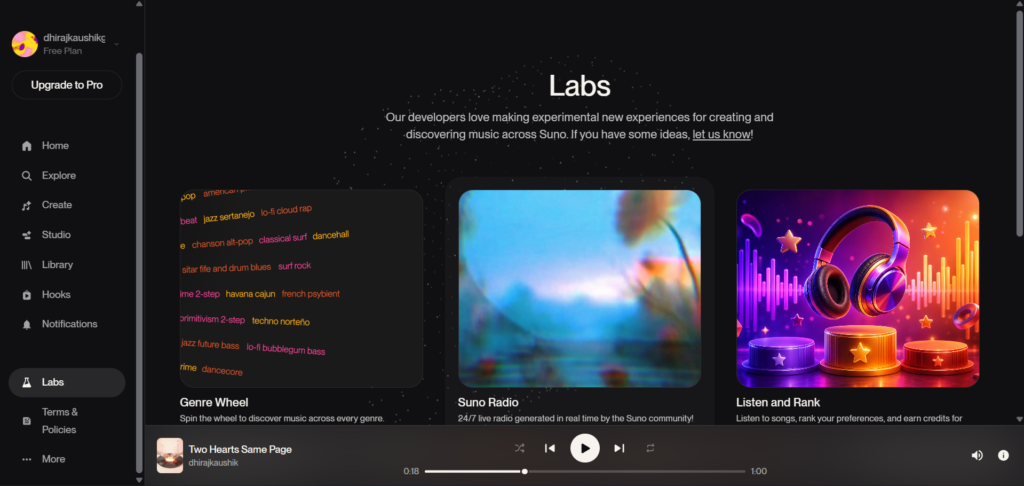
The company behind it is Suno Inc, based in Cambridge, Massachusetts, and the platform, accessible at suno.com, has grown from a niche experiment into one of the most used products in the creative AI space. By early 2026, it had built a user base in the tens of millions, with a meaningful share of paying subscribers funding ongoing development of the underlying model.
What makes it different from older music software is that it does not require you to know anything about music theory, mixing, or production. Traditional digital audio workstations like Logic Pro or Ableton ask you to build a song piece by piece. This approach skips that entirely. You describe the song, and the model handles melody, instrumentation, vocal delivery, and arrangement in one pass.
The latest version, often referred to as v5, brought a genuine jump in vocal realism over earlier releases. Older models sounded competent but slightly synthetic on sustained notes. The newer model handles breathiness, vibrato, and emotional shifts in a way that often passes a casual listen test, particularly in pop, indie, and electronic genres. Where it still struggles is anything that depends on precise rhythmic speech, such as rap or spoken word, where the timing between syllables can feel slightly off.
This is not the only tool doing this kind of work. Udio offers a similar text-to-song experience and went through its own licensing journey with the major labels. ElevenLabs, a company best known for AI voice cloning, entered the space from a different angle, focusing on audio fidelity over full song generation. I will compare all three properly later in this guide, but for most UK users asking which AI music generator to start with, this remains the most complete starting point because of its balance of ease of use, genre range, and community size.
One thing worth knowing upfront, because it shapes how you should use the tool: both this platform and Udio were named in copyright lawsuits filed by the Recording Industry Association of America in June 2024, on behalf of Universal Music Group, Warner Music Group, and Sony Music Entertainment. By late 2025, both companies had reached settlement agreements with the major labels. The exact terms were not made fully public, and the commercial use rights granted to subscribers still carry some ambiguity depending on how you plan to use the output. If you are planning to monetise tracks commercially, it is worth reading the current terms of service before you commit.
A practical note for UK readers specifically: pricing and billing run through US dollar systems, account access has no regional restrictions I encountered during testing, and the interface has no localisation quirks that caused problems from a UK IP address or with a UK bank card.
How Suno AI Works?
Suno AI works by combining a language model that interprets your prompt with a generative audio model trained to produce musical structure. When you type a description, the system does not search for an existing song that matches. It generates something new, note by note, based on patterns it learned from a huge volume of training audio.
Here is the part most guides skip. The generation process happens in two layers, and understanding them explains a lot about why results vary so much between attempts. The first layer interprets your prompt and decides on genre, tempo, mood, and song structure, things like verse, chorus, and bridge. The second layer renders that structure into actual audio, including vocals, instrumentation, and mixing, and the model is making creative decisions at both stages rather than just filling in a template.
You have two main ways to guide the output. The simple mode just takes your description and runs with it, choosing the lyrics and structure for you. The custom mode lets you write your own lyrics, choose a specific style tag, and even set the song title before generating. I found custom mode produces far more useful results once you know roughly what you want, because the automatic lyric writer tends to default to generic, slightly repetitive phrasing.
If you want sharper lyrics without writing them yourself from scratch, a tool like ChatGPT: The Complete Guide pairs well here. I often draft lyrics in ChatGPT first, refine the rhyme scheme, then paste them into the custom lyrics field. The combination produces noticeably better results than relying on the built-in lyric generator alone.
How the Vocal Engine Works?
The vocal model deserves its own explanation because it is the single biggest reason people choose this platform over instrumental-only tools. It trains vocal output to follow musical phrasing rather than just stringing words together. It maps syllables to melody, adds breath pauses where a real singer would need them, and varies dynamics across a verse versus a chorus.
The trade-off is consistency. I generated the same prompt twice in a row during testing and got one genuinely strong vocal take and one noticeably flatter version on the second attempt. This randomness is part of how the model works, and it means you should expect to generate a few versions of any song before landing on the one you actually want to keep. In my experience, roughly one in three generations was strong enough to keep without further tweaking, which is worth knowing before you budget your monthly credits.
Step-by-Step Guide to Using Suno AI
Getting your first song out of this tool takes under five minutes once you know where everything lives. Here is exactly what I did, step by step, from a standard UK home broadband connection with no VPN or workaround needed.
Step 1: Create Your Account
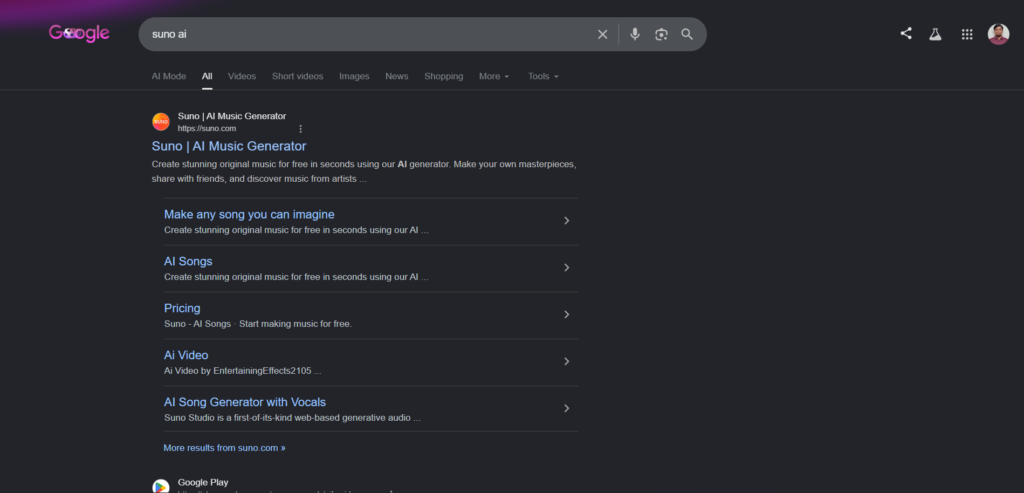
Go to suno.com and sign up using your email address or a Google account. The signup process does not ask for payment details for the free tier, which is a sensible touch for anyone in the UK who wants to try it without committing a card straightaway. The whole process took me under a minute.
Step 2: Choose Simple or Custom Mode
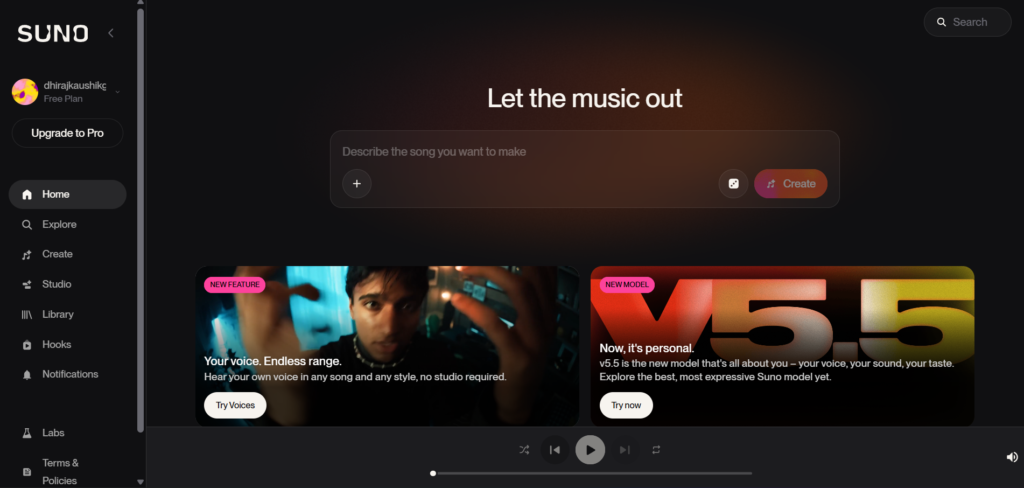
Once you are logged in, you will see a prompt box on the main create screen. Simple mode is selected by default, which is the better starting point if this is your first time. Custom mode appears as a toggle and unlocks separate fields for lyrics, style, and title, which is where most of the real control lives once you get comfortable.
Step 3: Write Your Prompt
In simple mode, describe the song you want in plain English. Be specific about mood, genre, and any instruments you want featured. A prompt like “slow acoustic ballad, rainy evening feeling, male vocals, gentle piano” will give the model far more to work with than just “sad song.” Vague prompts produce vague results, and that pattern held true throughout my testing.
Step 4: Generate and Listen
Press create, and the platform will produce two versions of your song, usually within sixty to ninety seconds. Listen to both, since they will differ more than you expect even from an identical prompt.
Step 5: Refine With Custom Mode
If neither version feels right, switch to custom mode and tighten your control. Add a more specific style tag, such as “90s britpop, jangly guitars, confident male vocal,” and consider writing your own lyrics if the automatic ones feel generic. This is the step that separates a usable track from a forgettable one in my experience.
Step 6: Download or Extend Your Track
Once you have a version you like, you can download it as an MP3 or WAV file from the song’s options menu. There is also an extend feature that lets you continue a song past its original length, which is useful if your first generation cuts off before a natural ending.
Step 7: Organise Your Library
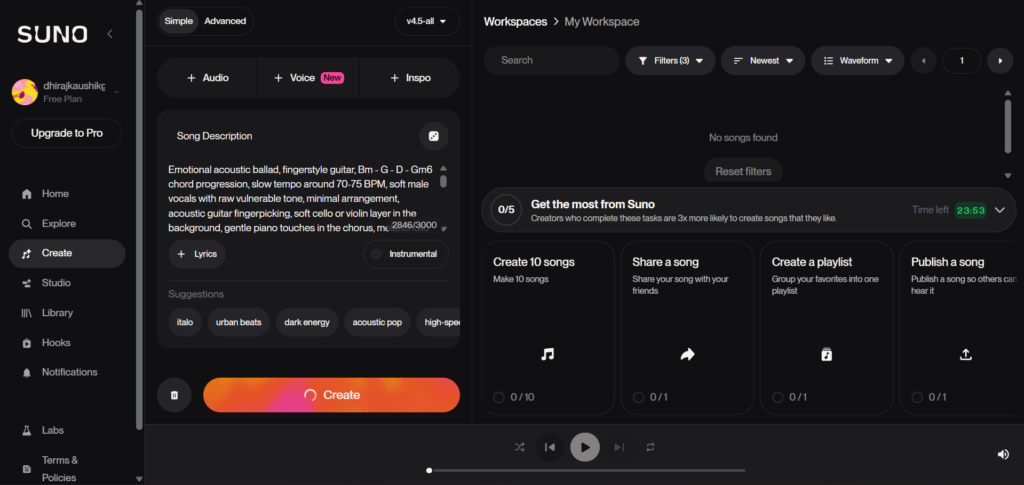
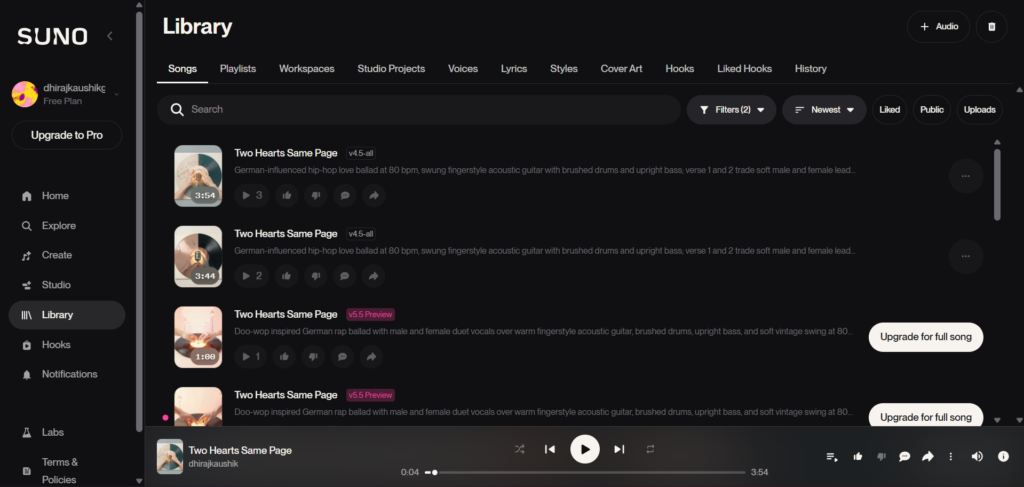
Every song you generate is saved to your library automatically. As you create more tracks, use the search and filter options to keep things organised, particularly if you are testing several variations of the same idea across an afternoon session.
Key Benefits of Suno AI
The most obvious benefit is speed. What used to take a songwriter, a producer, and a few hours in a studio now takes about a minute from a text prompt. For content creators who need background music for YouTube videos or podcasts, this turns music from a bottleneck into something you can generate on demand between other tasks. I tested this directly by scoring a short travel video, and the entire soundtrack took less time than editing the footage itself.
The second benefit is accessibility for people with no musical training. I have played guitar badly for years and never learned proper music theory, yet I produced a finished, listenable song on my first afternoon using this tool. You do not need to understand chord progressions or arrangement. You just need to describe what you want clearly, which is a skill closer to writing than to music production, and one that improves quickly with practice.
The third benefit is the sheer range of genres available from one account. Within a single session I generated a lo-fi hip hop beat, a folk ballad, and an electronic dance track, all without switching plugins or instruments. Traditional music production would require different skills and often different software entirely to cover that range, and most hobbyists simply never get round to learning all of them.
The fourth benefit is the community and remix culture built around the platform. There is a public feed where users share their generations, and you can remix or build on someone else’s song idea legally within the platform’s own ecosystem. This makes it genuinely useful for hobbyists who want feedback or inspiration, not just a private tool you use alone.
A smaller but real benefit is iteration cost. Because each generation only takes about a minute and costs a small number of credits rather than hours of studio time, you can afford to try ten different moods or styles for the same project without much financial pain. That kind of cheap experimentation was simply not available to most hobbyist musicians before tools like this existed, and it changes how freely you can explore an idea before committing to it.
Suno AI Comparison Table
| Tool Name | Standout Feature | Vocal Quality | Commercial Licensing Clarity | Monthly Cost (UK) |
|---|---|---|---|---|
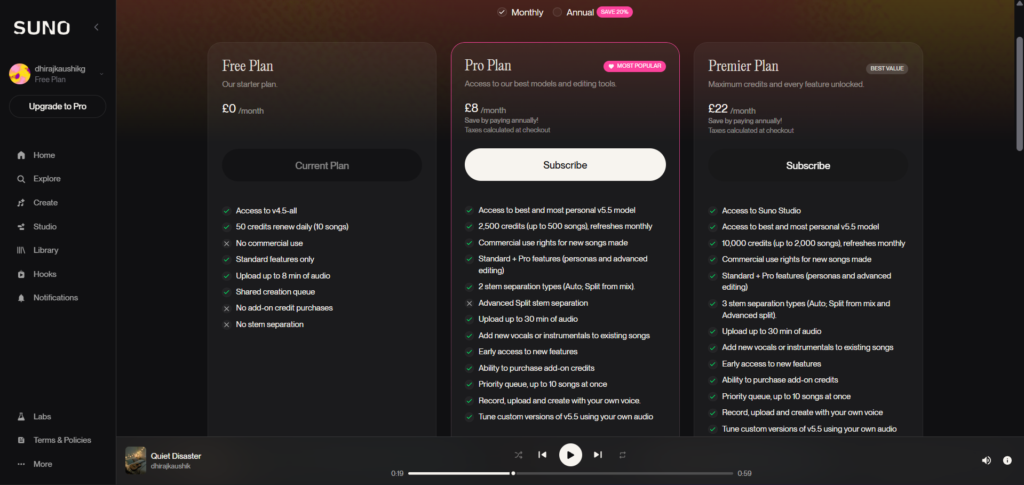
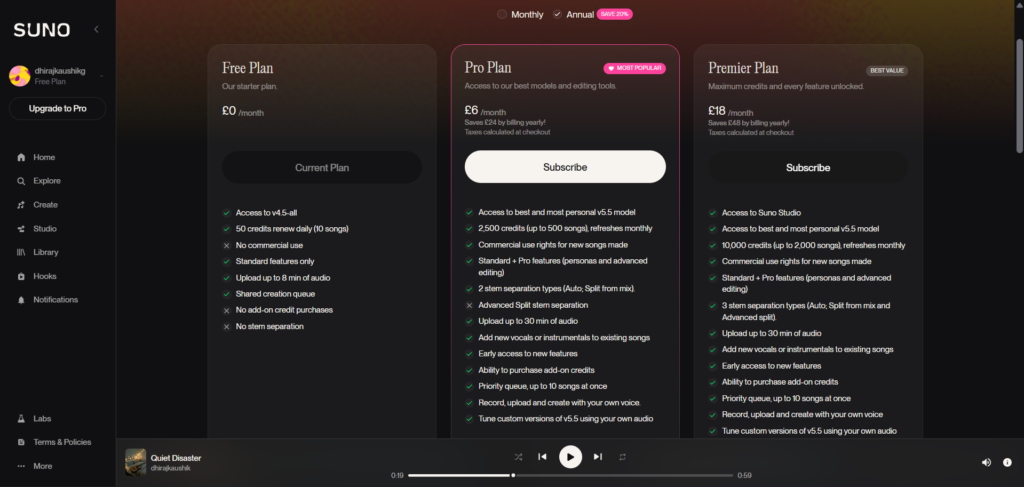
| Suno AI | Full song generation with strong vocals | Excellent for pop, indie, electronic | Settled with major labels, terms still evolving | Free tier, then from £8 (Pro) |
| Udio | Inpainting to edit specific song sections | Strong, slightly behind Suno on naturalness | Settled with UMG, jointly licensed platform planned | Free tier, then from £9 |
| ElevenLabs Music | Studio-grade audio fidelity | Less vocal-forward, stronger on instrumentals | Built on licensed training data from launch | From £8 as part of bundled ElevenLabs plans |
| Stable Audio | Licensed dataset, strong for sound design | Limited vocal focus | Clearest commercial licence among major tools | From £8 |
| AIVA | Orchestral and cinematic composition | Not built for pop vocals | Public domain training data, full ownership on Pro | From £13 to £42 depending on plan, see AIVA’s pricing page |
Prices shown are approximate GBP equivalents based on published pricing as of mid 2026 and can shift with currency rates or plan changes, so check each provider’s own pricing page before subscribing.
If you are weighing this up against tools built for visuals rather than audio, it is worth reading Leonardo AI Review: Is It Still Worth Your Money in 2026 to understand how a similar generative model handles images instead of sound.
For a wider view of how these generative tools stack up against each other, our AI Tools Comparison Hub: Every Major Tool Ranked Side by Side breaks down pricing and use cases across image, video, writing, and audio tools in one place.
Who Is Suno AI For?
Suno AI suits content creators who need a constant supply of background music without paying separately for stock music licences every month. If you run a YouTube channel, produce podcasts, or build short form video content, generating a custom track that nobody else owns solves a real and recurring cost.
It also suits hobbyist songwriters who have ideas but lack the technical skill to record them properly. I have spoken to several people in online music communities who had lyrics sitting in a notes app for years with no way to turn them into something listenable. The custom mode, where you supply your own lyrics, is built exactly for that gap, and pairing it with a brainstorming session in Gemini for Beginners: A Practical Walkthrough can help you get from a vague idea to structured lyrics faster.
Small business owners and marketers who need a jingle or a short branded track will find this useful for early drafts and concept testing, though I would be cautious about using AI generated music for anything customer facing until the commercial licensing picture becomes clearer.
This platform is a poor fit for professional composers working on film or game scores that need precise emotional timing matched to visuals, since the tool generates a complete song rather than a flexible, editable score. It is also not the right choice for anyone who needs guaranteed bulletproof commercial rights today, given the unresolved details around the 2025 label settlements.
If your content strategy already includes a mix of AI tools, it is worth seeing how this fits alongside something like Google Stitch AI Guide: Every Feature Worth Knowing in 2026, since pairing AI generated music with AI generated visuals is becoming a common setup for small creators.
FAQ
Is Suno AI free to use?
Yes, there is a free tier that lets you generate a limited number of songs per day without entering payment details. The free plan is genuinely usable for testing the tool and creating a handful of personal tracks, though you will hit daily limits quickly if you want to generate regularly. Paid plans remove those caps and unlock extra features like more downloads, commercial use rights, and access to newer models. For UK users who just want to try it out before spending anything, the free tier is a sensible starting point and does not require a credit card.
Can I use Suno AI songs commercially in the UK?
This depends on which plan you are subscribed to and how you intend to use the song. The paid tiers generally include commercial use rights for the tracks you generate, but the legal landscape around AI generated music is still settling following the 2024 RIAA lawsuits and the subsequent 2025 settlements with major labels. Before using any AI generated track in client work, advertising, or monetised content, read the platform’s current terms of service directly on their site, since licensing details can change and you want to be working from the latest version rather than an older summary.
How much does Suno AI cost in the UK?
Pricing is set in US dollars and converted at the prevailing exchange rate, so the exact GBP figure can shift slightly month to month. As of mid 2026, the paid tiers start at roughly £8 to £9 per month for the entry plan, with a higher tier available for users who need more monthly credits and faster generation. There is no separate UK specific pricing page, so what you see on the main pricing page in dollars is what you will be charged, adjusted by your card provider’s exchange rate at billing time.
Does Suno AI use real human singers?
No, every vocal performance is produced entirely by the AI model rather than being sung by a human and processed afterwards. The model has been trained to understand how human vocals behave, including breath patterns, pitch control, and emotional delivery, and it generates a synthetic performance based on that understanding. The realism varies by genre, with pop and indie vocals sounding the most convincing and rap or spoken word performances sounding noticeably more artificial due to timing inconsistencies between syllables and beat.
Is Suno AI better than Udio?
Neither tool is objectively better across every category, and the right choice depends on what you are making. This platform tends to win on vocal naturalness and overall song cohesion, particularly for pop, indie, and electronic genres, while Udio offers stronger section-by-section editing through its inpainting feature, which lets you regenerate just one part of a song without redoing the whole track. If full song generation with strong vocals is your priority, start here. If you want more granular control over editing specific sections after generation, Udio is worth testing alongside it.
Can Suno AI write song lyrics for me?
Yes, in simple mode the tool automatically writes lyrics based on your prompt description without any extra input from you. The results are usable but tend toward generic phrasing and predictable rhyme patterns, especially on longer songs. For better lyrics, switch to custom mode and write or refine the words yourself before generating, or draft them first in a separate writing tool and paste the finished version into the lyrics field. This combination consistently produces more original and personal sounding results than relying on the automatic lyric writer alone.
Final Thoughts
Suno AI is a genuinely useful tool for the right person, and I do not think it deserves either the hype or the dismissal it gets in different corners of the internet. It will not replace a trained musician working on something that needs precision and emotional nuance, but it will absolutely save time and money for content creators, hobbyists, and anyone who has musical ideas but lacks the technical skill to produce them.
The honest caveat that most reviews gloss over is the licensing situation. The 2024 lawsuits and 2025 settlements with the major labels mean the legal ground here is more solid than it was two years ago, but it is not perfectly settled, and anyone planning to monetise AI generated music commercially should read the current terms rather than assume yesterday’s summary still applies.
If you are building out a wider content workflow that mixes AI generated audio with AI generated voiceovers for video, our piece on AI Agents Explained: What They Actually Do in 2026 covers how several of these tools chain together into a single pipeline.
If you want a low risk way to start, use the free tier first, get a feel for how prompting actually shapes the output, and decide from there whether a paid plan earns its place in your monthly tool budget. Head to Suno and generate your first song today to see exactly what I mean.