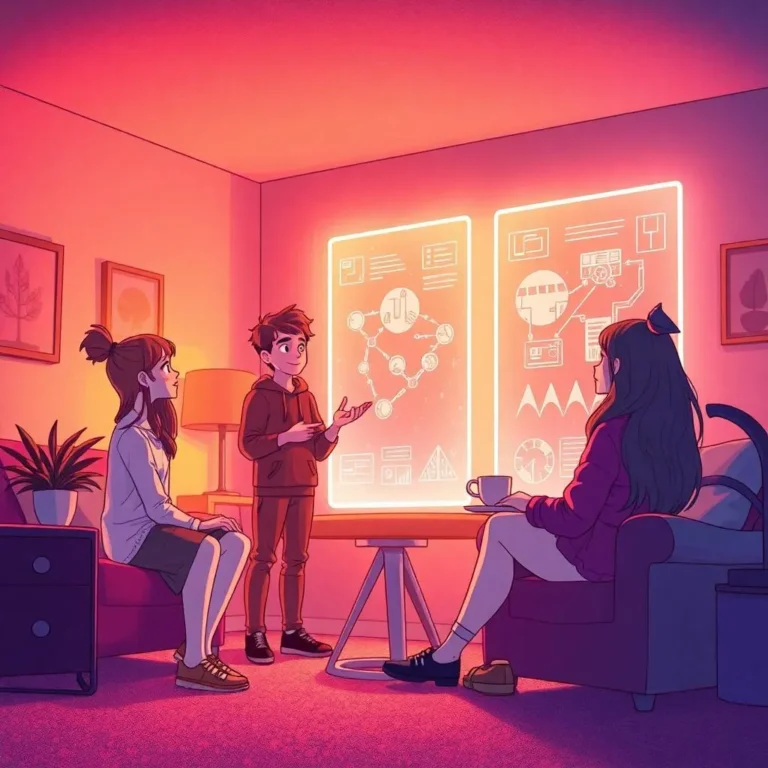
Leonardo AI for game developers has become the most practical answer to one of indie development’s oldest problems: producing a large volume of visually consistent assets without a full art team behind you.
The game developer community has converged on Leonardo AI as the category leader for game asset generation, covering textures, character sheets, and concept art. This guide covers the specific workflows, features, and honest limitations that matter for developers at every scale, from solo indie projects to small studio productions.
Table of Contents
Why Game Developers Choose Leonardo AI Over Other Tools?
Leonardo AI has become the default AI image generation platform for game artists because it solves the specific problems that game art development presents: style consistency, character maintenance, controlled iteration, and professional-grade output that serves as actionable reference for production teams.
Most AI image tools are built for single-image creative output. You enter a prompt, receive a striking image, and move on. Game development does not work that way. A single project might require hundreds of assets that all need to share the same visual language: the same lighting treatment, the same colour temperature, the same level of stylisation. Tools optimised for individual image quality often fail at this consistency requirement.
Unlike AI tools that generate art mainly for inspiration or novelty, Leonardo AI focuses on delivering outputs that are usable in real-world contexts, whether as concept art for games, textures for 3D models, or promotional visuals for marketing campaigns. That production-first orientation is why professional game artists reach for it over more aesthetically polished tools like Midjourney.
Leonardo AI is a browser-based AI image and art generation platform that remains the leading hosted tool for game developers, concept artists, and creative teams. No local GPU is required and no software needs to be installed, which removes the hardware barrier that previously kept many indie developers away from serious AI-assisted asset production.
Core Features That Matter for Game Development
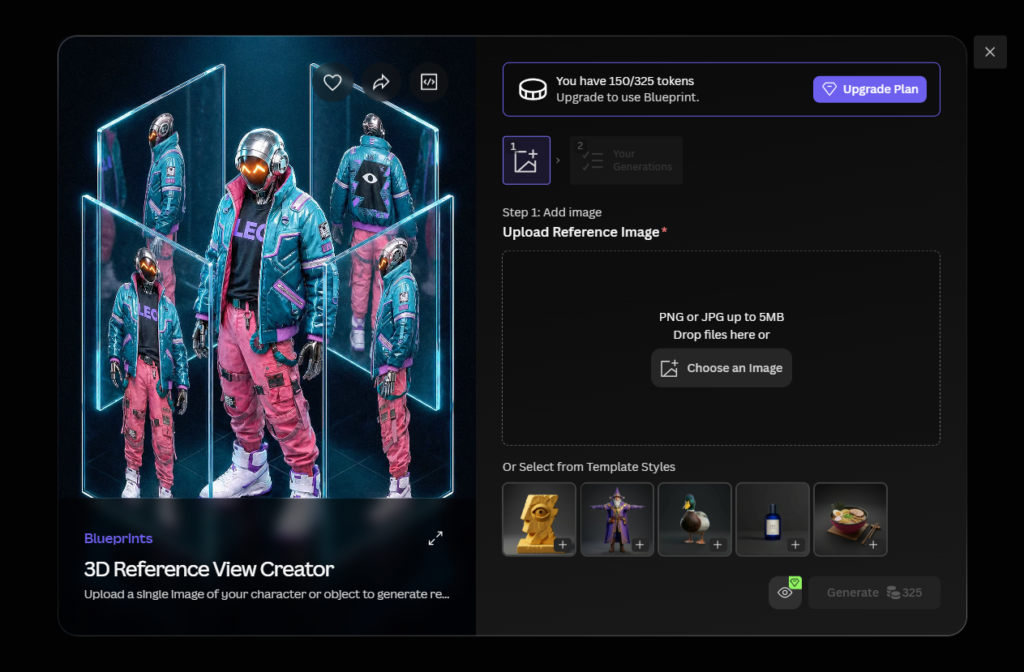
Leonardo facilitates various stages of game development, offering tools for rapid asset ideation, multiple iterations, detailed finessing, prompt engineering, background removal, consistent style asset generation, and even 3D texturing.
Understanding which features serve game development specifically helps you avoid spending tokens on tools that are not relevant to your workflow.
Custom Style LoRA Training is the foundation of consistent asset production on Leonardo. Leonardo’s LoRA training lets game studios define their art style as a trainable model: compile 50 to 100 reference images that represent the target style, train a style LoRA on Leonardo’s platform in 15 to 30 minutes, and the result is that every generated image carries the same stylistic DNA. For a solo developer, this means you can establish your game’s visual identity early in development and generate every subsequent asset within that established style without manually re-engineering prompts each time.
Consistent Character Engine handles the specific problem of character identity across multiple asset variations. Once a character design is confirmed, the engine uses reference embeddings to maintain facial identity, body proportions, and design elements across new poses, expressions, and scenarios. Need the character in battle armour? In casual clothes? In a cutscene pose? From behind? The trained character LoRA generates each variation while maintaining the character’s identity.
3D Texture Generation is one of the more practical additions for developers working in Unity or Unreal Engine. In 2026, Leonardo AI offers a unique 3D texture generation feature that produces UV-mapped textures, including albedo, normal, and roughness maps, from text prompts that can be imported directly into engines like Unity or Unreal. This removes a significant manual step from the asset pipeline for developers who previously had to convert generated images into usable texture maps through external software.
Image-to-Image Generation lets you use an existing sketch, stock image, or rough concept as the starting point for a generation rather than working from a text prompt alone. The developer would employ stock images with commercial licence to quickly generate ideas as starting points for the game, then use the Image-to-Image feature to iterate toward the final asset design.
Background Removal is built into the platform and works directly on generated images. For 2D game assets, character sprites, and UI elements that need transparent backgrounds for engine integration, this eliminates the need for a separate image editing step.
How to Generate Consistent Characters Across a Project?
Character consistency is where most AI-assisted game development workflows break down. Character design is inherently iterative. An artist might explore 20 to 50 variations of a protagonist before settling on a final design. Traditionally each variation requires sketching time. With Leonardo, the artist describes variations through prompts and evaluates visual options at a pace that manual sketching cannot match.
The professional workflow for character consistency on Leonardo in 2026 works in three phases.
Phase 1: Character Exploration. Use the standard image generation interface to explore character concepts. Generate 20 to 30 variations using descriptive prompts covering clothing style, body proportions, facial structure, and visual tone. Do not commit to a character design until you have enough variations to make a confident decision. This phase costs tokens but prevents the more expensive mistake of committing to a character that does not work within the game’s visual language.
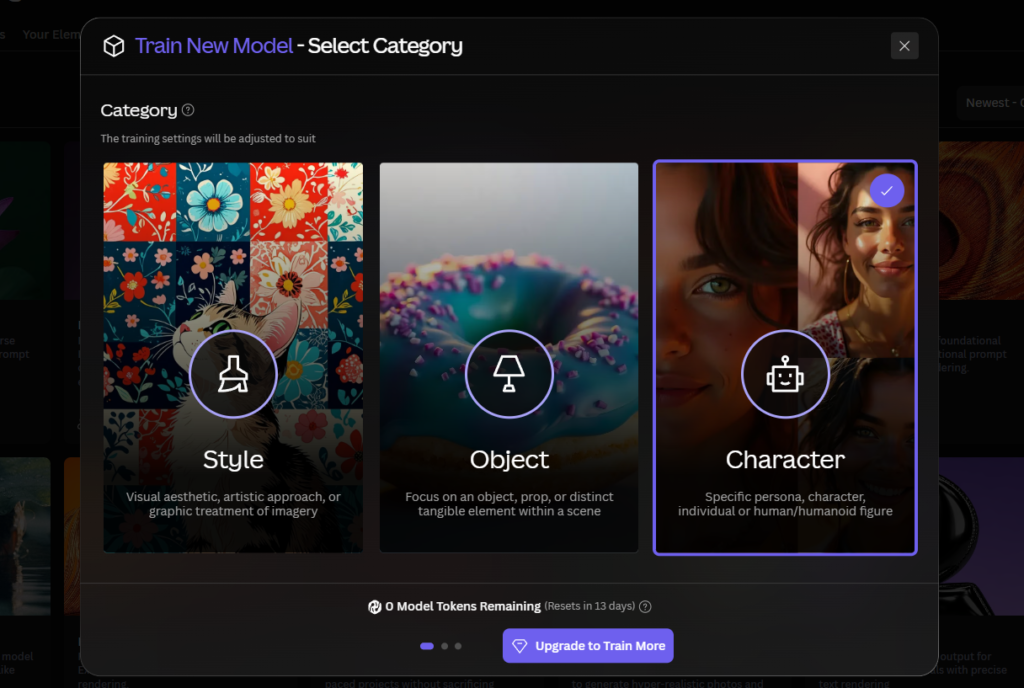
Phase 2: Character LoRA Training. Once a final character design is selected, compile 15 to 25 of the best generated images showing the character from different angles, in different lighting conditions, and with different expressions. Use these as the training dataset for a Character Element. Once a character design is selected, Leonardo’s character consistency features, specifically reference embeddings and trained LoRAs, lock that design for future use. Training takes 15 to 30 minutes on paid plans.
Phase 3: Asset Production. With the Character Element trained, apply it to every subsequent generation involving that character. Adjust element strength to 0.7 to 0.9 for maximum identity consistency. Generate character sheets, combat poses, NPC variants, and cutscene expressions all within the same visual identity.
Texture Generation for 3D Workflows
Textures are a major part of game design because they bring surfaces to life. Leonardo AI excels in generating high-resolution textures that developers can use for objects, environments, and characters. Whether someone needs metal, stone, wood, cloth, or sci-fi materials, the platform offers endless creative possibilities.
For 3D game development, the texture workflow on Leonardo in 2026 has two practical approaches depending on your pipeline.
Text-to-Texture for PBR Workflows. Leonardo AI supports PBR (Physically Based Rendering) workflows, which are essential in modern game engines like Unreal Engine and Unity. PBR textures give objects realistic material properties such as glossiness, roughness, metallic reflections, and depth. Generating textures directly as PBR-ready outputs saves the manual conversion step that was previously required when using standard AI-generated images as texture sources.
Seamless Texture Generation. One of the most valuable features of Leonardo AI is the ability to generate seamless textures. Seamless textures ensure that patterns repeat smoothly without visible edges, which is especially important for flooring, walls, terrain, and large environmental surfaces. Leonardo AI also allows for variations of the same texture, so creators can maintain visual diversity without losing style consistency.
The important caveat on textures: tileable textures are possible but require specific workflows and often manual cleanup. Generating a texture and using it directly without any review step is not reliable enough for production use. Budget time for reviewing and lightly editing texture outputs before integrating them into your engine.
Step-by-Step: Building a Game Asset Workflow in Leonardo AI
Step 1: Define Your Visual Style Before Generating Anything
Before generating a single asset, spend time defining your game’s visual language in writing. Document the art style, colour palette, lighting direction, level of detail, and any specific aesthetic references. This document becomes the basis for your style LoRA training dataset and your generation prompts. Without this upfront definition, you will generate assets that individually look good but do not belong to the same visual world.
Step 2: Train Your Style Element
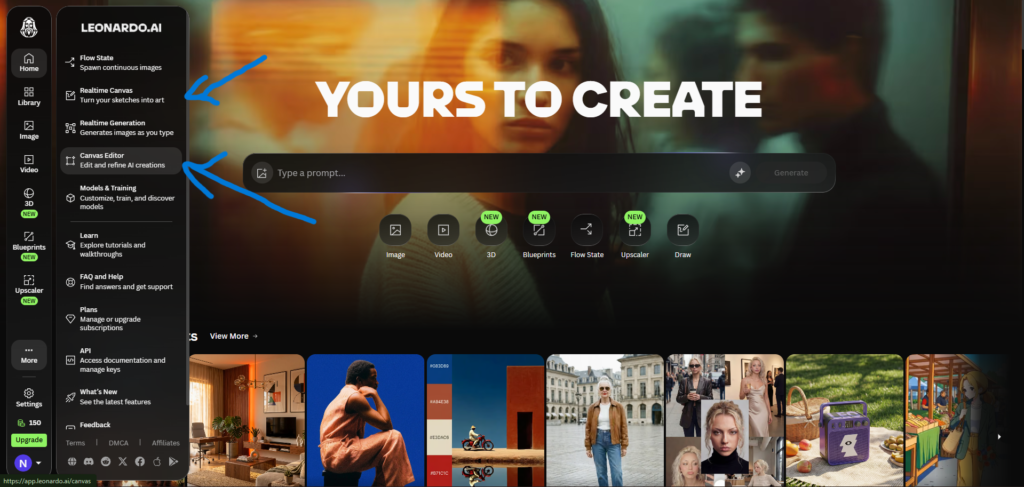
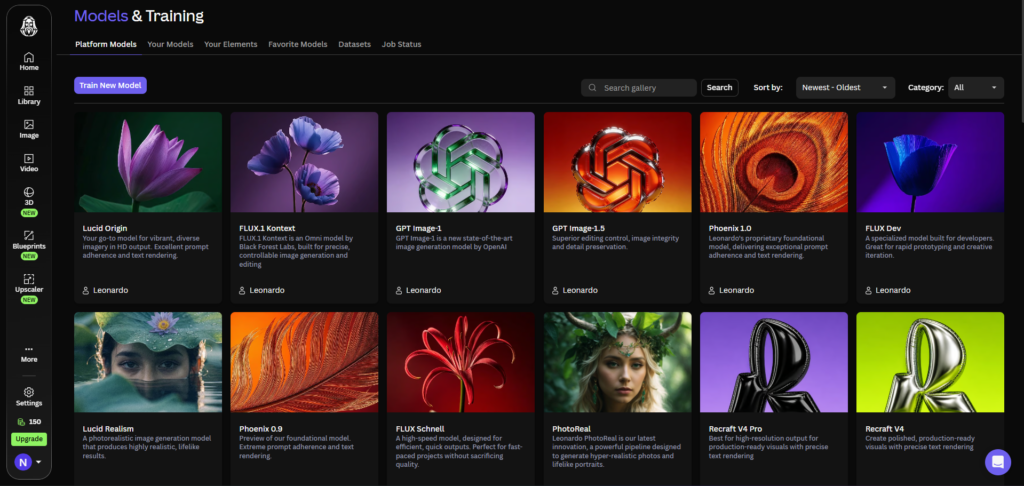
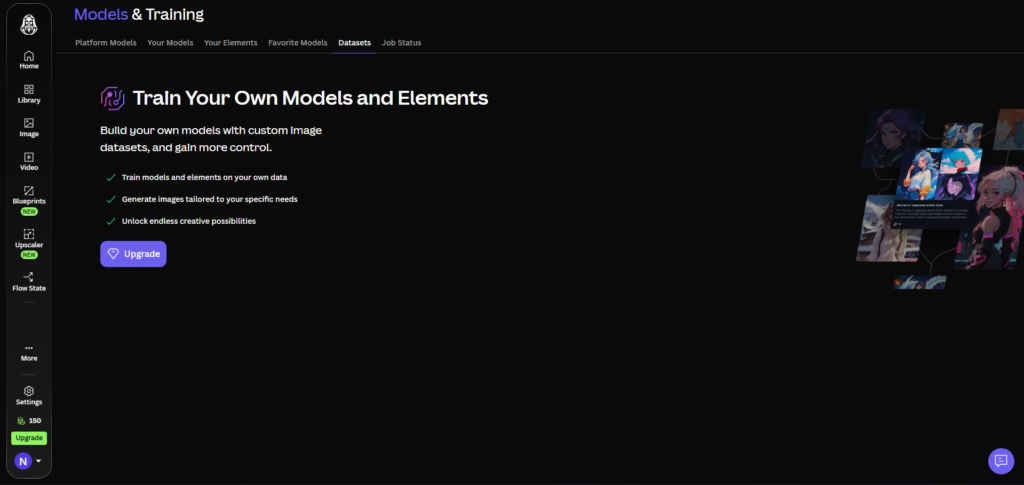
Collect 20 to 30 reference images that best represent your target art style. These can be your own sketches, licensed reference images, or carefully selected AI generations that match your vision. Navigate to Models and Training, click Elements, and train a Style Element on this dataset. Apply this Element to every generation in your project. This single step is responsible for more visual consistency than any other technique in the workflow.
Step 3: Generate and Evaluate Character Concepts
With your Style Element active, generate 20 to 30 character concept variations for each major character. Use prompts that specify body proportions, clothing style, and facial structure alongside the style Element. Evaluate the variations against your visual style document. Select the best 15 to 25 images for Character Element training.
Step 4: Build Your Asset Production Pipeline
With style and character Elements trained, establish a repeatable generation workflow for each asset category. Character assets use the Character Element at 0.8 strength with the Style Element at 0.4. Environment assets use only the Style Element at 0.7. Prop and item assets use the Style Element at 0.6 with specific material descriptions in the prompt. Documenting these settings for each asset category ensures that team members or your future self can reproduce consistent results without reverse-engineering the settings each time.
Step 5: Edit and Refine in the Canvas
After generation, use the AI Canvas for targeted corrections rather than full regenerations. Fix proportion issues through inpainting. Remove backgrounds for sprite assets using the background removal tool. Use outpainting to extend environment concepts to wider aspect ratios. Keep the original high-quality generation and edit only what needs changing. For a full breakdown of Canvas editing techniques, our Leonardo AI Canvas tutorial covers every editing tool in detail.
Step 6: Export and Integrate
Export final assets at full resolution. For 3D texture assets, export the PBR map set and import directly into Unity or Unreal Engine. For 2D character sprites and UI elements, apply background removal before export. Maintain a consistent file naming convention from the start. Asset management becomes significantly harder at scale if naming is inconsistent from the beginning of the project.
The Design Matrix: Maintaining Visual Consistency at Scale
A frequent challenge in game development is the temptation to incorporate a multitude of diverse ideas and concepts into a single game. Without a structured approach, this can result in a disjointed and confusing player experience.
A Design Matrix is a simple reference document that defines which visual elements are fixed across all assets in your game. It typically includes: the primary colour palette with hex codes, the lighting direction and quality (soft, hard, directional), the level of detail for different asset categories, the specific art style parameters that define the game’s visual identity, and examples of assets that pass and fail the consistency standard.
When working on character designs, the developer paid close attention to aspects like facial expressions, clothing textures, and accessories, ensuring they were consistent with the character’s backstory and role in the game. Similarly, when designing environmental elements such as landscapes and buildings, they ensured that these components resonated with the overall mood and setting of the game.
The Design Matrix is not an AI feature. It is a discipline you bring to the workflow. Leonardo’s tools make maintaining consistency technically easier, but the creative judgement about whether an asset belongs in your game is still yours to make.
Honest Limitations Game Developers Should Know
No tool guide that skips the limitations is actually useful. Here is what Leonardo AI does not handle well for game development in 2026.
Animation-ready designs: generated characters are not directly usable as animation reference without significant adaptation. Leonardo produces still images. If you need characters in specific rigging-ready poses or with clear silhouettes for sprite animation, additional manual work is required after generation.
Text and symbols: in-game text, UI elements, and specific symbols are unreliably rendered. Phoenix 2.0 has improved text rendering within images, but UI elements with precise text, icons with specific meanings, and symbol-heavy assets still require manual creation or significant post-generation editing.
Tileable textures require specific workflows and often manual cleanup. Do not assume a generated texture is tiling-ready without testing it in your engine first. Budget time for reviewing and patching seams.
Generated assets are concept-level references, not production-ready files in most cases. The best approach is to spend time starting with a unique concept you have either designed yourself or had done for you, and using AI for enhancement and refinement rather than expecting AI to create unique images from scratch. This is the professional position and it reflects how the tool actually performs at its best.
Token Budget for a Solo Indie Project
Understanding the token cost of a full asset production run helps you choose the right plan before starting rather than discovering mid-project that your monthly allocation is exhausted.
A typical solo indie project requiring 200 final assets across characters, environments, props, and UI involves roughly:
- 400 to 600 concept exploration generations (10 to 15 per final asset, discarding most)
- 2 to 4 Style Element training jobs (covered by training slots, not token cost)
- 2 to 6 Character Element training jobs (same)
- 200 to 300 production generations with Elements active (higher token cost due to Element processing)
- 100 to 200 Canvas editing operations for corrections and refinements
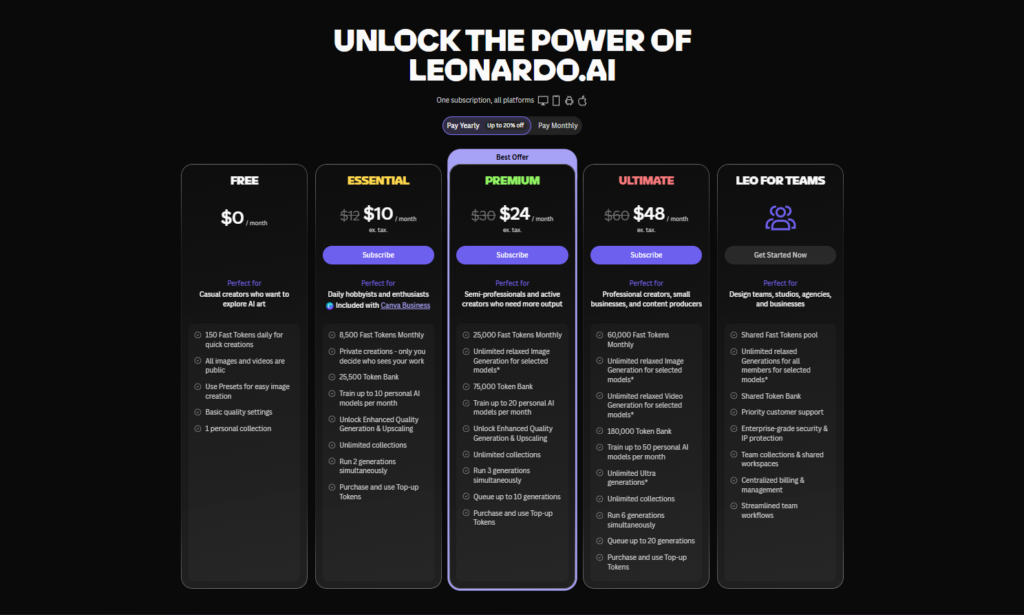
At an average of 8 to 12 tokens per generation with Elements active, a 200-asset project realistically requires 8,000 to 15,000 tokens across the full production run. This puts the project within the Premium plan’s 25,000 monthly token allocation with room for iteration, or across two months of the Essential plan’s 8,500 monthly tokens.
For a larger project requiring 500 or more assets, the Ultimate plan’s 60,000 monthly tokens provides enough capacity for a single intensive production month without rationing. Our Leonardo AI pricing guide covers the full token math for every plan tier in detail.
Which Plan Suits Your Development Scale?
| Developer Type | Recommended Plan | Reason |
|---|---|---|
| Game jam participant | Free plan | 150 tokens/day is enough for a short sprint. Public images are fine for jam submissions. |
| Solo hobby developer | Essential ($12/mo) | Private assets, 1 LoRA training slot, 8,500 tokens covers light monthly production. |
| Solo indie developer | Premium ($30/mo) | 5 LoRA training slots for style and character Elements, 25,000 tokens for sustained production, API access for pipeline integration. |
| Small indie studio (2 to 4 people) | Ultimate ($60/mo) | 20 training slots, 60,000 tokens, 10 concurrent generations for team throughput. |
| AAA concept art team | Teams plan from $24/seat | Shared workspace, admin controls, and collaborative asset organisation. |
Leonardo AI vs Other Tools for Game Development
| Tool | Game Asset Strength | Custom Training | Texture Generation | Entry Cost | Verdict for Game Dev |
|---|---|---|---|---|---|
| Leonardo AI | Purpose-built features for game assets | Yes, from $12/mo | Yes, PBR-ready UV maps | Free / $12/mo | Strongest overall for game dev workflows |
| Midjourney | Strong concept art aesthetic | No | No | $10/mo | Good for mood boards, weak for production assets |
| Adobe Firefly | Commercial safety, Photoshop integration | No | No | From $9.99/mo | Best for legally cleared marketing assets |
| Stable Diffusion | Full control, unlimited local generation | Yes (technical setup required) | Yes (with plugins) | Free (self-hosted) | Best for technical developers with GPU hardware |
| DALL-E 3 | Ease of use, conversational prompting | No | No | $20/mo (ChatGPT Plus) | Weakest for game dev production workflows |
Choose Leonardo if you need game assets, consistent characters, or specific UI textures. Choose Midjourney if you want the absolute highest artistic composition for one-off art pieces. That is the most accurate summary of where each tool fits in a game development context.
For a detailed head-to-head comparison of Leonardo and Midjourney across all use cases beyond game development, our Leonardo AI vs Midjourney guide covers every meaningful difference with 2026 pricing.
Frequently Asked Questions
Can Leonardo AI generate assets ready to import directly into Unity or Unreal Engine?
For 2D assets, generated images can be imported into Unity or Unreal after background removal and format conversion, both of which can be handled within Leonardo or through the engine’s import tools. For 3D assets, Leonardo AI’s 3D texture generation feature produces UV-mapped textures including albedo, normal, and roughness maps from text prompts that can be imported directly into engines like Unity or Unreal. Generated images used as texture inputs for 3D models still require some manual mapping and seam checking before production use, but the PBR map generation removes the most labour-intensive conversion step.
How many assets can a solo developer realistically produce per month on Leonardo AI?
On the Premium plan with 25,000 monthly tokens, a solo developer running a structured asset production workflow can realistically produce 150 to 300 final assets per month, accounting for exploration generations, production generations with Elements active, and Canvas editing operations. This assumes roughly 60 to 80 tokens spent per final asset across the full exploration-to-production pipeline. The Essential plan at 8,500 tokens supports approximately 60 to 100 final assets per month on the same basis. Disabling Alchemy post-processing during the exploration phase and reserving it for production renders extends monthly output considerably.
Does Leonardo AI replace game artists?
No, and treating it as a replacement rather than an accelerator produces worse results than using it correctly. The tool does not replace game artists. It accelerates them. The creative vision, style development, and final quality judgement remain human. Leonardo handles the mechanical work of exploring variations and maintaining consistency, freeing artists to focus on the creative decisions that define a game’s visual identity. The most effective workflows treat Leonardo as a high-speed concept and variation tool rather than an autonomous asset factory.
What is the best Leonardo AI model for game asset generation?
The best model depends on the asset type. For character design and concept art with strong prompt adherence, Leonardo Phoenix 2.0 is the strongest current first-party model. For photorealistic textures and environment art, the Lucid suite produces higher-quality results for realistic material rendering. For stylised game art in anime or illustrated styles, purpose-trained community models available in the platform’s model library often outperform the general-purpose first-party models for those specific aesthetics. The model selector in the generation interface includes descriptions that make the right choice reasonably clear for each asset type.
Can I use Leonardo AI game assets commercially in a released game?
Yes, on all paid plans. Paid plan subscribers retain full intellectual property ownership of everything they generate and receive a commercial licence covering all commercial use including sold products, published games, and client work. On the free plan, Leonardo retains asset ownership and all images are publicly visible, which makes the free plan unsuitable for commercial game projects. For any game you intend to release or sell, a paid plan starting at the Essential tier is the minimum appropriate choice. For more detail on what each plan includes for commercial use, our Leonardo AI pricing guide covers the licensing terms at every tier.
How does Leonardo AI handle environment and background art for games?
Environment art requires exploring mood, lighting, composition, and spatial design. Leonardo excels at generating environment concepts that can serve as reference for 3D environment artists. Mood exploration generates the same location with different lighting conditions such as dawn, noon, dusk, night, and storm. Style alternatives apply different visual treatments to the same spatial concept. The outpainting feature in the AI Canvas is particularly useful for extending environment concepts to wider aspect ratios needed for parallax backgrounds or panoramic level art. Environment generation is one of Leonardo’s strongest game development use cases because mood and atmosphere are well served by the platform’s generation models.
Final Thoughts
Leonardo AI is the most complete managed platform for game asset production available in 2026. The combination of custom style LoRA training, the Consistent Character Engine, PBR texture generation, and a full editing Canvas addresses the specific production challenges of game development in a way that no other hosted tool currently matches.
The limitations are real and worth knowing before you commit. Animation-ready assets, precise UI elements, and production-ready tileable textures all require additional manual work beyond what Leonardo generates. The platform accelerates the concept and variation phase dramatically, but a human review step remains necessary before any asset enters your engine.
For a solo indie developer or a small studio that previously spent weeks on concept art before a line of code was written, Leonardo AI compresses that timeline significantly. The token budget math works out in favour of the Premium plan for most sustained indie projects. Start on the free plan to validate your workflow, then upgrade when the daily token limit starts to create production bottlenecks.
Go to app.leonardo.ai and start with a Style Element trained on your game’s visual references. That single step will change how the rest of your asset pipeline feels. For a full overview of everything Leonardo AI can do beyond game development, our complete Leonardo AI guide covers the platform from top to bottom.
External resources: How to generate a full game asset suite with Leonardo AI | Gamepack game development case study with Leonardo AI | Why game artists are choosing Leonardo AI | Leonardo AI 3D texture generation documentation | IGDA Game Developer Tools and Technology Survey 2026