I went into this thinking pricing research would take an afternoon. It took three days, mostly because Suno’s own marketing materials contradict each other, the FAQ still references numbers the live pricing page does not match, and nobody warns you upfront about the single detail that actually determines whether a plan is worth it: how fast editing burns through your credits. I tracked every credit I spent across all three tiers for two weeks. Here is the real math.
Table of Contents
The Short Answer for Most US Creators
If you only read one paragraph of this article, read this one. Stay on the Free plan if you are experimenting and have no intention of publishing or monetizing anything. Move to Pro the moment you want to publish a single song commercially, since the free plan’s terms forbid commercial use entirely, no exceptions. Only consider Premier if you are generating heavily every single month or specifically want Suno Studio’s multitrack editing environment. For the vast majority of US content creators, YouTubers, and musicians, Pro at $8 per month on annual billing is the tier that actually matters.
That is the practical verdict. Everything below is the detailed reasoning, the credit math, and the parts of Suno’s pricing structure that genuinely confused me during testing.
How Suno’s Credit System Actually Works?
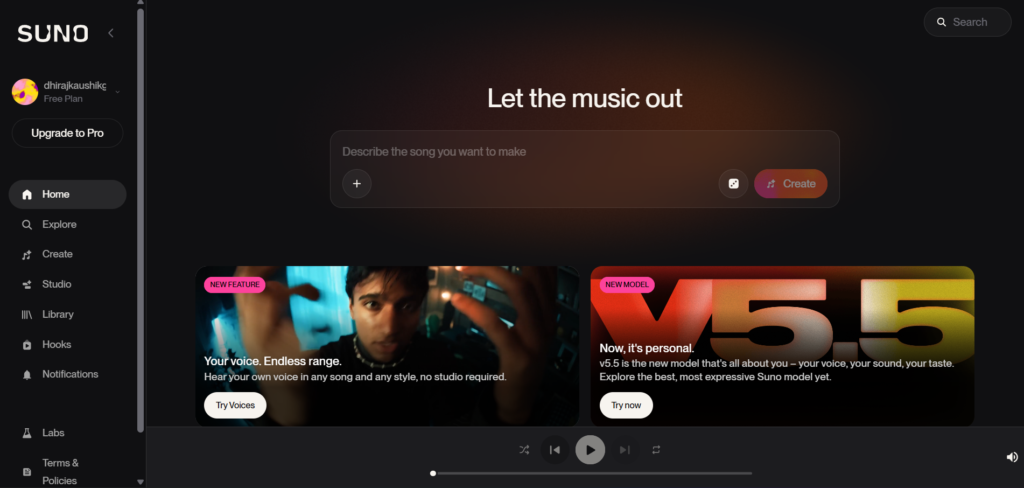
Every action you take on Suno costs credits, not dollars directly, and understanding this system before you subscribe to anything will save you real money. One full-length song generation costs 5 credits, and a single generation returns two variations for you to choose between.
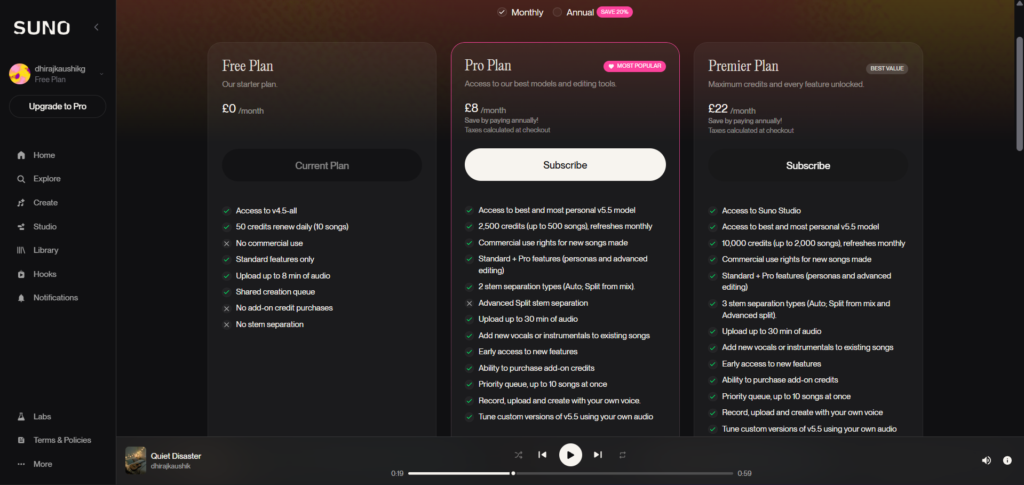
That 5-credit figure is the number Suno uses for all of its marketing math. Free’s 50 daily credits translate to roughly 10 songs per day. Pro’s 2,500 monthly credits translate to roughly 500 songs per month. Premier’s 10,000 monthly credits translate to roughly 2,000 songs per month. These are the headline numbers you will see everywhere, including on Suno’s own pricing page.
What those headline numbers do not tell you clearly is that credits do not roll over, ever, at any tier. Free credits reset daily at UTC midnight, so whatever you do not use today simply disappears. Pro and Premier credits reset monthly on your billing anniversary, with the exact same forfeiture rule. The only credits that persist are purchased top-up credits, which do not expire but require an active subscription to actually use.
Free Plan: What You Actually Get?
The Free plan, sometimes labeled Basic in Suno’s own interface, gives you 50 credits per day, renewing every 24 hours, with no credit card required to sign up. That works out to approximately 10 two-variation song generations daily, which is genuinely generous compared to most AI tools that gate nearly everything behind a paywall from the start.
You get access to Suno’s earlier model, v4.5-All, rather than the current flagship v5.5. The Free plan also operates on a shared, lower-priority generation queue, meaning your songs may take longer to render during high-traffic periods compared to paid subscribers.
Here is the restriction that matters most and the one every beginner needs to understand before generating a single song they plan to use anywhere public: Free plan output is for non-commercial use only, full stop. You cannot publish it on a monetized YouTube channel, sell it, use it in client work, or distribute it commercially in any form. Suno’s help documentation is explicit that upgrading to a paid plan later does not retroactively grant commercial rights to songs you already made on Free. Anything created on the Free plan stays non-commercial forever, even if you become a Pro subscriber the next day.
One additional restriction that arrived following the Warner Music settlement in late 2025: Free tier users are now limited to playback and sharing rather than full file downloads under the new licensed model system. If you want the actual audio file to use anywhere outside Suno’s own interface, you need a paid plan.
The Free plan also does not support purchasing add-on credit top-ups, so once your daily 50 credits are gone, you are done generating until the next reset, with no way to buy your way past that limit at this tier.
Pro Plan: The $8 to $10 Tier Explained
This is the tier where Suno becomes a serious tool rather than a toy, and it is where most US creators evaluating Suno should focus their attention.
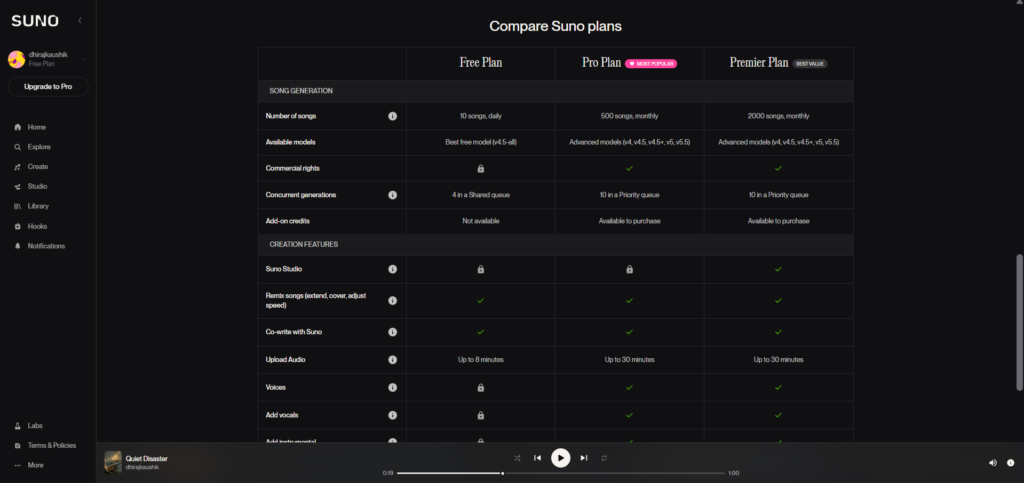
Pro is priced at $10 per month on monthly billing, or $8 per month when billed annually. For that price you get 2,500 monthly credits, translating to roughly 500 songs per month, full access to the current v5.5 flagship model, and most importantly, commercial use rights for everything you generate while your subscription is active.
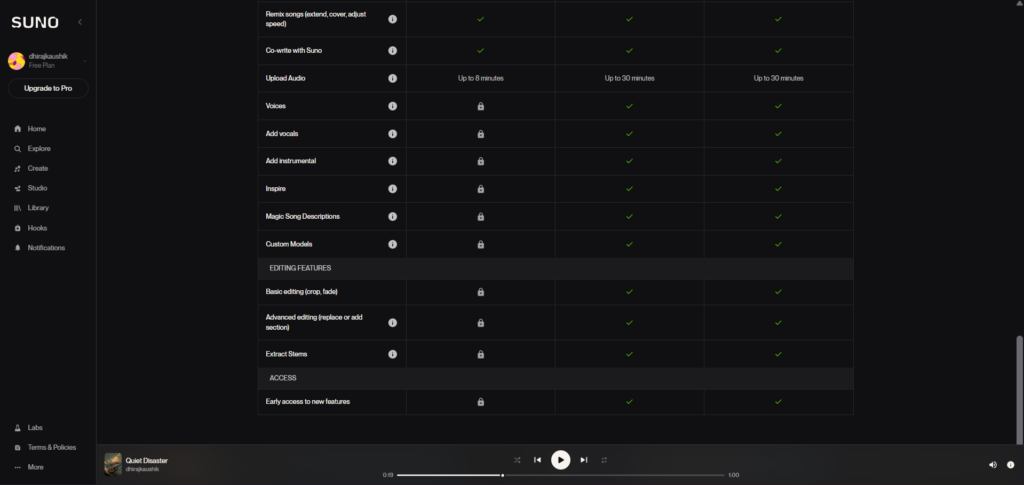
Beyond the model upgrade and the commercial license, Pro unlocks several features the Free plan does not offer. You get the Song Editor for making targeted changes to specific sections of a track rather than regenerating the whole thing. Stem separation lets you split any generated song into up to 12 individual vocal and instrument tracks. Personas let you save and reuse a consistent vocal identity across multiple songs. Audio uploads jump to 30 minutes in length, up from whatever the Free tier allows, which matters significantly if you are using Suno to develop existing musical ideas rather than starting from a blank prompt every time. You also get priority placement in the generation queue, supporting up to 10 songs generating simultaneously, which noticeably speeds up your workflow compared to Free’s shared queue.
At roughly $0.02 per two-variation song generation based on the raw credit math, this is dramatically cheaper than licensing a single traditional stock music track, which typically runs $15 to $50 per song from a conventional library. For any US creator publishing content on a regular schedule, YouTube channels, podcasts, social media, the economics here are not just better, they represent an entirely different cost model.
Premier Plan: Is Suno Studio Worth $24 to $30
Premier costs $30 per month on monthly billing, or $24 per month annually. You get everything included in Pro, plus a quadrupled credit pool of 10,000 monthly credits, translating to roughly 2,000 songs per month, and exclusive access to Suno Studio.
Suno Studio launched in late 2025 and is genuinely the feature that differentiates Premier from simply being “Pro with more credits.” It is a browser-based, AI-native digital audio workstation, essentially a lightweight DAW built directly into Suno. The platform shipped Studio 1.1 with Stem Cover, which lets you isolate a vocal or instrumental stem and “cover” it with a new performance using the same notes but a different timbre, and recording capability. Studio 1.2 followed in early 2026 with Remove FX, Warp Markers for adjusting timing at specific points, and time signature controls.
Studio gives you a genuine multitrack timeline, AI stem generation organized into what Suno calls Take Lanes, mixing controls including EQ, faders, pan, and solo and mute per track, and an export menu that produces full song WAV files, per-clip WAV stems, or MIDI extracted from any individual stem. That MIDI export specifically costs 10 credits per call, on top of whatever you have already spent generating the underlying song.
One detail worth knowing before you assume Studio works everywhere: it is browser-only, with no mobile version. You need Chrome on a desktop or tablet with at least a 768 pixel wide screen, and the system requirements call for a CPU supporting SIMD instructions plus a minimum of 4GB of RAM. If your primary device is a phone or an older laptop, Studio may simply not run smoothly, regardless of which plan you are paying for.
The honest verdict on whether Premier is worth the extra cost over Pro: only upgrade if you will actually open Studio more than once a week. If your workflow is purely generate-a-song-and-publish-it without deeper editing, Pro’s 500 monthly songs will outlast most individual creators’ actual needs, and Premier’s additional credits and Studio access go largely unused.
The Hidden Cost Nobody Warns You About
This is the single most important section in this entire article, and it is the part that most pricing breakdowns either skip entirely or mention only in passing.
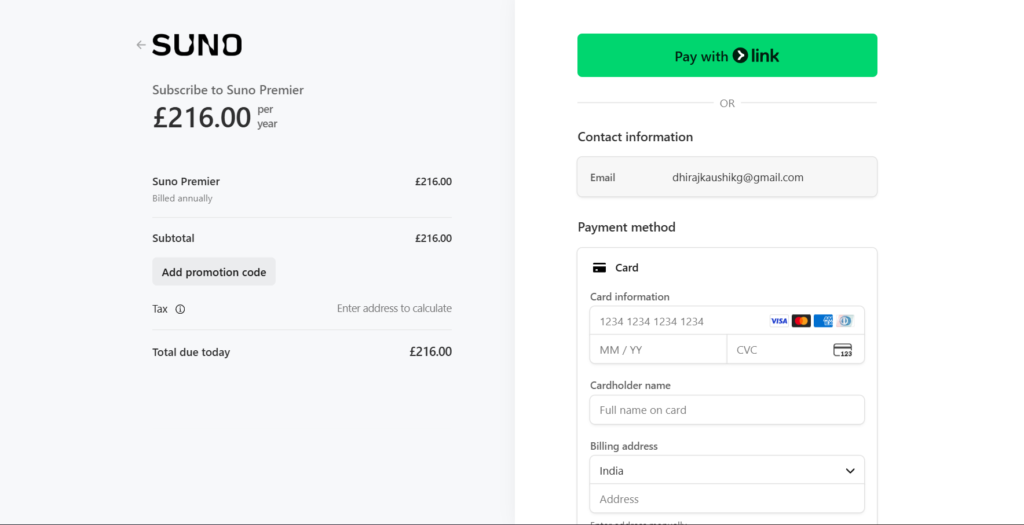
The 5-credits-per-song figure assumes a clean, single generation. In actual practice, users typically need 20 to 100 or more generation attempts per finished track, adjusting lyrics, trying style variations, and iterating on tone until something actually sounds right. Failed generations and “regenerate until acceptable” attempts still consume credits from your pool, even when you immediately discard the result.
This is consistently the loudest recurring complaint across the Suno community on Reddit’s r/SunoAI, and it is the specific reason the headline 500-songs-per-month figure on Pro is best understood as a soft ceiling rather than a number you will actually hit in practice. During my own two weeks of credit tracking, a single three-minute track I was genuinely happy with consumed closer to 30 credits once I accounted for extending the intro, regenerating a weak chorus twice, and reworking the outro, against the advertised 5-credit baseline.
One user account documented spending the equivalent of $40 worth of credits to produce a single track they were satisfied with. On the Free plan specifically, this editing-cost reality means a heavy iteration session on just one song can consume most or all of your entire daily 50-credit allowance, which is the real reason serious creators outgrow Free far faster than the “10 songs a day” headline suggests.
The practical takeaway: budget your credits for iteration, not just raw generation. If you are planning your monthly usage around Pro’s 2,500 credits, treat that as enough for roughly 80 to 100 genuinely polished, edited tracks rather than 500 quick one-shot generations, depending on how perfectionist you are about each result.
Full Pricing Comparison Table
| Plan | Monthly Price | Annual Price (per month) | Credits | Approx. Songs (raw) | Commercial Rights | Model Access |
|---|---|---|---|---|---|---|
| Free | $0 | $0 | 50/day | ~10/day | No | v4.5-All |
| Pro | $10/month | $8/month | 2,500/month | ~500/month | Yes | v5.5 (full) |
| Premier | $30/month | $24/month | 10,000/month | ~2,000/month | Yes | v5.5 (full) + Studio |
Remember that the “approximate songs” figures in this table are Suno’s own raw credit math at 5 credits per generation, and they significantly overstate your realistic output once you factor in the iteration and editing costs covered above. Treat the song counts as theoretical ceilings, not planning numbers.
Monthly vs Annual Billing: The Real Savings
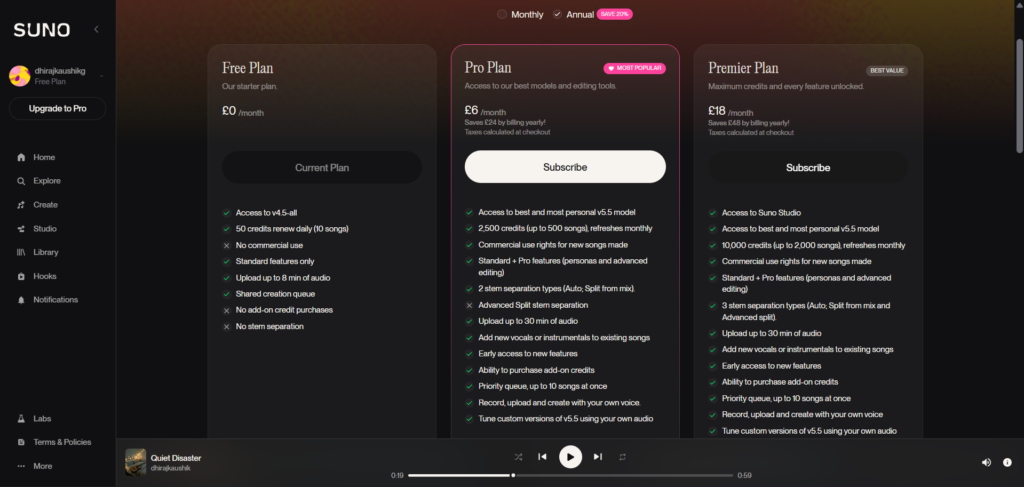
Annual billing saves you exactly 20 percent on both paid tiers, which is a meaningful and consistent discount worth taking advantage of if you are confident you will use Suno for more than a few months.
| Plan | Monthly Billing (12-month total) | Annual Billing (12-month total) | You Save |
|---|---|---|---|
| Pro | $120/year | $96/year | $24/year |
| Premier | $360/year | $288/year | $72/year |
One genuinely confusing wrinkle worth flagging here: Suno’s own FAQ and help content sometimes still reference the $10 and $30 monthly figures even on pages discussing what appears to be annual context, while the live pricing page clearly displays $8 and $24 specifically for annual billing. Always check the toggle on the actual checkout screen before assuming which rate you are about to be charged, since the marketing copy across Suno’s own site is not always perfectly consistent about which billing cycle a given number refers to.
Suno vs Udio Pricing
If you are also considering Udio, the closest direct competitor, the entry-level pricing lands in a similar band, but the credit-to-song ratio differs meaningfully between the two platforms.
Suno Pro at $10 per month gives you 2,500 credits for roughly 500 songs. Udio’s comparable Standard plan runs at approximately $10 per month for 2,400 credits, but translates to roughly 1,200 songs, since Udio’s credit cost per generation is structured differently. At the higher tier, Suno Premier’s $30 per month gets you 10,000 credits for roughly 2,000 songs, while Udio’s Pro tier at a similar price point offers 6,000 credits for what Udio describes as effectively unlimited songs under certain conditions.
On pure credit efficiency, Udio currently edges ahead. The decision should not come down to raw numbers alone, however. Udio became a walled garden after its UMG settlement, meaning content created on the platform cannot be exported off it, which is a significant practical limitation if you actually need the downloadable audio file for use elsewhere. For a full breakdown of how the two platforms compare beyond pricing, including actual output quality from generating the same prompt on both, see our Suno vs Udio comparison.
Which Plan Should You Actually Choose?
Choose Free if you are purely exploring whether AI music generation is something you enjoy, you have zero plans to publish or monetize anything, and 10 songs per day comfortably covers your casual experimentation.
Choose Pro if you need commercial rights for any reason, YouTube monetization, client work, podcast intros, social media content, and you generate somewhere between a handful and a few dozen polished tracks per month. This is the right default tier for the overwhelming majority of US creators, and our complete Suno AI review covers exactly what a month of real Pro-tier usage looks like in practice.
Choose Premier if you are already certain Suno is central to your creative workflow, you generate at genuinely high volume, and you specifically want Suno Studio’s multitrack editing, stem manipulation, and MIDI export capabilities for production-grade work rather than simple generate-and-publish use.
Skip paying entirely for now if you are still deciding whether AI-generated music fits your creative process at all. There is no reason to pay before you have spent real time on the Free tier first, especially since Free’s daily reset gives you a genuinely usable testing ground without any financial commitment.
FAQ
Is Suno AI’s free plan good enough to test seriously before paying?
Yes, more so than most AI tools at the free tier. Suno’s Free plan gives you 50 credits daily, translating to roughly 10 song generations every day with no credit card required, which is a meaningful amount of real testing room rather than a token teaser. The catch is that Free output is locked to non-commercial use permanently, even if you later upgrade to a paid plan, and you are working with an older model version rather than the current v5.5 flagship. Use Free specifically to evaluate whether Suno’s overall workflow and output quality fits what you are trying to create, then move to Pro the moment you want to publish anything commercially.
How much does Suno AI Pro actually cost per song in 2026?
Based on the raw credit math of 5 credits per generation at $10 per month for 2,500 monthly credits, the theoretical cost works out to roughly $0.02 per two-variation song. In practice, factoring in the iteration and editing reality covered earlier in this article, where most creators need 20 to 100 or more generation attempts to land on a track they are happy with, your realistic effective cost per finished, polished song is considerably higher, often landing somewhere in the $0.40 to $2.00 range depending on how much regeneration and editing a given track requires. Budget based on the realistic figure, not the theoretical headline number.
Do unused Suno credits roll over to the next day or month?
No, at any tier. Free plan credits reset every 24 hours at UTC midnight, and whatever portion of your 50 daily credits you did not use simply disappears rather than carrying forward. Pro and Premier subscription credits reset monthly on your billing anniversary with the identical no-rollover rule. The only credits that persist beyond their reset period are purchased add-on top-up credits, which do not expire on their own but do require you to maintain an active paid subscription in order to actually spend them.
Can I upgrade later and get commercial rights for songs I already made on the free plan?
No. This is one of the most commonly misunderstood points in Suno’s entire pricing structure. Suno’s help documentation is explicit that upgrading to a paid plan does not retroactively grant commercial-use rights to content you generated while on the Free plan. Any song created during a period when you were on Free remains restricted to non-commercial use permanently, regardless of what plan you subscribe to afterward. If there is any chance you might want to monetize a specific track, generate it while you are already on a paid Pro or Premier subscription, not before.
What is the real difference between Pro and Premier besides the price?
Beyond the larger credit allowance, roughly 500 versus 2,000 songs monthly at the raw math level, the decisive practical difference is Suno Studio, which is exclusive to Premier. Studio is a browser-based multitrack digital audio workstation offering stem-level mixing, EQ and fader controls, Stem Cover for replacing a vocal or instrumental performance while keeping the same notes, Warp Markers for precise timing adjustment, and MIDI export from individual stems. If your work stops at generating a complete song and publishing it, Pro covers everything you need. If you want to get into genuine post-production editing at the stem level inside the browser, Premier’s Studio access is the feature that justifies the price jump.
Why did my Suno credits disappear so quickly compared to the advertised song count?
This happens because every generation attempt, including ones you immediately dislike and discard, still costs credits, and most creators need far more than one attempt per finished song. The advertised figures of roughly 500 songs on Pro or 2,000 on Premier assume a clean 5-credit generation with no regeneration, no extending sections, and no editing, which is rarely how real creative work actually happens. Extending an intro, regenerating a weak section, and reworking an outro on a single track can easily push your real cost for that one song to 25 to 30 credits or more. Plan your monthly usage around realistic iteration patterns rather than the theoretical maximum song count Suno advertises.
Final Thoughts
After two weeks of tracking every credit across all three tiers, the pricing structure itself is genuinely simple, three plans, a shared credit currency, and a clean commercial-rights line drawn at the paid tier. What makes Suno’s pricing harder to evaluate honestly is the gap between the marketing math, 5 credits per song, 500 songs on Pro, and the real-world editing behavior that quietly multiplies your actual cost per finished track.
For most US creators, the right move is straightforward. Spend a genuine week on the Free plan first, generate enough songs to understand how much iteration a track you are happy with actually requires for your specific style and standards, then make an informed decision about Pro based on your real usage pattern rather than the headline song counts on Suno’s pricing page. Only consider Premier once you have a specific, concrete reason tied to Suno Studio rather than simply wanting more credits.
Check the live, current pricing directly at suno.com/pricing before subscribing to anything, since these figures can and do shift, and confirm the billing toggle is set to whichever cycle you actually intend to pay before completing checkout. For the full picture of what a month of real Suno usage looks like beyond pricing alone, our complete Suno AI review covers 60 generated songs and the honest legal landscape in detail.
External resources: Suno’s official pricing page | Suno Help Center on credit resets and timing | Suno Help Center on output ownership and commercial rights | r/SunoAI community discussion on credit consumption during editing | The Guardian on Warner Music’s licensing settlement with Suno