

I paid for Google AI Pro out of my own pocket and used it as my primary AI subscription for 30 straight days. Not a trial account. Not a borrowed login. Real money, real daily use, across research, writing, video generation, and the storage bundle Google keeps mentioning in every ad. Here is exactly what $19.99 a month actually buys you in mid-2026, what changed after Google’s massive I/O restructure, and whether it deserves a spot in your monthly budget as a US subscriber.
Table of Contents
What Google AI Pro Actually Is in 2026?
Google AI Pro is Google’s mid-tier consumer AI subscription, sitting between the budget Google AI Plus plan and the premium Google AI Ultra tiers. On April 11, 2026, Google officially renamed its core AI subscription. Google One AI Premium is now Google AI Pro at the same $19.99 per month price. If you remember paying for Google One AI Premium last year, this is the same product with a clearer name.
At its core, Google AI Pro gives you access to Gemini 3.1 Pro with a 1 million token context window, which Google describes as equivalent to 1,500 pages of text or 30,000 lines of code in a single conversation. Alongside the AI model access, the plan bundles 5TB of Google One storage, YouTube Premium Lite, the Jules coding agent, Google AI Studio access, and deep integration across Gmail, Docs, and Google Home devices.
The plan is built around a simple pitch: if you already use Google’s ecosystem daily, the AI features arrive almost as a bonus on top of services you would pay for separately anyway. Whether that pitch holds up depends heavily on how you actually use it, which is what 30 days of real testing was designed to find out.
The Big Change: Google’s I/O 2026 Pricing Restructure
This is the part of the Google AI Pro story that most reviews still get wrong, because so much changed so recently that outdated information is everywhere.
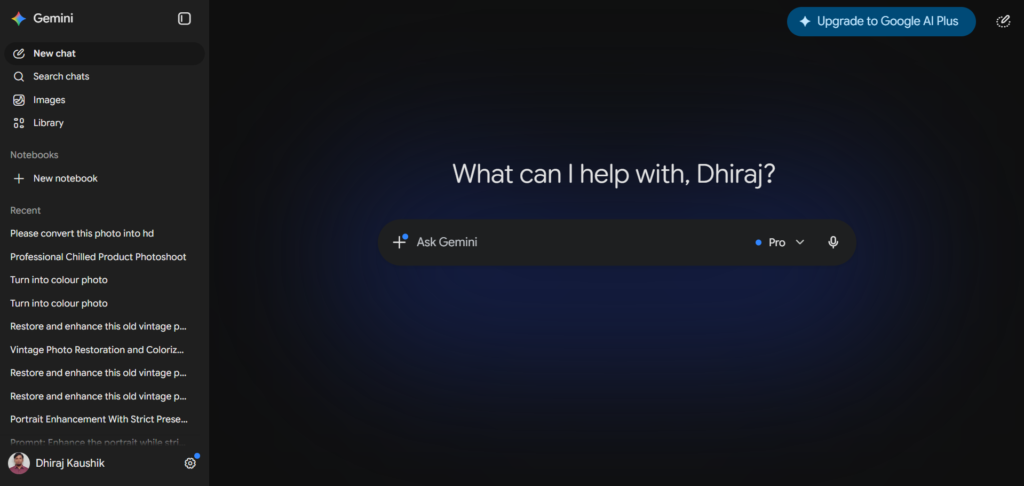
Four days after Google I/O 2026, Google reset its entire consumer AI subscription ladder on May 19, 2026. Before this restructure, the entry tier was priced at $7.99 per month. After the restructure, AI Plus dropped to $4.99 per month with 400GB of storage as of June 8, 2026, undercutting ChatGPT Plus by a significant margin. Many articles published before I/O 2026 quoted AI Pro at approximately $30 per month. That figure is outdated. The verified, current price as of June 2026 is $19.99 per month with a 50 percent discount for the first year for new subscribers.
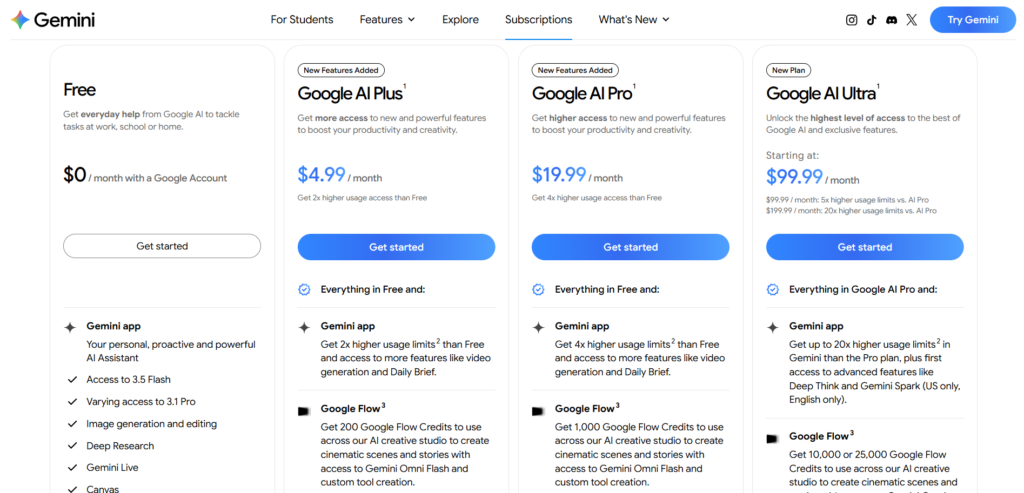
The full current lineup looks like this: a free tier, Google AI Plus at $4.99, Google AI Pro at $19.99, and two tiers of Google AI Ultra at $99.99 and $199.99. This replaced what was previously a much simpler two-tier system, and the gap between Plus and Pro is now the most important decision point for most US subscribers.
One structural change matters more than the pricing shuffle itself. Google switched from daily prompt limits to a compute-based usage model that refreshes every five hours until a weekly limit is reached, with paid top-up credits planned for heavier use. This is a meaningful shift in how your usage is measured, and it caught a lot of existing subscribers off guard because the headline price did not change even though the underlying usage mechanics did.
What You Get for $19.99: The Full Breakdown?
Here is the complete, verified feature list for Google AI Pro as of June 2026.
The AI model access: Gemini 3.1 Pro with a 1 million token context window. Daily limits at launch were structured as: Thinking model at 300 prompts per day, Pro model at 100 prompts per day, Deep Research at 20 reports per day, image generation at 100 per day, music generation at 20 tracks per day, Veo 3.1 Lite video at 3 per day, and unlimited slide generation. These limits now operate within the 5-hour compute window rather than as strict daily caps.
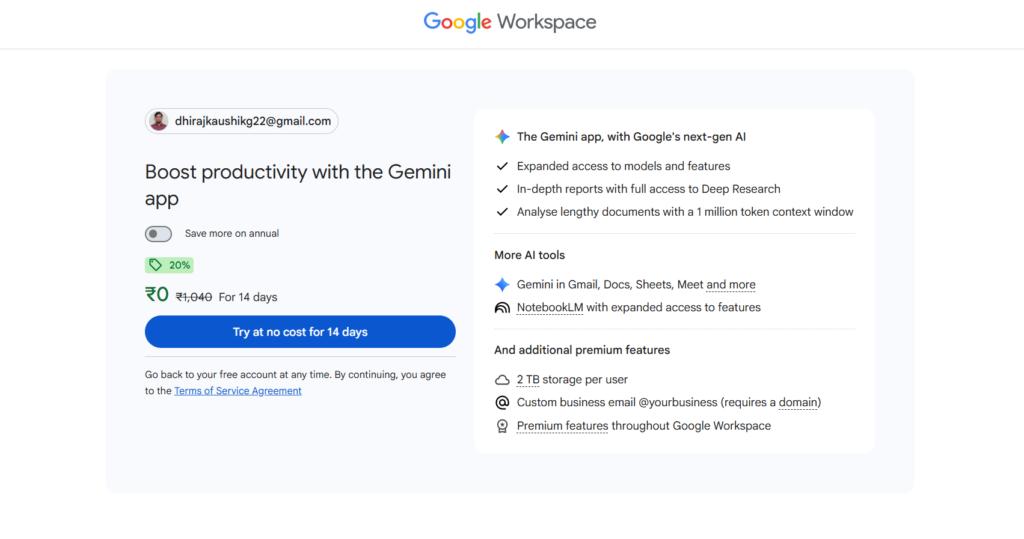
Storage: 5TB of Google One storage. Google bumped this from 2TB to 5TB on April 1, 2026, with no price change. If you already pay for Google One at $9.99 per month for 2TB, the effective cost of upgrading to Pro is only about $10 per month more once you account for the storage value alone.
YouTube Premium Lite: Included at no extra charge, reducing ads on most videos. This is not the full YouTube Premium experience, which would include offline downloads and background play, but it meaningfully reduces the ad interruptions during regular viewing.
Developer perks: AI Pro includes $10 per month in Google Cloud credits. For developers running small Cloud Run experiments or BigQuery queries, this effectively reduces the net cost of AI Pro below $10 per month in real terms if you would have spent that on Cloud services anyway.
Workspace integration: Gemini integrations across Gmail, Docs, Sheets, and Drive. This is where the subscription earns its keep for people whose daily work already happens inside Google’s apps.
Video generation: Pro subscribers receive approximately 100 Flow credits per month for Veo video generation. Generating a single Veo 3 clip with audio at standard length costs roughly 50 credits, meaning 100 monthly credits translates to approximately 2 full Veo 3 video generations per month. This is a genuinely small allowance if video is a priority for you, a point covered in more detail below.
AI Credits: 1,000 per month, a separate allowance from the model prompt limits, usable across various Google AI features.
Step-by-Step: How to Subscribe to Google AI Pro?
Step 1: Check Your Current Google One Status
Before subscribing, open one.google.com and check whether you already have an existing Google One storage plan. If you do, upgrading to AI Pro often replaces your current storage tier rather than stacking on top of it, which affects the real cost calculation.
Step 2: Go to the Gemini Subscriptions Page
Navigate to gemini.google/subscriptions or open the Gemini app and tap your profile icon, then select Upgrade. You will see the full current lineup: Free, AI Plus at $4.99, AI Pro at $19.99, and the two Ultra tiers.
[SCREENSHOT: The Gemini app subscription comparison screen showing all four tiers (Free, AI Plus, AI Pro, AI Ultra) side by side with their respective prices and key features listed under each column. Alt text: Gemini app subscription tier comparison screen showing four pricing options]
Step 3: Select AI Pro and Confirm the First-Year Discount
Select the AI Pro tier. As a new subscriber, you should see a 50 percent discount applied automatically for the first 12 months, bringing your effective monthly cost down significantly during that period. Confirm this discount is showing before completing payment, since it is easy to miss in the checkout flow.
Step 4: Link Your Payment Method and Confirm
Complete the subscription using your existing Google payment method or add a new one. The subscription activates immediately, and your storage upgrade to 5TB along with Gemini 3.1 Pro access should be available within minutes.
Step 5: Set Up Workspace Integration
Once subscribed, go into Gmail, Docs, or Sheets and check that the Gemini side panel or integration features are now active. Sometimes this requires a browser refresh or a few minutes to propagate across Google’s services.
The 5-Hour Compute Window: What Actually Changed?
This is worth its own section because it is the single most misunderstood part of the new Google AI Pro structure, and it directly affects how much value you actually get for your $19.99.
Google is replacing daily prompt caps with a compute-based usage model that refreshes every five hours until a weekly limit is reached, with paid top-up credits planned for heavier use. In practice, this means your usage allowance is no longer a simple “100 prompts today” counter. It is a rolling compute budget that resets every five hours, with an overarching weekly ceiling.
More complex prompts, including extended thinking, Deep Think, media generation, and Deep Research, consume more of this compute budget and will reach your limit faster than simple text exchanges. The Google AI Pro plan got what one outlet called a quiet downgrade alongside this change. The compute-credit shift means that heavy users who previously burned through fixed daily prompt counts may now hit effective ceilings sooner, even though the headline price at $19.99 did not change.
During my 30 days of testing, I noticed this most clearly on days when I ran multiple Deep Research reports back to back. The five-hour window meant that a morning spent on heavy research tasks could leave me with reduced capacity by early afternoon, something that did not happen as predictably under the old daily-cap system. For typical daily use, writing, research, and conversational queries, this change is barely noticeable. For anyone running multi-hour deep work sessions regularly, it is worth understanding before you commit.
Key Benefits I Found After 30 Days
The storage bundle alone justifies the price for many US users. If you are already paying for 2TB of Google One storage at $9.99 per month, upgrading to AI Pro for the 5TB allocation plus full Gemini access costs you roughly $10 more per month than your current storage bill. For anyone who was already a Google One subscriber, this is close to getting the entire AI feature set for free.
The 1 million token context window genuinely changes what you can do in one session. I fed entire contracts, full codebases, and lengthy research documents into single Gemini conversations without hitting context limits. For anyone whose work involves processing long documents regularly, this is a structural advantage that smaller context windows on competing platforms cannot match.
Deep Research at 20 reports per day (within the compute window) is genuinely generous. Compared to ChatGPT Plus, which caps Deep Research at 10 runs per month total, Google AI Pro’s allowance is dramatically more usable for anyone doing research-heavy work daily rather than occasionally.
The Google Cloud credit is a real, usable perk for developers. I tested this specifically by running small Cloud Run and BigQuery workloads during the month. The $10 monthly credit covered my actual usage in three of the four weeks, meaningfully offsetting the subscription cost for anyone already building on Google Cloud infrastructure.
The Honest Downsides
Video generation through Flow is disappointingly limited. Pro subscribers receive approximately 100 Flow credits per month. Generating a single Veo 3 clip with audio at standard length costs roughly 50 credits. That means 100 credits per month translates to approximately 2 full Veo 3 video generations. For anyone hoping to use AI Pro as a meaningful video production tool, this allowance runs out almost immediately. Do not subscribe to Pro expecting Flow to be a primary video production tool at that tier.
The 5-hour compute window adds real unpredictability. Unlike a simple daily counter you could track mentally, the rolling compute window combined with variable costs per task type makes it genuinely harder to predict when you will hit your limit. Several reviewers have flagged this as a quiet downgrade in practice, even though the sticker price stayed the same.
Gemini’s consistency still lags behind ChatGPT and Claude on certain tasks. Independent reviewers tracking all major AI subscriptions in 2026 note that Gemini still has consistency issues that ChatGPT and Claude do not, particularly on tasks requiring precise multi-step reasoning. This is improving with each model update but remains a real gap as of mid-2026.
The naming changes have created genuine confusion. Between the Google One AI Premium to AI Pro rename, the AI Plus price drops happening twice within months, and the introduction of two separate Ultra tiers, even attentive subscribers have struggled to track what they are actually paying for. If you subscribed more than a few months ago, it is worth checking your current plan details directly rather than relying on memory of what you originally signed up for.
[SCREENSHOT: The Google Flow video generation interface showing the credit balance counter at the top, illustrating how quickly the 100 monthly credits deplete after generating just two Veo 3 clips with audio. Alt text: Google Flow credit balance showing limited monthly video generation allowance]
Google AI Pro vs Google AI Plus vs Google AI Ultra
| Feature | AI Plus | AI Pro | AI Ultra ($99.99) | AI Ultra ($199.99) |
|---|---|---|---|---|
| Monthly Price | $4.99 | $19.99 | $99.99 | $199.99 |
| Model | Gemini 3 Pro (capped) | Gemini 3.1 Pro | Gemini 3.1 Pro, higher limits | Gemini 3.1 Pro, maximum limits |
| Context Window | 128K tokens | 1M tokens | 1M+ tokens | 1M+ tokens |
| Storage | 400GB | 5TB | 20TB | 30TB |
| Deep Research | Limited | 20 reports/day | Higher allowance | Highest allowance |
| Video (Flow/Veo) | Veo 3.1 Fast, limited | ~100 credits/month | Higher credit allowance | Highest allowance |
| YouTube Premium | Not included | Lite version | Full (select countries) | Full (select countries) |
| Project Mariner / Genie | No | No | No | Yes |
| Best For | Casual users, families | Daily power users | Developers, creators | Technical teams, top-tier needs |
Choose Google AI Pro if you are a video creator who needs Flow credits beyond the bare minimum, a developer who wants AI Studio, Jules, Antigravity, and Google Cloud credits, or a researcher who needs the 1 million token context window and higher NotebookLM limits. NotebookLM specifically gives Pro users 5 times the source limit, up to 300 sources per notebook, compared to the 100 source limit on Plus.
Google AI Pro vs ChatGPT Plus
At $19.99 versus $20 per month, the two plans are priced almost identically, but the value proposition diverges sharply depending on your existing digital habits.
Google AI Pro includes 5TB storage, Veo 3.1 Lite video, the Jules coding agent, and a Google Cloud credit that ChatGPT Plus does not offer. ChatGPT Plus includes Agent Mode, Sora 2 video generation, Canvas, and a more mature memory system that Google AI Pro does not match feature for feature.
The honest verdict from testing both extensively: if you are deeply embedded in Google Workspace, Gmail, and Google Drive already, AI Pro’s bundled value is difficult to beat at the same price point as ChatGPT Plus. If your work involves more writing, voice interaction, or autonomous agent tasks, ChatGPT Plus remains the stronger choice for those specific use cases. For a full breakdown of how the two platforms compare across 50 real tasks, see our Gemini vs ChatGPT comparison.
Who Should Actually Pay for Google AI Pro?
Existing Google One subscribers. If you already pay $9.99 per month for 2TB of storage, upgrading to AI Pro for roughly $10 more per month gets you the full Gemini 3.1 Pro experience essentially as a bonus. This is the single clearest value case for the plan.
US researchers and analysts who need Deep Research daily. Twenty Deep Research reports per day (within the compute window) is a meaningfully higher allowance than ChatGPT Plus’s 10 reports per month. For anyone doing research-heavy professional work, this difference alone can justify the subscription. Our Gemini Deep Research guide covers exactly how to get the most from this allowance.
Developers already building on Google Cloud. The $10 monthly Cloud credit combined with Jules and AI Studio access creates real, usable value for anyone with existing GCP workloads. The effective subscription cost drops meaningfully once you factor in credits you would have spent anyway.
Anyone working with very long documents regularly. The 1 million token context window handles tasks that would require chunking on smaller-context platforms. Contract review, large codebase analysis, and lengthy research synthesis all benefit directly from this structural advantage.
Who should skip it: anyone hoping to use Flow for serious video production. The 100 monthly credits, enough for roughly 2 Veo 3 clips with audio, will frustrate anyone expecting meaningful video output capacity. For video-focused workflows, evaluate the Ultra tiers or a dedicated video platform instead.
FAQ
Is Google AI Pro the same as Google One AI Premium?
Yes. On April 11, 2026, Google officially renamed Google One AI Premium to Google AI Pro at the same $19.99 per month price. If you were already subscribed to Google One AI Premium before that date, nothing about your billing or core features changed. The rename was administrative, designed to clarify the lineup as Google introduced its higher-tier AI Ultra plans above it. If you see references to Google One AI Premium in older articles or your billing history, that is the same product now called Google AI Pro.
How much storage does Google AI Pro actually include in 2026?
Google AI Pro includes 5TB of Google One storage as of April 1, 2026, when Google doubled the previous 2TB allocation with no price increase. This storage applies across Gmail, Google Drive, and Google Photos combined. If you are currently on a standalone Google One plan paying for 2TB at $9.99 per month, upgrading to AI Pro effectively adds the full Gemini AI feature set for roughly $10 more per month once you account for the storage value you were already paying for.
What is the 5-hour compute window and how does it affect my usage?
Starting with the I/O 2026 restructure, Google replaced fixed daily prompt limits with a compute-based usage model that refreshes every 5 hours until you hit a weekly cap. This means your usage allowance resets multiple times per day rather than just once at midnight, but complex tasks like Deep Research, Deep Think, and media generation consume your compute budget faster than simple conversational prompts. For typical daily use including writing and research, most users will not notice a meaningful difference. For anyone running multiple heavy research or generation tasks within a short window, this change can mean reaching your limit sooner than the old daily-cap system would have allowed.
Is Google AI Pro worth it if I do not use Google Workspace?
The value proposition weakens considerably if you are not already using Gmail, Google Docs, Drive, or Google One storage. Without that existing ecosystem investment, you are paying $19.99 per month primarily for Gemini 3.1 Pro access, the 1 million token context window, and Deep Research. That is still a reasonable AI subscription on its own merits, comparable in price and core capability to ChatGPT Plus, but the bundled extras that make AI Pro a standout value for Google users do not apply the same way. Evaluate it as a standalone AI subscription rather than a bundle if Google’s ecosystem is not already part of your daily workflow.
Can I use Google AI Pro for serious video production?
Not at a meaningful volume. Pro subscribers receive approximately 100 Flow credits per month, and a single Veo 3 clip with audio at standard length costs roughly 50 credits. That caps you at approximately 2 full video generations per month, which is far too limited for any regular content production schedule. If video generation is central to your work, you will need to either upgrade to one of the Ultra tiers, which offer substantially higher credit allowances, or use a dedicated video generation platform without Google’s credit caps.
Should I upgrade from Google AI Plus to Google AI Pro?
Upgrade if you regularly hit the usage ceiling on AI Plus, need the larger 1 million token context window for long documents or codebases, or want the 5TB storage bump and Deep Research allowance that Plus does not include. If you are a casual user whose AI usage fits comfortably within Plus’s more limited daily allowances and 128K context window, the $4.99 entry tier remains the better value. The decision point is usage intensity rather than feature curiosity. If you have not hit a usage limit on Plus yet, there is little urgency to upgrade.
Final Thoughts
Thirty days of real money and real daily use produced a clear conclusion: Google AI Pro at $19.99 per month is a genuinely strong value specifically for people already invested in Google’s ecosystem. The storage bump, the Cloud credits, the generous Deep Research allowance, and the 1 million token context window collectively make a compelling case for anyone who lives in Gmail, Docs, and Drive daily.
For everyone else, it is a solid, competitively priced AI subscription that happens to come from Google rather than OpenAI or Anthropic, with its own specific strengths in research volume and document length handling, and its own specific weakness in video generation capacity.
The honest bottom line: if you are already paying for Google One storage, upgrading to AI Pro is close to a no-brainer. If you are evaluating Google AI Pro purely as a standalone AI subscription with no existing Google ecosystem investment, compare it carefully against ChatGPT Plus for your specific primary use case before committing.
Check your current eligibility and the latest pricing at gemini.google/subscriptions before subscribing, since Google has changed this lineup multiple times in 2026 alone. For the full picture of what Gemini offers beyond this specific plan, our complete Gemini review covers every feature across all tiers in one place.
Useful Backlinks
| # | Specific Article / Page | URL |
|---|---|---|
| 1 | “Google AI Pro and Ultra Subscriptions” — Google Official | gemini.google/subscriptions/ |
| 2 | “Google AI Plans: Free vs Plus vs Pro vs Ultra 2026” — DigitalApplied | digitalapplied.com/blog/google-ai-plans-free-plus-pro-ultra-2026 |
| 3 | “Google’s New AI Subscription Plans Explained” — TechCabal | techcabal.com/2026/06/05/google-ai-subscription-plans-explained/ |
| 4 | “Google AI Pro vs Ultra: Is $250/mo Worth It?” — AI Tool Briefing | aitoolbriefing.com/blog/google-ai-pro-vs-ultra-pricing-2026/ |
| 5 | “Google Flow Pricing Explained: Credits, Tiers” — MindStudio | mindstudio.ai/blog/google-flow-pricing-credits-tiers-explained |
| 6 | “Google AI Plus vs Pro” — GlbGPT Hub | glbgpt.com/hub/google-ai-plus-vs-pro/ |
| 7 | “Google AI Plus Review (June 2026)” — AI Tool Analysis | aitoolanalysis.com/google-ai-plus-review/ |
| 8 | “Every AI Subscription Ranked 2026” — Tony Reviews Things | tonyreviewsthings.com/ai-subscriptions-ranked-2026/ |
| 9 | “Best AI Subscriptions for Professionals in 2026” — PCMag | pcmag.com/picks/best-ai-subscriptions |
| 10 | “Google AI Pro vs ChatGPT Plus: Which Is Worth Your Money?” — TechRadar | techradar.com/features/google-ai-pro-vs-chatgpt-plus |











[…] The old separate Gemini for Workspace add-on has been discontinued entirely. Gemini is now embedded directly into paid Workspace plans, which simplifies the decision considerably compared to last year. For most small businesses, Business Standard at $14 per user monthly on annual billing is the practical sweet spot, since it includes full app-wide Gemini access without requiring the additional Expanded Access add-on. For a complete breakdown of how this compares to running Gemini as a standalone subscription, see our Google AI Pro review. […]
[…] Who should think twice: anyone planning to use this as a primary, high-volume video production tool on the standard Pro subscription. The credit economics simply do not support that use case without either the Ultra tier or supplemental API spending, and the math should be run carefully against your actual planned output before committing budget. For a full understanding of what the Pro tier offers beyond video specifically, see our Google AI Pro review. […]
[…] This is the right default choice for most US professionals evaluating Gemini seriously. Our Google AI Pro review covers 30 days of real testing on this specific tier in full […]
[…] Workspace heavily, upgrading to Google AI Pro at $19.99 per month is the natural next step, and our Google AI Pro review covers exactly what that upgrade includes based on 30 days of real […]